holger.volz
Inspiring
July 29, 2025
Question

Acrobat displays incorrect font

  • July 29, 2025
  • 1 reply
  • 652 views

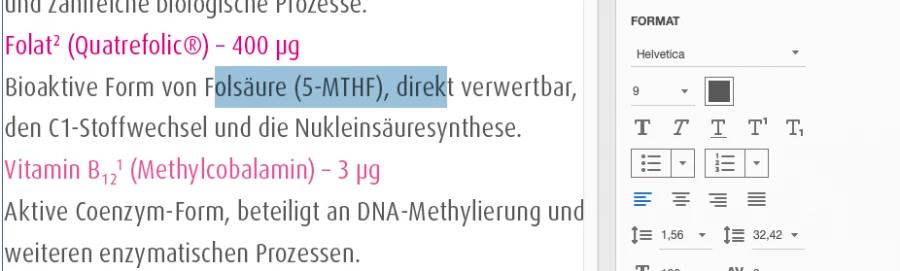
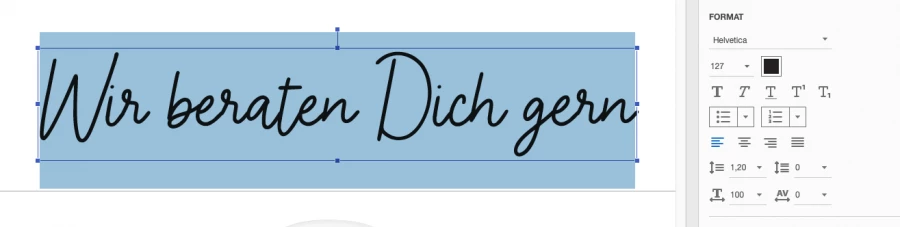
I have a PDF and the full version of Acrobat, and I want to find out which font is used in a text. When I go to Edit PDF and select a text, it always displays Helvetica. But that's not it.
 

1 reply

Meenakshi Negi
Community Manager
Community Manager
July 29, 2025

Hi holger.volz,


Thank you for reaching out, and sorry about the trouble caused.


Please confirm if this happens with any file you open in Acrobat or a specific file. Also, check if the document you're trying to edit was a scanned PDF. 

Could you please share the file so we can check and find the root cause of this behavior? Please also share the current Acrobat and OS versions on your machines. 


Feel free to let us know if you need any help.


Thanks,

Meenakshi


holger.volz
Inspiring
July 29, 2025

It happens not with ANY file and not with ANY text but over and over again. I can't see any pattern.

OS version: Sequoia 15.4

Acrobat DC 20.9.20065.383522

Enclosed such a file.

S_S
Community Manager
Community Manager
July 30, 2025

I've downloaded the last Acrobat version directly from the adobe page and now the correct font will be displayed. 

However, I have no idea why Adobe didn't show me an update.


Hi @holger.volz,


Glad to know that it worked for you.


For the update part, there could be network challenges at any given time, due to which Acrobat might not be able to search for updates.


Also, we were experiencing server issues at the time you posted this query. That could be another possible reason to why the app was not able to search for available updates.


Regards,
Souvik.
