Exit
  • Global community
    • Language:
      • Deutsch
      • English
      • Español
      • Français
      • Português
  • 日本語コミュニティ
  • 한국 커뮤니티
1

Acrobat error

Community Beginner ,
May 06, 2025 May 06, 2025

Acrobat 您订阅的是简体中文产品版本。请确认您的操作系统、浏览器和软件下载中的语言设置已设为简体中文。 

When opening the software, the error message is as shown in the picture. In China, the computer system, browser, and language settings are all Simplified Chinese.
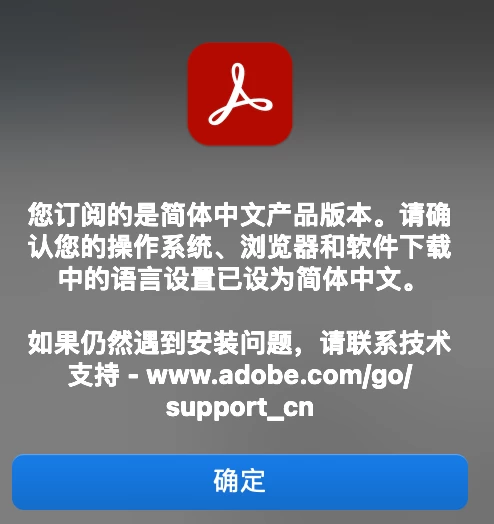

截屏2025-05-06 17.41.09.png

TOPICS
Al Assistant , Modern Acrobat
2.7K
Translate
Report
Community guidelines
Be kind and respectful, give credit to the original source of content, and search for duplicates before posting. Learn more
community guidelines
1 ACCEPTED SOLUTION
Adobe Employee ,
Jun 05, 2025 Jun 05, 2025

Hi @ambitious_Rose8329,


Hope you are doing well. Sorry for the trouble with installing Acrobat.


Would you mind trying the steps below:

Please run the Acrobat cleaner tool https://adobe.ly/3ZLeEzS, reboot the computer once, and install the application using the direct link https://adobe.ly/3Tf9fxa.


Also, try installing the app initially in English or Japanese, and then change the language of the application by going to Preferences > Language > Application Language > set it as "Same as the Operating System" > Restart.


Hope this helps.


Regards,
Souvik.

View solution in original post

Translate
Report
Community guidelines
Be kind and respectful, give credit to the original source of content, and search for duplicates before posting. Learn more
community guidelines
Adobe Employee ,
May 06, 2025 May 06, 2025

Hi @rui_9873


Sorry for the troubled experience, and thank you for reaching out. 

A couple of questions, are your OS and Browser set for Simplified Chinese language? Also, are you based in China? 


Will be waiting for your response. 


~Tariq

Translate
Report
Community guidelines
Be kind and respectful, give credit to the original source of content, and search for duplicates before posting. Learn more
community guidelines
Community Beginner ,
May 06, 2025 May 06, 2025

Hello, I am in China, my system and browser are in simplified Chinese. Many people have the same problem on the Chinese social software Xiaohongshu.

Translate
Report
Community guidelines
Be kind and respectful, give credit to the original source of content, and search for duplicates before posting. Learn more
community guidelines
New Here ,
May 08, 2025 May 08, 2025

I also want to know why

Translate
Report
Community guidelines
Be kind and respectful, give credit to the original source of content, and search for duplicates before posting. Learn more
community guidelines
New Here ,
May 08, 2025 May 08, 2025

I also want to know why

Translate
Report
Community guidelines
Be kind and respectful, give credit to the original source of content, and search for duplicates before posting. Learn more
community guidelines
Community Beginner ,
May 10, 2025 May 10, 2025

I also encountered the same problem,Please fix this issue as soon as possible, this software is used every day and is included in the subscription fee.

Translate
Report
Community guidelines
Be kind and respectful, give credit to the original source of content, and search for duplicates before posting. Learn more
community guidelines
New Here ,
May 11, 2025 May 11, 2025

I also encountered the same problem,Please fix this issue as soon as possible.

Translate
Report
Community guidelines
Be kind and respectful, give credit to the original source of content, and search for duplicates before posting. Learn more
community guidelines
New Here ,
May 12, 2025 May 12, 2025

I have the same problem,please solve it quickly

Translate
Report
Community guidelines
Be kind and respectful, give credit to the original source of content, and search for duplicates before posting. Learn more
community guidelines
New Here ,
May 29, 2025 May 29, 2025

I also encountered the same problem

Translate
Report
Community guidelines
Be kind and respectful, give credit to the original source of content, and search for duplicates before posting. Learn more
community guidelines
New Here ,
May 14, 2025 May 14, 2025

I also encountered the exact same problem. After opening the PDF file, a pop-up appears, and then the software closes. There are no issues with the settings.

我也遇到了一模一样的问题,设置上都是正确的,这真的很影响工作。截屏2025-05-14 17.48.39.png

Translate
Report
Community guidelines
Be kind and respectful, give credit to the original source of content, and search for duplicates before posting. Learn more
community guidelines
Adobe Employee ,
May 22, 2025 May 22, 2025

Hi @baikkk


Sorry for the troubled experience. I assume you are already aware that this issue is known to us. 

While we are working on the fix, as an interim solution, you can uninstall the latest version and install the March 19, 2025, release builds using the installer posted at: Acrobat Installer


Note: It is important to disable Automatic update installation. 


Steps to disable Auto-updates
1. Launch Acrobat
2. Open Prefrences dialog - Ctrl + K (Win) or Cmd + K (mac) > Preferences > Updater
3. Uncheck - "Automatically install Updates"

If the issue, appears again, record the version installed - https://adobe.ly/3PQQ7nE


~Tariq

Translate
Report
Community guidelines
Be kind and respectful, give credit to the original source of content, and search for duplicates before posting. Learn more
community guidelines
New Here ,
May 26, 2025 May 26, 2025

你给到的链接已经失效了

Translate
Report
Community guidelines
Be kind and respectful, give credit to the original source of content, and search for duplicates before posting. Learn more
community guidelines
Community Beginner ,
May 27, 2025 May 27, 2025

The link you provided does not allow you to download the version released on March 19, 2025. Please resolve this issue as soon as possible.

Translate
Report
Community guidelines
Be kind and respectful, give credit to the original source of content, and search for duplicates before posting. Learn more
community guidelines
Community Beginner ,
May 27, 2025 May 27, 2025

Once this problem is solved, please inform everyone who encounters this situation in this reply so that they can update to the latest version.

Translate
Report
Community guidelines
Be kind and respectful, give credit to the original source of content, and search for duplicates before posting. Learn more
community guidelines
New Here ,
May 29, 2025 May 29, 2025

When I open the software, a prompt will appear. Click OK to exit the software. How to disable automatic updates? Even if you click to cancel automatic updates quickly, it will still be checked the next time you log in, and it will not be recorded.

Translate
Report
Community guidelines
Be kind and respectful, give credit to the original source of content, and search for duplicates before posting. Learn more
community guidelines
Adobe Employee ,
May 30, 2025 May 30, 2025

Hello @E_fan3432!


I hope you are doing well, and thanks for reaching out.


Could you please share more details about the issue? Are you on a Mac or Windows machine, and what is the version? Can you share a screenshot of the pop-up window you are getting? If you are able to launch Acrobat, check for any pending updates from the Menu > Help > Check for updates, install the updates, restart the app and the machine, and try again.


If you’re on a company-managed machine or using an Adobe subscription tied to an organization, check with your IT admin. Some update behavior may be centrally controlled via Adobe Admin Console or Group Policy.


We're here to help, just need more info.

Thanks,

Anand Sri.

Translate
Report
Community guidelines
Be kind and respectful, give credit to the original source of content, and search for duplicates before posting. Learn more
community guidelines
Community Beginner ,
Jun 02, 2025 Jun 02, 2025

Xnip2025-06-02_21-22-36.jpgAfter opening the PDF file, a pop-up appears, and then the software closes. There are no issues with the settings.

Translate
Report
Community guidelines
Be kind and respectful, give credit to the original source of content, and search for duplicates before posting. Learn more
community guidelines
New Here ,
Jun 03, 2025 Jun 03, 2025

此问题已经发生一个月了,现在仍然未修复,希望adobe团队能够尽快解决问题

Translate
Report
Community guidelines
Be kind and respectful, give credit to the original source of content, and search for duplicates before posting. Learn more
community guidelines
Adobe Employee ,
Jun 05, 2025 Jun 05, 2025

Hi @ambitious_Rose8329,


Hope you are doing well. Sorry for the trouble with installing Acrobat.


Would you mind trying the steps below:

Please run the Acrobat cleaner tool https://adobe.ly/3ZLeEzS, reboot the computer once, and install the application using the direct link https://adobe.ly/3Tf9fxa.


Also, try installing the app initially in English or Japanese, and then change the language of the application by going to Preferences > Language > Application Language > set it as "Same as the Operating System" > Restart.


Hope this helps.


Regards,
Souvik.

Translate
Report
Community guidelines
Be kind and respectful, give credit to the original source of content, and search for duplicates before posting. Learn more
community guidelines
New Here ,
Jun 05, 2025 Jun 05, 2025

I used the method you mentioned, but the error still occurs. Please solve this problem as soon as possible, which greatly affects our daily work. Thanks!

截屏2025-06-06 10.43.39.png

Translate
Report
Community guidelines
Be kind and respectful, give credit to the original source of content, and search for duplicates before posting. Learn more
community guidelines
New Here ,
Jun 05, 2025 Jun 05, 2025
LATEST

Sorry, I installed the wrong version and that caused the problem. After installing the right version, my problem was solved! Thank you!

Translate
Report
Community guidelines
Be kind and respectful, give credit to the original source of content, and search for duplicates before posting. Learn more
community guidelines