Inspiring
February 15, 2024
Resuelto

Acrobat: I don't want any AI in my Adobe Apps. Can AI be turned off?

  • February 15, 2024
  • 9 respuestas
  • 29896 visualizaciones

I don't want any AI in my Adobe Apps. Can AI be turned off?
In addition, my Acrboat says to update it, but CreativeCloud says it is up-to-date. I click Restart and it crashes.

Mejor respuesta de AnandSri

Hi @thomasb14279947 and @Raz Naz 


Thanks for reaching out. 


The Acrobat's generative AI features are currently in beta, and the AI Assistant and Generative summary are available for testing and feedback.


To turn off the feature, navigate to Acrobat's Preferences > Generative AI from Menu in Windows and Acrobat in Mac. 
To turn off the generative AI features, deselect Enable generative AI features in Acrobat, then select OK. Restart the application.
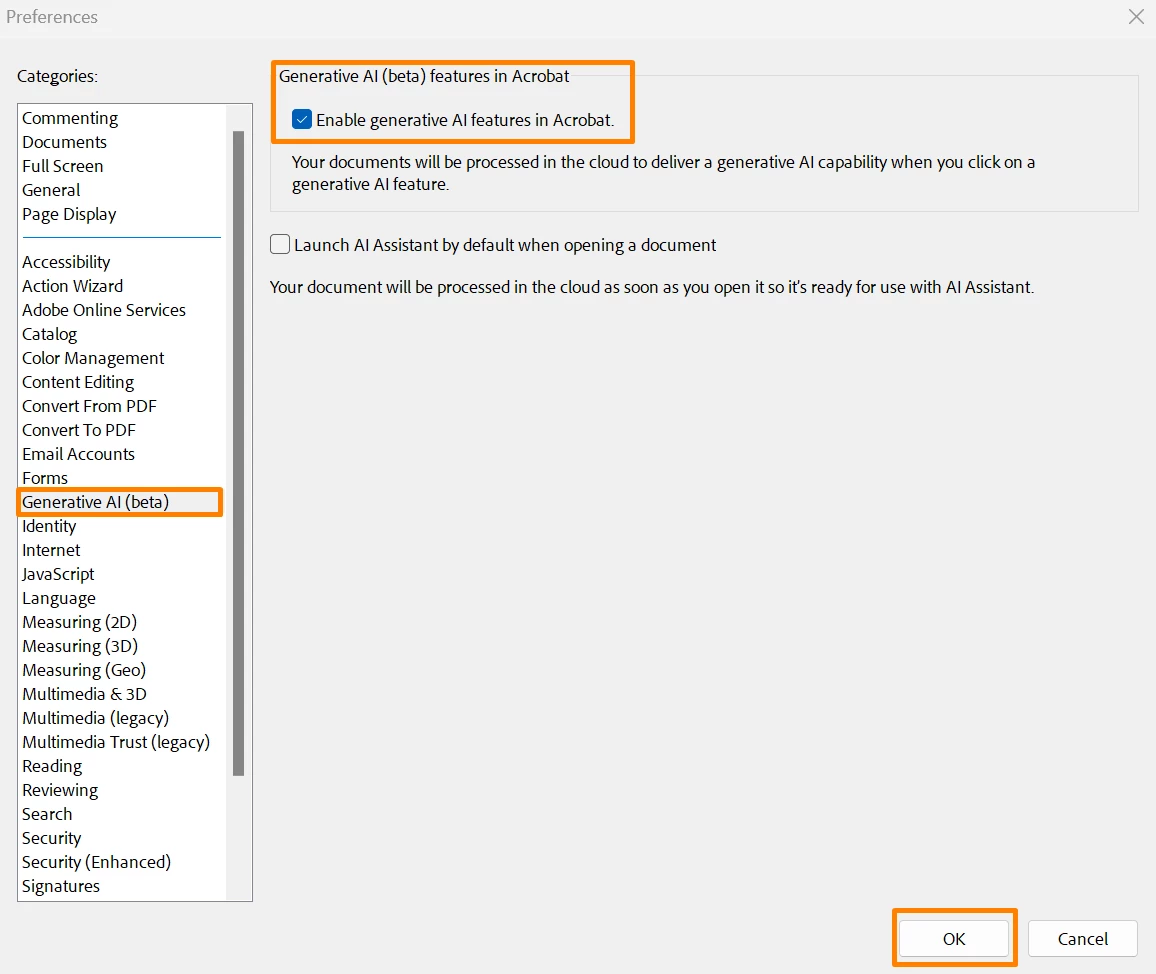


If you are on a Mac machine, and the app is crashing, please try this Preferences settings and let us know if that works for you: 

Navigate to the Preferences(Cmd+K)>General>Select "Show home screen when all documents are closed" Click OK, relaunch the app and check.


To learn more about the Generative AI feature, see this article. I hope this helps.


Thanks,

Anand Sri.

9 respuestas

Participant
May 22, 2025

From another post, remove all AI by reverting to the old interface:

  • On Macs, go to the View menu and select Disable New Acrobat. (I'm not on Mac, so I cannot test).
  • On Windows, to the hamburger menu in the upper left corner (where the old File menu used to be) and select Disable New Acrobat, it's about 2/3 down the menu 

https://community.adobe.com/t5/acrobat-discussions/remove-ai-assistant-button/td-p/14436115

Participant
March 20, 2025

Yeah. Im a photographer and the AI processing while using the remove tool in Camera RAW in Adobe Bridge severly slows down my workflow. What used to take seconds now takes minutes. Is there a way to disable it? Why would you mandate something that slows tge user down? Its just dumb!

cheris96055495
Inspiring
August 13, 2024

I am just trying to select some text to copy paste.  Why on earth is some ai thing doing  annoying stuff on my document while I am trying to work? I need to select the text with so much trouble.

kakmjb1110
Participant
August 14, 2024

It is absolutely infuriating! I'm so sick of this. I'd jump ship if I didn't use Lightroom and Photoshop for my job. And I pay good money for these stupid apps.

Participant
July 17, 2024

If you, like me, don't see that menu option, and/or you want a more permanent solution that entirely removes the AI garbage, follow the steps listed here: https://www.reddit.com/r/sysadmin/comments/1avpv2x/adobe_acrobat_generative_ai_how_to_permanently/


Full disclosure: I am not the author of that post, but following the steps did remove all the AI garbage from my adobe

Participant
June 28, 2024

Hi- I have taken the steps to deactivate generative AI but I still have them pinned in my sidebar and cannot remove them, and still have intrusive pop-ups telling me to reactivate it even though I have opted out. I loathe generative AI and it really puts me off using what used to be a very smooth and professional set of applications. Generative AI is highly innapropriate to the kind of work I am doing and the way it is being pushed on us is intrustive to the point of feeling malicious.

Participant
May 8, 2024

Same complaint here - I want to completely remove all aspects of AI from all of my Adobe products and would be willing to pay a premium for a simpler version that doesn't have all of the AI non-sense that is currently being forced on users.

Inspiring
May 8, 2024

Well stated Steven37260660gq44

Participant
March 17, 2024

I have followed the instructions, but I can't get rid of the AI in Acrobat. I tried truning it off in preferences, but, according to the checkbox, it wasn't enabled. Still, I tried enabling it, returning to a document, and disabling it. That didn't help. I really don't like having a button that keeps emiting pop-ups inviting me to use it cluttering the screen and distractingh me from my work. 


AnandSri
Community Manager
AnandSriCommunity ManagerRespuesta
Community Manager
February 23, 2024

Hi @thomasb14279947 and @Raz Naz 


Thanks for reaching out. 


The Acrobat's generative AI features are currently in beta, and the AI Assistant and Generative summary are available for testing and feedback.


To turn off the feature, navigate to Acrobat's Preferences > Generative AI from Menu in Windows and Acrobat in Mac. 
To turn off the generative AI features, deselect Enable generative AI features in Acrobat, then select OK. Restart the application.


If you are on a Mac machine, and the app is crashing, please try this Preferences settings and let us know if that works for you: 

Navigate to the Preferences(Cmd+K)>General>Select "Show home screen when all documents are closed" Click OK, relaunch the app and check.


To learn more about the Generative AI feature, see this article. I hope this helps.


Thanks,

Anand Sri.

Participating Frequently
March 11, 2024

Yeah that doesn't work. I've got it disabled there and every time I open a document I still get a stupid AI Assistant dialog box in the top right corner. And to make matters worse it keeps you from doing anything with the document. Can't even page through a file with the arrow keys because that dialog box stays active for so long and makes the app think I'm interacting with it.

Abambo
Community Expert
Community Expert
March 12, 2024

I have the AI enabled and I do not get this dialogue box.

ABAMBO | Hard- and Software Engineer | Photographer
Inspiring
February 22, 2024

Same here. Any AI functionality should be an explicitly opt-in feature, which requires manual installation and not just a 'switch' that automatically turns itself back on per update.

spikedsynapse
Participant
May 12, 2024

agreed, people at adobe who chose to be part of this should consider being better humans instead of corpo shills.