
Participant
December 11, 2018
Answered

Acrobat introduces white border around doc

  • December 11, 2018
  • 1 reply
  • 7055 views

Hi,

I have a Word doc with some graphics that go all the way to the side, top, and bottom edges. When I convert it to a pdf, a thin white border is introduced around every page. This occurs whether I convert the doc using the print dialog, the "Create PDF" command in the ribbon, or Save As. I've also reproduced this in a simple test doc of one page and one graphic. The border isn't a screen artifact. It appears no matter the magnification. Any ideas as to what's causing this?

I'm using Word 2016 on Windows 10 and Acrobrat Pro DC 2019.008.20081

Thanks.

Correct answer Dov Isaacs

That's so bizarre! I've attached a link to a screenshot of how it looks on my monitors (laptop and attached monitor). I also had a couple colleagues view it, and it looks the same on their screens as it does on mine: a thin white line visible around the blue. We're all using Windows 10. Haven't been able to test it with anyone yet who has a Mac.
I don't have the Show art, trim etc. option selected. I toggled it a few times and checked each time to see if it would affect anything, but no change.

https://drive.google.com/open?id=1sHSb2XYOjkIMXPwHE0-7pkyzHE0p9YHb

[Mod: File attached for convenience of others following this thread!]


Yes, your screenshot does show that very thin (possibly one screen pixel wide) white line. However, it also looks like that line surrounds the entire page!

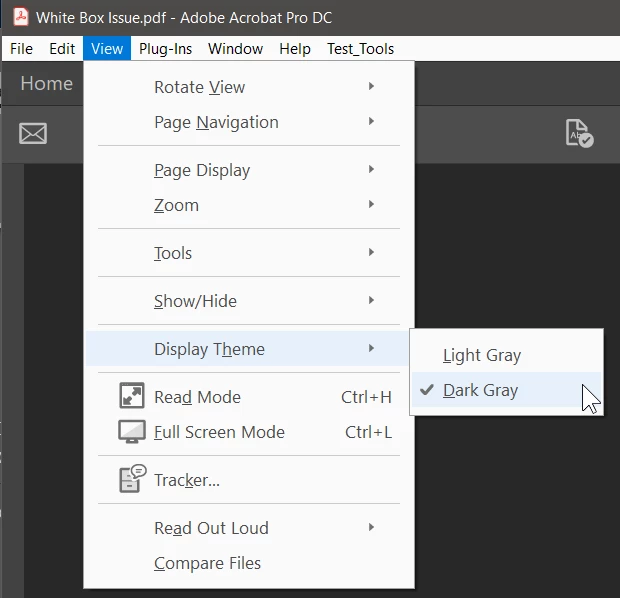
What I am wondering is whether the problem is actually caused by the Display Theme you have selected, Light Gray? My copies of Acrobat are set for Dark Gray. Perhaps the lighter theme puts in that one pixel border for contrast?

Could you try an experiment and change the display theme per below and advise as to whether the problem still occurs?

I know you would really like to get to the bottom of this.

          - Dov

1 reply

Dov Isaacs
Legend
December 11, 2018

I've seen similar “artifacts” in Microsoft Office content in the past.

The problem is that by the time either the Adobe PDF PostScript printer driver instance gets content for producing PostScript and subsequently PDF via distillation of that PostScript or either Adobe's Acrobat PDFMaker or Microsoft's Save as PDF gets the page content from Word (or other Microsoft Office applications), those strange oddities are already in the content stream. They typically appear as white backgrounds under lines of text, paragraphs or text frames.

Conceivably, if your graphic truly goes to the full page edge or maybe overlaps the edge a small amount on all sides (i.e., bleed it off the edges), that white box should (famous last words) be hidden underneath your graphic. Also, conceivably using Acrobat Pro DC's editing capability, you could select and delete such annoying polygons or lines.

Sorry, but there really isn't anything that Adobe can do about this problem.

That having been said, I tried duplicating what you described using today's update to Word 2019 (part of monthly Office 365 subscription) and I can't currently reproduce the problem I believe you are describing. If you can post a sample Word document that can be downloaded and tested, I can ascertain whether the actual fix is in Word 2019. (Note you can't attach in these forums, but you can post a link to the file!)

          - Dov

- Dov Isaacs, former Adobe Principal Scientist (April 30, 1990 - May 30, 2021)
Stephen36Author
Participant
December 11, 2018

Thanks for the response! Here's a link to a simple Word doc and the corresponding pdf that shows the issue: Adobe forum - Google Drive

On the first page of the Word doc, the graphic goes right to the edges. On the second page, the graphic overlaps a bit the long edge. However, the pdf of each looks the same.

Stephen

Dov Isaacs
Legend
December 11, 2018

Hi Stephen,

Thanks for the files. I downloaded both.

You might not believe this (or want to believe this), but all that is in your PDF file as well as the PDF files that I generated were the text on a blank background (i.e., no background white) plus the RGB blue boxes RGB=(91,155,213), both filled and outlined with that same color. There is no white lines or boxes anywhere.

What I see in Acrobat is as follows:

-

Using the various Print Production tools also confirms that there are no white boxes, white lines, etc.

Since this is a very large screen shot, I am also attaching the .PNG file of the screen shot as well as the .DOCX and the .PDF file you provided such that others might confirm what I am (or am not) seeing.

I also tried this on multiple systems and multiple monitors and cannot see any white line or border.

Perhaps in the Preferences under Page Display you enabled the Show art, trim, & bleed boxes option? If so, disable that. Conceivably that could show a very thin border, but you have no actual trim or bleed areas in the PDF (Word doesn't know about that). In any case, trying that option enabled still didn't result in my seeing any extraneous lines or borders.

Sorry! Anyone else following this thread see any such extraneous white line or border?

          - Dov

- Dov Isaacs, former Adobe Principal Scientist (April 30, 1990 - May 30, 2021)