

bkimball90
Participant
January 21, 2025
Answered

Acrobat issues that traveled to new computer

  • January 21, 2025
  • 2 replies
  • 335 views

We have a user that has been having problems where Acrobat goes into "Not Responding" frequently.  It doesn't appear to be related to any specific documents and it doesn't always happen but it's frequent enough to cause a lot of headaches for the user.  We've tried removing/reinstalling, repairing Windows (11 Pro 64-bit) and more that isn't coming to mind at the moment.  We then assigned her a new computer.  The issue has continued to occur on the new computer and we are stumped as to how to resolve it.  I'm wondering if something is saved in her Adobe account like preferences or settings that would have moved from one computer to the next?  Any help or suggestions would be greatly appreciated, Brian
Correct answer creative explorer

@bkimball90 when I see the 'Not Responding' I think it's 'internet' related...so, I would suggest:

1. Clear your history, cookies and cache in the web browser windows. Test. If good. Awesome. If not...
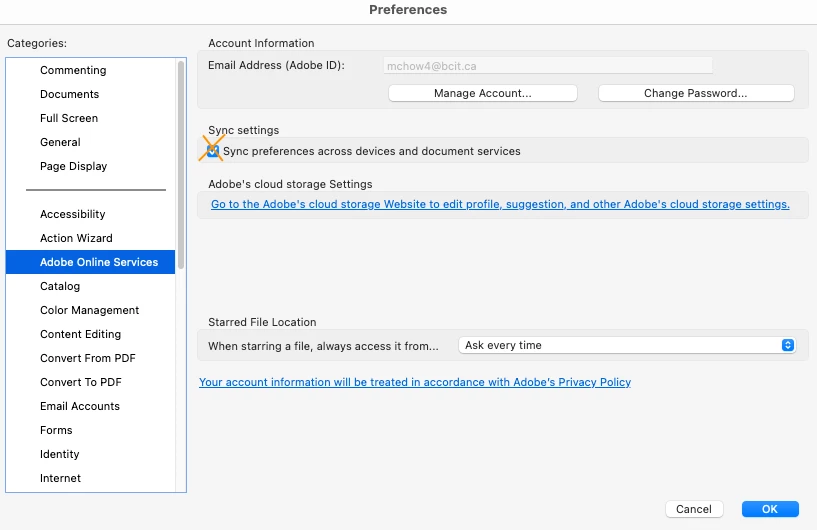
2. Disable Cloud Sync for Acrboat. Log into Acrobat, Preferences (Control K) and disable 'syncing'. Mine is on. So, uncheck yours. Test. If good. Awesome. If not...

3. If you can't find a dedicated "Sync Settings" section within Acrobat's preferences, it's possible that cloud sync for Acrobat is managed through the main Creative Cloud desktop


2 replies

creative explorer
Community Expert
creative explorerCommunity ExpertCorrect answer
Community Expert
January 21, 2025

@bkimball90 when I see the 'Not Responding' I think it's 'internet' related...so, I would suggest:

1. Clear your history, cookies and cache in the web browser windows. Test. If good. Awesome. If not...
2. Disable Cloud Sync for Acrboat. Log into Acrobat, Preferences (Control K) and disable 'syncing'. Mine is on. So, uncheck yours. Test. If good. Awesome. If not...

3. If you can't find a dedicated "Sync Settings" section within Acrobat's preferences, it's possible that cloud sync for Acrobat is managed through the main Creative Cloud desktop


m
Meenakshi Negi
Community Manager
Community Manager
January 21, 2025

Hi bkimball90,


Thank you for reaching out.


Please try the troubleshooting steps suggested in the following help document for a crash: https://adobe.ly/40sS8LC


You may also try reinstalling the application using the following steps:
-Remove the application and run the cleaner tool (https://adobe.ly/42mxbEI).
-Reboot the machine
-Install Adobe Acrobat from the following page: https://adobe.ly/40D7Ghb;


Let us know how it goes.


Thanks,

Meenakshi