
Acrobat Pro 2017 - Protected Mode / Enable All Features / Closing PDF
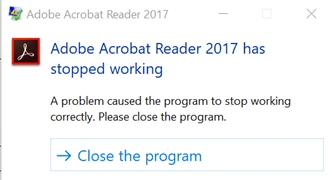
We are running into an issue with Acrobat Pro 2017 (17.011.30143) and wondering if anyone else have seen this. Whenever one of our users receives an email (Outlook) from an external email address with an attached PDF file, our policy is to open the document in Protected Mode. The user must “Enable All Features” before working with the PDF. Within 10 seconds of closing the PDF, our users receives the following error message . We are running Windows 10 - 1809
Has anyone ran into this?
Adobe Acrobat Reader 2017 has stopped working
A problem caused the program to stop working correctly. Please close the program.
Close the program
Below is the Event Viewer log info…
Log Name: Application
Source: Application Error
Date: 6/21/2019 7:08:10 AM
Event ID: 1000
Task Category: (100)
Level: Error
Keywords: Classic
User: N/A
Computer: xxxxxx.yyyyyy.zzzzz.com
Description:
Faulting application name: AcroRd32.exe, version: 17.11.30143.4665, time stamp: 0x5cfea96e
Faulting module name: windows.storage.dll, version: 10.0.17763.557, time stamp: 0x03f61bfc
Exception code: 0xc0000005
Fault offset: 0x002338c4
Faulting process id: 0x1a04
Faulting application start time: 0x01d5283ab8d8b65d
Faulting application path: C:\Program Files (x86)\Adobe\Acrobat 2017\Acrobat\AcroRd32.exe
Faulting module path: C:\WINDOWS\System32\windows.storage.dll
Report Id: a8c9cc46-b6a9-4fe5-a5ee-9a865a77e957
Faulting package full name:
Faulting package-relative application ID:
Event Xml:
<Event xmlns="http://schemas.microsoft.com/win/2004/08/events/event">
<System>
<Provider Name="Application Error" />
<EventID Qualifiers="0">1000</EventID>
<Level>2</Level>
<Task>100</Task>
<Keywords>0x80000000000000</Keywords>
<TimeCreated SystemTime="2019-06-21T14:08:10.686667600Z" />
<EventRecordID>2463</EventRecordID>
<Channel>Application</Channel>
<Computer>xxxxxx.yyyyy.zzzzzz.com</Computer>
<Security />
</System>
<EventData>
<Data>AcroRd32.exe</Data>
<Data>17.11.30143.4665</Data>
<Data>5cfea96e</Data>
<Data>windows.storage.dll</Data>
<Data>10.0.17763.557</Data>
<Data>03f61bfc</Data>
<Data>c0000005</Data>
<Data>002338c4</Data>
<Data>1a04</Data>
<Data>01d5283ab8d8b65d</Data>
<Data>C:\Program Files (x86)\Adobe\Acrobat 2017\Acrobat\AcroRd32.exe</Data>
<Data>C:\WINDOWS\System32\windows.storage.dll</Data>
<Data>a8c9cc46-b6a9-4fe5-a5ee-9a865a77e957</Data>
<Data>
</Data>
<Data>
</Data>
</EventData>
</Event>
 AdChoices