
Participating Frequently
March 14, 2025
Answered

Acrobat Pro 2025 on OS 15.1 not displaying certain fonts

  • March 14, 2025
  • 11 replies
  • 7040 views

OS: 15.1

Acro Pro: 2025.001.20432


Certain system and non-system fonts do not display at all when viewing in Acrobat Pro 2025.001.20432 on OS 15.1. The affected PDFs were exported from either XD v57.1.12 or XD 58.0.12 (I know it's in maintenace mode but I'm stuck w/ it for now). This includes both legacy PDFs created weeks, months ago as well as newly created PDFs. The same fonts view fine when PDFs are exported form other Adobe apps such as ID, AI, etc. Some interesting facts.


OS 15.3

Acro Pro 2025.001.20432 does NOT view properly

Acro Reader 2025 does NOT view properly

Chrome views properly

WorkFront Proof views properly

Acro Pro 2024.004.20219 views properly


Windows 10 Enterprise 22H2

Acro Pro 2025.001.20432 views properly


Switching to "New" Acrobat does not correct the problem nor have numerous other setting changes and uninstall/reinstalls I have tried.


To illustrate, I've attached a screen grab of a simplified test file. On the left side you will notice the fonts that are missing as compared to the image on the right.
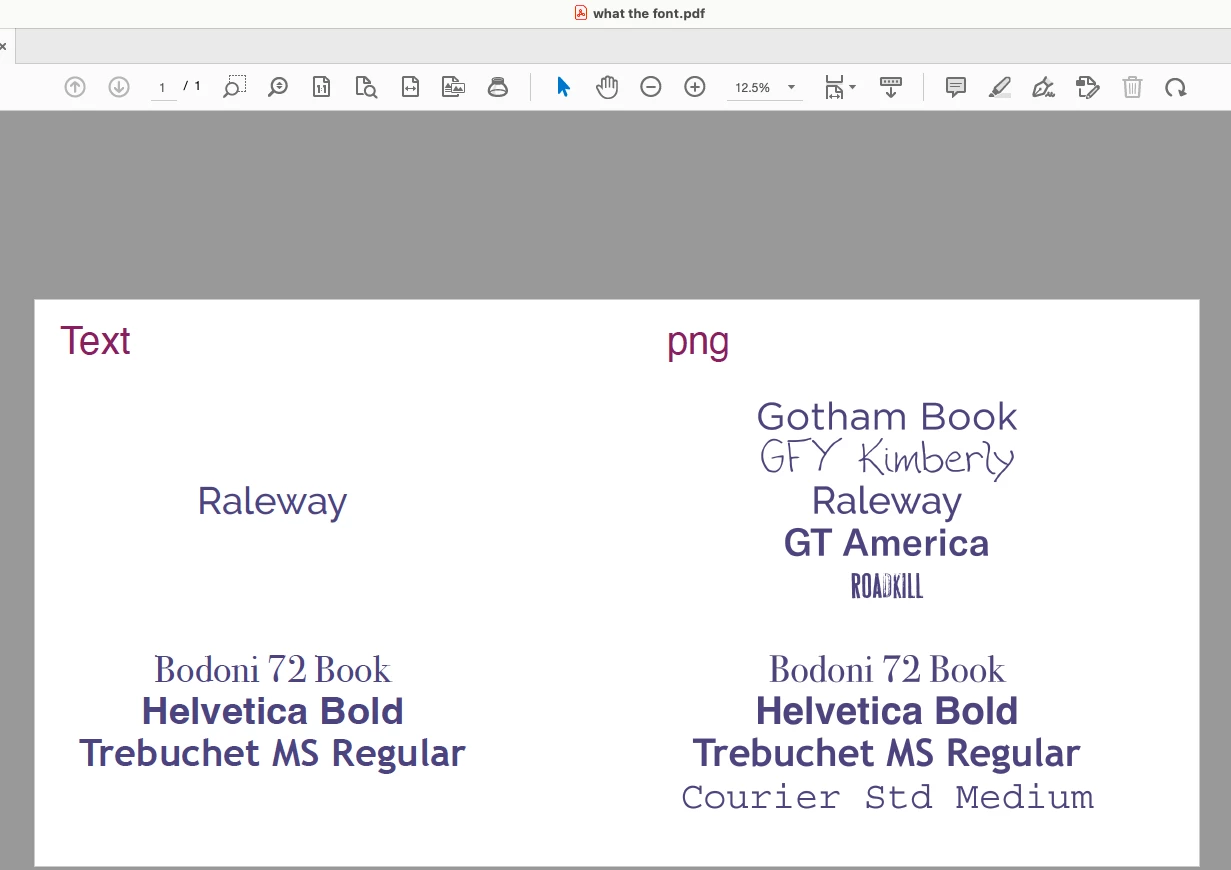


Looking for both a long term fix as well as a dmg of Acrobat 2024 as it is not available in CC. Thank you.

Correct answer Amal.

Hi there,

Thanks for reaching out.

This issue has been resolved in the latest version 25.001.2043x of the application. Please follow these steps to update:

  1. Open the application and navigate to Help in the top menu.
  2. Click on Check for Updates and install any available updates.
  3. Once the update is complete, restart your computer to ensure the changes take effect.


11 replies

Participant
October 4, 2025

It looks like this is a known issue specific to Acrobat/Reader 2025.001.20432 on macOS 15.x when handling fonts exported from XD. Since the same files display correctly in Acrobat 2024, Chrome, and other apps, the problem isn’t with your fonts or PDF export itself but with the latest Acrobat build on macOS. For now, the most reliable workaround is to either view with Acrobat 2024 or use another PDF viewer until Adobe patches the 2025 release. You can also try re-embedding fonts during export or distilling the PDF through another Adobe app (like Illustrator or InDesign) as a temporary fix.

By the way, if you’re also looking for updated resources beyond design tools, you might find this helpful guide on scholarship programs.

Amal.
Community Manager
Amal.Community ManagerCorrect answer
Community Manager
March 21, 2025

Hi there,

Thanks for reaching out.

This issue has been resolved in the latest version 25.001.2043x of the application. Please follow these steps to update:

  1. Open the application and navigate to Help in the top menu.
  2. Click on Check for Updates and install any available updates.
  3. Once the update is complete, restart your computer to ensure the changes take effect.


Participant
March 22, 2025
That did it all good now with the latest update

Thank You,
greg pinkman
orders@woodfieldprinting.com
Participant
March 20, 2025

have the exact issues spent hours uninstalling reinstalling app without success i have a macbook air that is running an older version 2024 veiws fine both 2025 and 2024 print fine its just a viewing issue can not revert back to older app as adobe took that away with acrobat for unknow reason

 hope they get this worked out now i will need to pack around two laptops

Brad @ Roaring Mouse
Community Expert
Community Expert
March 19, 2025

Version 20438 (March 19) has corrected the problem for me.


Participating Frequently
March 19, 2025

Fantastic. I'm trying to force download that now (check for updates) but no luck so far.

Participating Frequently
March 19, 2025

Just installed 20438. Looks good so far.

Participating Frequently
March 19, 2025

This works. Open the PDF file in the ColorSync Utility app, and save it as PDF - and the text will appear.

Brad @ Roaring Mouse
Community Expert
Community Expert
March 19, 2025

Yep, I had it happen to me today, too. There was no rhyme nor reason to when it would occur. In my case, it happned on a Utility bill I received today, although when I went back and reviewed previous months's bills, some were fine, some others were missing huge chunks of copy.  Not sure if this is relevant, but they were all SECURED documents.

So yes, the 20432 update is pooched somehow.

Participant
March 18, 2025

Same issue. Don't they Beta test these updates or at least offer a rollback since a critical function like this is broken? At any rate, I installed the Mac reader version made for a lower OS than what I have and it functions as it used to AKA I can view all text/fonts in a PDF. That at leats makes it viewable but you lose the "Pro" features.. Also, uncheck automatic updates since Adobe is abviously inept at rolling out an upgrade without a rollback redundancy feature. I mean, that's basic software 101 Adobe. Take note. https://helpx.adobe.com/acrobat/kb/install-reader-x-mac-os.html

Participating Frequently
March 18, 2025

More Sleuthing. Here is what I found with configurations of my 3 Macs, and opening a Barclay's credit card statement downloaded as well as my other bank's tax form. And even the 2024 and older downloaded financial files no longer display.

Mac OS 13.7.4, Acrobat Pro 2025.0001.20432 - Fonts not displaying, just get some boxes

Mac OS 14.7.1, Acrobat Reader 2025.001.20432 Unified App - Fonts not displaying, etc.

Mac 10.15.7, Acrobat Reader 2024.004.20272 All the above files display fine.

By the way, these problem files were all downloaded from financial instituions and when I look at doc properties, they have long, cryptic name, such as: COEX00Q0_T1EX0000_0. They are many different fonts similar in name in all the downloaded documents I am having problems with.


This is tax season. What if someone sends a PDF of a tax statement that displays fine on their computer to an accountant, and they can't read it because of the Acrobat version uses?

Participating Frequently
March 18, 2025

Having the exact same problem with 2025.001.20432. I have 3 Macs. One Acrobat Pro, One Acrobat Reader, both ending in 20432. Fonts not showing up current and even 1-year old older statements from Barclay's. However, a very old Mac I have has an older version and the fonts show up fine. I was going crazy. So glad you posted this.

Participating Frequently
March 18, 2025

Curious - how new is that update? I had to upload a tax file from my bank and couldn't read it. Ended up getting it into MS Word. then creating a PDF from Microsoft. Fonts looked thin and wonky, but at least they were there.

Community Manager
March 18, 2025

Hi @Michael_TSM et al., 


Sorry for the troubled experience, and thank you for your feedback and patience. 


We are aware of this issue and the problem has been identified. The bug is currently being working upon on priority.

A similar discussion is happening here: https://adobe.ly/3Riu8qm


If you could help us with a few sample files that exhibit the same behavior it will help us in fixing the issue and testing the fix. 


Thank you for your continued support and patience. 


~Tariq

Participating Frequently
March 18, 2025

Same here, must print to PDF to read the text