Exit
  • Global community
    • Language:
      • Deutsch
      • English
      • Español
      • Français
      • Português
  • 日本語コミュニティ
  • 한국 커뮤니티
0

Acrobat Pro 32 Bit

New Here ,
Aug 06, 2021 Aug 06, 2021

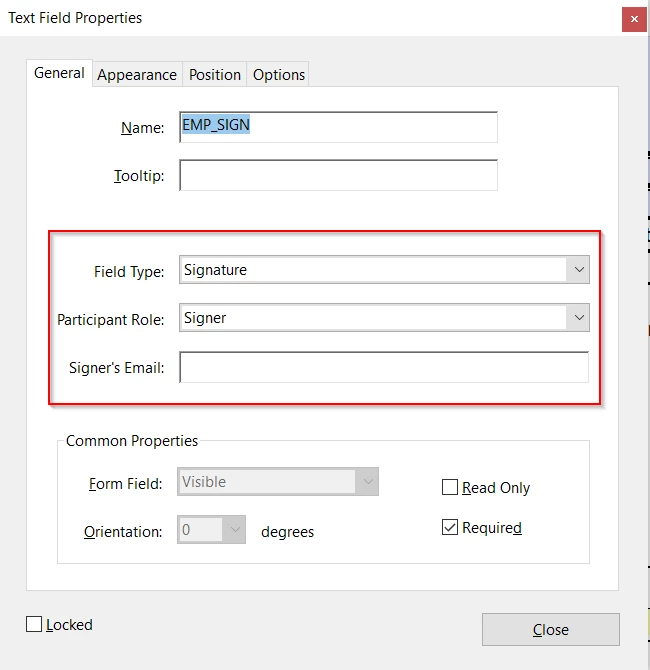
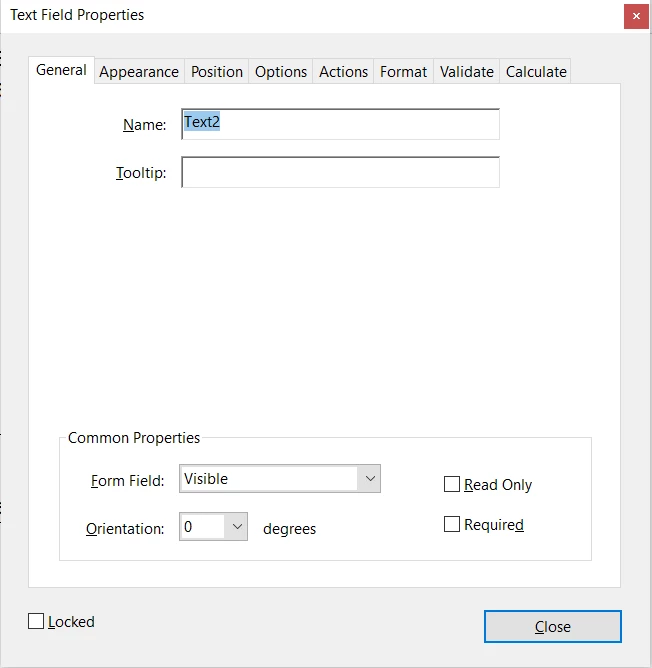
Hi All I am not sure where I can find the belwo field. I used to work withthis version, but now I dont see these option in my text field property bar. can some one help me understnd where can I find the same fields. I need to use the sign option. NEW.pngOLD.png
382
Translate
Report
Community guidelines
Be kind and respectful, give credit to the original source of content, and search for duplicates before posting. Learn more
community guidelines
Community Expert ,
Aug 06, 2021 Aug 06, 2021

I've moved this from the Using the Community forum (which is the forum for issues using the forums) to the Acrobat forum so that proper help can be offered.

Translate
Report
Community guidelines
Be kind and respectful, give credit to the original source of content, and search for duplicates before posting. Learn more
community guidelines
Adobe Employee ,
Aug 06, 2021 Aug 06, 2021

Hi Sindhu,


Hope you are doing well.

Can you confirm from where did you take the 2nd screenshot attached above? Is it possible to share this form with us?

It seems you were trying to send the form for signature, where assigning signature fields for signer. Is this an Enterprise license for Adobe Acrobat?


Thanks,

Akanchha 

Translate
Report
Community guidelines
Be kind and respectful, give credit to the original source of content, and search for duplicates before posting. Learn more
community guidelines
Community Expert ,
Aug 07, 2021 Aug 07, 2021
LATEST

The second screenshot is from an Adobe Sign form. You will need to convert your file to this format and then you'll have these options.

Translate
Report
Community guidelines
Be kind and respectful, give credit to the original source of content, and search for duplicates before posting. Learn more
community guidelines