
Acrobat Pro DC - Action Wizard - Print
Hi All,
I am wondering if anyone else had this before and come out with a solution.
In short all of my printings are working great apart from 1 situation I can not sort out.
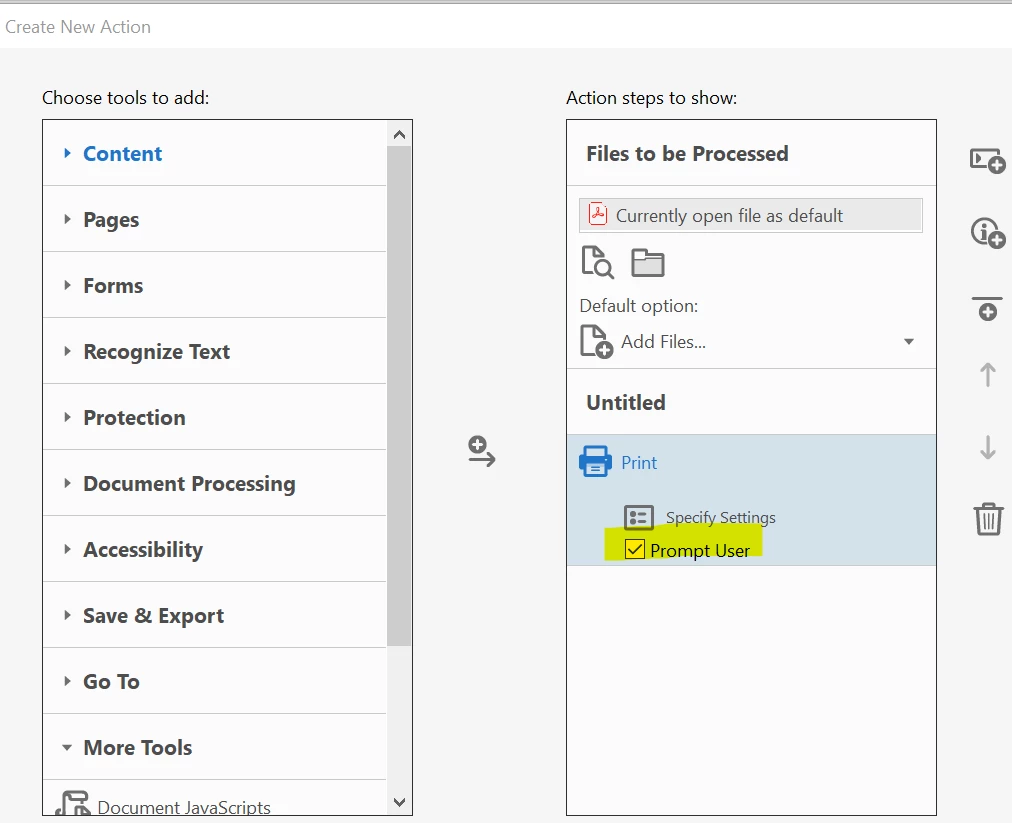
At my work on a weekly basis we print 100 PDF reports, each reports are containing multiple pages and each report is different, so when we print them they come out as stapled / report. To do this I am using the Action Wizard - Printing tool....I uncheck the "prompt user" box, so this way Adobe is using the printer's default settings, works great.
The issue I have is, that within 1 PDF there is a mixture of A3 and A4 sized pages....with the printing method above our default printer's setting can only print the files in A4 or A3 (depends on what I choose) regardless what is the original page size, there is no option to say "look for source size" or something.
If I do not uncheck the "prompt user" box, then the Adobe's printer settings will be used....and within the application there is a function called "choose paper source by PDF size"....this does the job I want...however with this method the printing dialog box within Adobe pops up 100 times and I need to click "print" each time.
Is there any way where the printing dialog box can be switched off when I start printing.
If not....is there any working Java Sript which can do the job please?
 AdChoices