


- Home
- Acrobat
- Discussions
- Re: Acrobat Pro DC becomes unresponsive on launch
- Re: Acrobat Pro DC becomes unresponsive on launch
Acrobat Pro DC becomes unresponsive on launch

Copy link to clipboard
Copied
Adobe Reader DC becomes unresponsive for about 10 seconds on launch, a few seconds after opening.
-Occurs with or without a file open
-Files can be opened and closed without issue, it only occurs on first launch of program
-Will display (Not Responding) in title bar if I click inside the program while it's not responsive
-Issue is happening on several computers in my network, all running Windows 10 1803
-Unsure when the issue began happening
Version 2019.010.20069.49826
Troubleshooting steps:
Bypassed firewall by connecting computer directly to modem
Cleared recent documents list
Set Documents in recently used list: 0
Disabled both 'Show online storage' options
Disabled 'Show me messages when I launch Adobe Acrobat'
Disabled 'Tell me if Adobe Acrobat is not my default PDF application'
Disabled Sync preferences across devices and document services
Disabled 'Enable Enhanced Security'
Disabled 'Automatically install updates'
Deleted preferences folder
Performed Repair installation
Sign out / in Adobe account
Seems to become unresponsive when the silhouette icon in the upper right corner of the window changes from gray to the blue splotch that is my "profile picture".
How can I isolate what operation the program is trying to perform at the time it's unresponsive?


 25
Replies
25
25
Replies
25


Copy link to clipboard
Copied
Hi Justinj,
I am sorry for the trouble you had with Adobe Reader, please reboot the machine once and navigate to Adobe Reader's Preferences from Edit>Preferneces>Security(Enhanced)>and disable 'Protected Mode at startup'>Click OK and restart the application and check.
Note: Disabling the Protected Mode is only for testing purpose, please enable it back.
Collect the log files of the machine on which Adobe Reader is unresponsive. I have shared the steps to collect the log files by direct message, please check your email inbox and share the log files.
Also, use Acrobat cleaner tool to remove the installed Adobe Reader Download Adobe Reader and Acrobat Cleaner Tool - Adobe Labs
Reboot the machine and download Adobe Reader from Adobe - Adobe Acrobat Reader DC Distribution
Once the setup is downloaded, locate the setup file Right-click on the setup file and click on ‘properties’.
Click on the ‘compatibility’ tab and check the box ‘Run this program in compatibility mode for’ and select Windows 8/7 operating system from the drop down menu and proceed with the installation.
Once this is done, restart the computer and locate the Adobe Reader icon and right click and choose 'Run as Administrator'.
Then from the help menu>install the latest patch of Adobe Reader 19.010.20069 by selecting check for updates.
If the issue still persists, please create a test user profile with full admin rights and install Adobe Reader and check.
Let us know how it goes and share your observation.
Thanks,
Anand Sri.
Copy link to clipboard
Copied
Anand, thank you for your reply. I have isolated it down further. I followed the uninstall/cleanup instructions, rebooted, reinstalled. The 19.010.20069 build is what was available in the distribution so no update was needed. The same behavior is present after the re installation. This seems to be affecting all users on the machine except the default Administrator account. What happens is that after Reader is open approximately 15 seconds, the text "Convert and edit PDFs with Acrobat DC Pro; Start Free Trial" appears in the bottom right and then a few seconds later the program becomes unresponsive. It remains unresponsive for approximately 10 seconds and then resumes with no further issues. I can close and open as many files as I want and the issue does not reoccur as long as the user doesn't exit the program all together. If the program is exited, the cycle repeats.

Copy link to clipboard
Copied
I have the same issue. It seems to me that the program is Not Responding during the process of logging me in to my Adobe account. Each and every time I open Adobe.

Copy link to clipboard
Copied
I have the same issue. It has been happening for a couple of weeks now in spite of multiple uninstall/reinstall attempts, rebuilding the install, checking for updates, etc. When I chatted w/ Adobe yesterday and screen shared with them, it quit freezing up, but now it's doing it again. I've even made sure I'm logged in online to my account in a web browser, I'm logged into Creative Cloud, and already had Adobe open before attempting to open my Secured file and it still froze up.

Copy link to clipboard
Copied
Dear,
exactly same issue, hangs for a couple of seconds after opening file,
stops hanging and profile picture becomes a blue pie cake,
but I have it with Adobe Acrobat Reader DC 2019.010.20098 (the free version).
Gr, D

Copy link to clipboard
Copied
Hello,
We are also running into this issue. Acrobat hangs on startup for about 10 seconds + the user icon turns into a blue pie logo after the app comes back. Please keep us posted if you were able to figure this out. Thank you!

Copy link to clipboard
Copied
Since this seems to be starting back up again, time to move it to the Acrobat forum.

Copy link to clipboard
Copied
Same issue as described by OP, running on windows 10.

Copy link to clipboard
Copied
Same issue here for a user with Windows 10 and Acrobat Pro. Not responsive for 10-15 seconds then everything starts working. Hopefully, someone figures this out sooner than later.
Copy link to clipboard
Copied
So now I have a second user reporting this issue. It sure would be nice if anyone had an idea or fix for this issue!

Copy link to clipboard
Copied
Hello, any news about this? We have the same problem.
Copy link to clipboard
Copied
I was able to resolve the problem for my user by deleting the app data folders under local and roaming. Once you reopen the application, it rebuilds those folders and won’t freeze on you.
Regards,
Joseph Trepanier
Copy link to clipboard
Copied
Thanks Josepht22945670! It seems to work.
Regards.

Copy link to clipboard
Copied
Thank you to Joseph for offering this piece of advise. Can you be specific as to the specific folder you are referring to?
Is it the whole folder?:
\users\<username>\Application Data\Adobe\Acrobat\DC
Copy link to clipboard
Copied
Yes, it’s the whole folder. Below are the file paths. If you rename those folders to “OLDAdobe” and leave them in the same folder that they are located in, it will effectively do the same function.
C:\users\\appdata\Roaming\Adobe
Thank you
Joseph Trepanier

Copy link to clipboard
Copied
I just tried this and it worked. Now instead of automatically logging in, which I believe was the hold up, it instead asks me to sign in, which I don't really need to do to open or edit a file on my machine.

Copy link to clipboard
Copied
this worked for me, thanks
Copy link to clipboard
Copied
I was also able to sort it out by uninstalling Acrobat and running the Acrobat Cleanup tool from Adobe. Once reinstalled, the issue was no longer present. I didn't know that tool was available but I'm keeping it around for future use! Thanks all!
Copy link to clipboard
Copied
Hi All,
Thanks for your time and patience thus far, the new update of Acrobat and Reader is available
Please install the latest patch from help menu of Acrobat>select check for updates, reboot the machine and check.
You may also install the updates manually from DC Release Notes — Release Notes for Acrobat DC Products
let us know if you still experience any issue.
Thanks.
Anand Sri.

Copy link to clipboard
Copied
Hi
I am on Adobe Pro DC 19.010.20099 and have the same irritating problem. Seems to have started a few weeks/months ago. I also now have some strange window appearing on load-up that flashes on screen (almost looks like a cmd or DOS window) then disappears on load. I can immediately scroll down on a PDF but then it freezes for a number of seconds. It feels to me like the app is busy doing something else and interestingly if you watch it when it comes back after losing responsiveness, when it comes back it then immediately identifies your plan "Your Current plan is Creative Cloud".
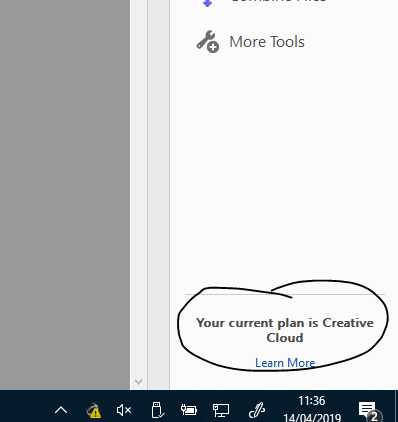
SO, Adobe, my guess is you are busy going off and checking licencing. Fully get you need to do this but can you please program it so it does it in the background!!! Hundred of 10 seconds out of the day is frustrating a lot of people and costing people time and so money!
Copy link to clipboard
Copied
Hello,
Any update on this one? If I delete the Adobe folders under AppData per above it works 100% but if I then have the user input username and password I am back into the same spot.
Every PDF seems to hang for 10 seconds at startup.
Looking for more suggestions
Copy link to clipboard
Copied
Hello everyone,
I just deactivate the "Enable Protected Mode at startup" and now Adobe is working normal, take less than a second to open


Copy link to clipboard
Copied
I don't have that option in my Security (enhanced)

Copy link to clipboard
Copied
With the version 2019.012.20034 it seems to be fixed with me.

-
- 1
- 2

Find more inspiration, events, and resources on the new Adobe Community
Explore Now
 AdChoices