
Patrick97
Participant
December 19, 2017
Answered

Acrobat Pro DC has Photoshop icon

  • December 19, 2017
  • 2 replies
  • 2830 views

Hello,

When i turned on my machine today my acrobat pro dc had the icon of Photoshop.

Fixed it by creating a new link. Thats a quiet nasty bug for an application that costs so much.

Windows 10 64

latest cc versions
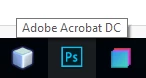
Edit: To be more clear, If I search for the application in windows it still shows the Photoshop icon.

This topic has been closed for replies.
Correct answer AnandSri

Hello Patrick97

We apologize for the inconvenience caused, as per the description above the icon of Acrobat Pro DC is showing as an icon of Photoshop, as visible in the screenshot, Is that correct?

Please try the steps mentioned below:

  • Remove, unpin or delete Adobe Acrobat Pro DC icon from the Start Menu, the desktop and (if you have it there) from the taskbar.
  • Go to C: > ProgramData > Microsoft > Windows > Start Menu > Programs and you'll find the "Adobe Acrobat Pro DC" with the wrong icon. That looks like a shortcut. Delete it!.. Close the window.
  • Go to C: > Program Files (x86) > Adobe > Acrobat DC > Acrobat... and find Acrobat.exe
  • Right click on Acrobat.exe > Send to > Desktop
  • Right-click again on Acrobat.exe > Pin to Start Menu... and close the window
  • Right click on Acrobat.exe - shortcut (that you just created on your desktop) > Copy
  • Go back to C: > ProgramData > Microsoft > Windows > Start Menu > Programs... and Paste the shortcut here (you need administrator privileges for that)
  • Rename this shortcut from "Acrobat.exe - shortcut" to "Adobe Acrobat  Pro DC"
  • Close the window
  • Now if you open any PDF document, the right icon will appear on the taskbar.

Let us know how it goes.

Regards,

Anand Sri.

2 replies

Participant
February 18, 2020

I continue to have this issue every time Acrobat is updated. Each time, I need to remove the shortcut from the start menu and recreate it. Last time I never bothered to recreate the shortcut after deleting it. An update has occurred once again, and I now have the Photoshop icon, once again.


AnandSri
Community Manager
AnandSriCommunity ManagerCorrect answer
Community Manager
December 19, 2017

Hello Patrick97

We apologize for the inconvenience caused, as per the description above the icon of Acrobat Pro DC is showing as an icon of Photoshop, as visible in the screenshot, Is that correct?

Please try the steps mentioned below:

  • Remove, unpin or delete Adobe Acrobat Pro DC icon from the Start Menu, the desktop and (if you have it there) from the taskbar.
  • Go to C: > ProgramData > Microsoft > Windows > Start Menu > Programs and you'll find the "Adobe Acrobat Pro DC" with the wrong icon. That looks like a shortcut. Delete it!.. Close the window.
  • Go to C: > Program Files (x86) > Adobe > Acrobat DC > Acrobat... and find Acrobat.exe
  • Right click on Acrobat.exe > Send to > Desktop
  • Right-click again on Acrobat.exe > Pin to Start Menu... and close the window
  • Right click on Acrobat.exe - shortcut (that you just created on your desktop) > Copy
  • Go back to C: > ProgramData > Microsoft > Windows > Start Menu > Programs... and Paste the shortcut here (you need administrator privileges for that)
  • Rename this shortcut from "Acrobat.exe - shortcut" to "Adobe Acrobat  Pro DC"
  • Close the window
  • Now if you open any PDF document, the right icon will appear on the taskbar.

Let us know how it goes.

Regards,

Anand Sri.

Patrick97
Patrick97Author
Participant
December 20, 2017

Thank you, that fixed the problem.

AnandSri
Community Manager
Community Manager
December 20, 2017

That's so awesome to hear. Give us a shout if you need any assistance with Acrobat/Reader/Document Cloud Services in future.

Regards,

Anand Sri.

[eidted response]