
Participant
June 17, 2021
Beantwortet

Acrobat Pro DC is turning edited text into illegible characters

  • June 17, 2021
  • 2 Antworten
  • 3114 Ansichten

When I try to add text through Acrobat Pro DC, the text is turned into jumbled letters that are unable to be read. I have made sure that it is updated to the latest version and I am not sure what is wrong. I am editing the same type of document that previously has had no issue in doing so, the fonts are also the same as what I used to edit. 

I am also getting this error:
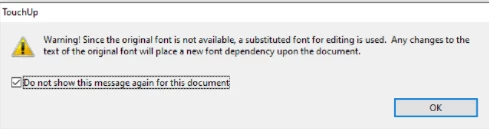
Any help/suggestions would be appreciated!

Beste Antwort von Karl Heinz Kremer

Hmmm... If you were able to do this with the same document and a previous version of Acrobat, this is very likely a bug that got in. In general, these types of problems usually have to do with subset embedded fonts. I describe one of these problems (after merging two or more documents) and a potential workaround here: http://khkonsulting.com/2015/02/missing-characters-merging-inserting-pdf-files-potential-workaround/

Even though your symptoms are different, it might be worth trying the workaround to see if you can fix any protential problems before you edit the document. 

I've also heard that running auto tagging before you edit a document may fix such problems. You can find the tagging function when you search for "Autotag document" in the tools search field. 

2 Antworten

Karl Heinz  Kremer
Community Expert
Community Expert
June 17, 2021

Hmmm... If you were able to do this with the same document and a previous version of Acrobat, this is very likely a bug that got in. In general, these types of problems usually have to do with subset embedded fonts. I describe one of these problems (after merging two or more documents) and a potential workaround here: http://khkonsulting.com/2015/02/missing-characters-merging-inserting-pdf-files-potential-workaround/

Even though your symptoms are different, it might be worth trying the workaround to see if you can fix any protential problems before you edit the document. 

I've also heard that running auto tagging before you edit a document may fix such problems. You can find the tagging function when you search for "Autotag document" in the tools search field. 

PWellmAutor
Participant
June 18, 2021

Auto tagging worked for me, thank you!

Karl Heinz  Kremer
Community Expert
Community Expert
June 18, 2021

Great. Thanks for letting us know. It's always good to have some feedback about what works and what not, so next time, I may recommend that first, and not as the last option 🙂

radzmar
Community Expert
Community Expert
June 17, 2021

The message says, the fonts used in you PDF are not available on your computer, so Acrobat tries to find a suitable surrogate. The result can be fine but depending on that original font used it can also be totally different. There not much you can do about that. Acrobat is not a full text editor such as MS Word and PDFs were not invented to be modified. Try to get another version of the PDF from its author that has the fonts embedded which allows editing (it's a font property).