
Participant
June 12, 2020
Answered

Acrobat Pro DC: output preview - printer profile shown as RGB

  • June 12, 2020
  • 2 replies
  • 1225 views

Hello,

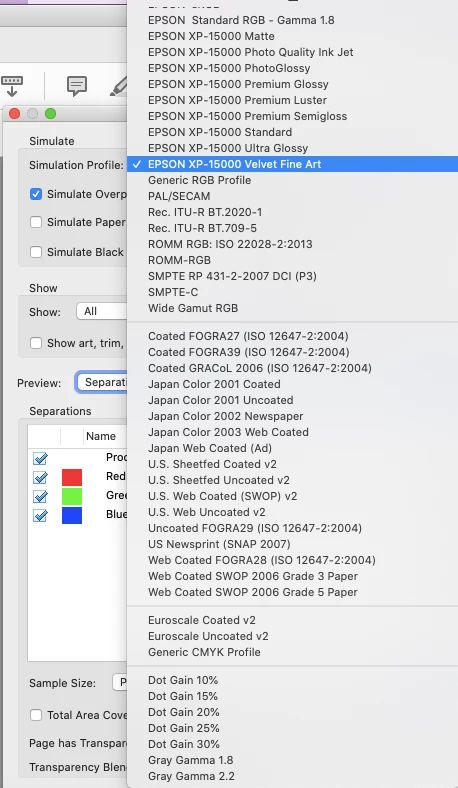
I tried Output Preview for the first time after I got a new printer (Epson XP-15000).  The Output Preview does show the Epson printer's various profiles (standard, photo, etc); however, all of them shows RGB under Separations, rather than CMYK (see screenshot attached).  Do I need to fix something to make sure the printer shows its color scheme under Separations?

Thanks,
 

Correct answer tlotman

In your preferences, check that this Color Setup Working Spaces does NOT have an RGB profile. (See attached).


Mine had sRGB, I think. After changing it to US Web, never could go back to an RGB profile to show you.

2 replies

tlotmanCorrect answer
Participant
March 12, 2025

In your preferences, check that this Color Setup Working Spaces does NOT have an RGB profile. (See attached).


Mine had sRGB, I think. After changing it to US Web, never could go back to an RGB profile to show you.

S_S
Community Manager
Community Manager
March 16, 2025

Hi @tlotman,


Hope you are doing well. 


Thanks for writing what worked for you.

Marking this as a correct answer for future users to use as a reference.


Regards,
Souvik.

Dov Isaacs
Legend
June 13, 2020

The Epson XP 15000 printer is an RGB printer in terms of what the programmatic interface provides. Application programs are only able to submit RGB colors to the printer driver and then the printer itself which performs its “secret sauce” to translate that RGB into the actual CMYK plus G (gray) and R (red) inks within the printer. As such, neither Acrobat nor any other application can provide CMYK separation previews. Sorry!


- Dov Isaacs, former Adobe Principal Scientist (April 30, 1990 - May 30, 2021)
Participant
June 13, 2020

Thank you for the helpful info!