
New Participant
April 29, 2021
Answered

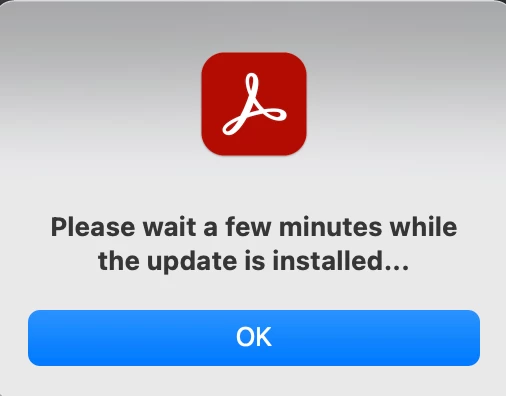
Acrobat Pro DC please wait a few minutes while the update is installed

  • April 29, 2021
  • 10 replies
  • 102803 views

This is an on going problem with my iMac, running High Sierra v 10.13.6.

Regularly, my acrobat will stop printing. I can open a file, but when I hit Ctrl-P I get the spinning beach ball.

I restarted my computer, now it tells me that I should "please wait a few minutes while the update is installed..."

This comes after I have already uninstalled the application, reinstalled it, restarted my mac, reset my prefs, restarted my mac, searched for a solution, and it never finishes this phantom "update install".

I'll force quit the app, uninstall it again, reinstall it, and maybe it will work?

david
Correct answer AkanchhaS8194121

Hi, this link does not work in the South East Asian region. Still getting the same issue. Screenshot appended below.


I am on the macOS Big Sur 11.6


Thanks! 


Hi Kahmun, 


Please try this link to run the cleaner tool https://www.adobe.com/devnet-docs/acrobatetk/tools/Labs/cleaner.html 

Once done, try installing the application once again through the link shared above: https://helpx.adobe.com/download-install/kb/download-install-acrobat-subscription.html 

Let us know if it still doesn't work.


Thanks,

Akanchha 

10 replies

New Participant
September 1, 2024

Still happening in September 2024. Did you figure out a fix? The cleaner tool link is dead and I'm not running any of the other Adobe programs. 

New Participant
September 26, 2024

I have constant problems with this. I find that Acrobat freezes up when my laptop awakens from sleep and I often have to force quit it and restart. I don't understand why Acrobat isn't updated thorugh the CC application like everything else rather than on its own whim.

Participating Frequently
January 8, 2024

It's pretty annoying that you all charge way more for this than you used to, but it sucks more.


Before there was a monthly fee, problems like this were understandable.  But now that you charge for this every month it's unacceptable. 

New Participant
November 4, 2023

Fortunatly I have Photoshop. Its 2023, Adobe get your act together!

Mac OS 13.6.1 (22G313), Acrobat 23.6.20360.0. I have to uninstall and run some cleaning tool then reinstall? Give me a break. Your software engineer time is more valuable than mine?

Participating Frequently
March 24, 2023

I know this is a really old post, and I'm not sure what Windows OS I am running, but I got the same message, opened PhotoShop, and that must have pushed an update through so, the opening of photoshop seems to be a working work around

FINIEN1
New Participant
September 28, 2021

Same issue and the Photoshop update worked magic. Kinda sad, but hey, thanks for sharing, this saved my presentation tomorrow!


sfklein1
Participating Frequently
January 14, 2022

Same here re: Photoshop... you'd think this bug fix would have come through pronto...

Participating Frequently
June 23, 2022

Ditto all above. The Photoshop solution works (w/ Big Sur 11.6 on a 2021 iMac). And WHY hasn't Adobe fixed this longstanding problem in its Acrobat updates?

New Participant
September 16, 2021

hello.. 

i had the same problems as you did. There was a photoshop update in the creative cloud which waited to be downloaded. After i did that Acrobat worked smoothly again. I have no idea why this worked, but it did.


best, d

DrEntropy
Inspiring
September 16, 2021

Well that didnt work for me.   Same issue, mac os 11.5.2  and latest Acrobat.  I have no idea how this happened. It was working, then it stopped. No update, no changes.  The only thing is it stopped working right after i used photoshop to do something unrelated.   So I figured the photoshop upate trick mentioned here would work, but it did not.  I also tried re-intalling, and it still somehow manages to come up with this error. WTH adobe?    I never realized how much I rely on this one program until it suddenly crapped the bed.

New Participant
September 17, 2021

I had the same problem and I was about to use the cleaner tool.

OS10.15 + latest Acrobat Dc installation.
opening Distiller did the trick for me. Now I realize I need to backup all my custom profiles very quickly.

New Participant
June 15, 2021

Same issue here... you guys found a solution yet? 


Meenakshi Negi
Community Manager
Community Manager
June 15, 2021

Hi Fransj,


Sorry for the trouble caused.


Could you please let us know the Acrobat and OS version number? Also, share the screenshot of the message that appears.


Try once to uninstall the application using the cleaner tool (https://www.adobe.com/devnet-docs/acrobatetk/tools/Labs/cleaner.html) and reboot the machine. Then reinstall the application from this link: https://helpx.adobe.com/download-install/kb/download-install-acrobat-subscription.html 


 Thanks,

Meenakshi

New Participant
September 14, 2021

Hi, this link does not work in the South East Asian region. Still getting the same issue. Screenshot appended below.


I am on the macOS Big Sur 11.6


Thanks! 


New Participant
June 10, 2021

I had the same issue, MacOS 11.4 and the latest version of acrobat. 

I tried

  • Quiting CC and reopening - didnt work
  • Restart - didnt work
  • uninstall Acrobat - didnt work
  • Opened a recently updated photoshop (it said verifying update as i opend it) then opened acrobat and problems solved!

So not sure why but maybe it was a permissions issue or something to do with verifying a recent update


irist21244517
New Participant
September 16, 2021

Genius. And so random. But it worked...

New Participant
June 10, 2021

Yep same here. Mac OS Mojave, MBP.

I cannot actually use Acrobat now until this is resolved. I've tried uninstalling and then re-installing but still not working.

New Participant
May 31, 2021

I'm at 11.3.1 OS and I'm trying to start my Adobe Acrobat pro and I get the same phantom message, "Please wait a few minutes while the update is installed...", which it never does.

Mark