
laurab18990060
Participant
October 4, 2018
Question

Acrobat Pro DC shared review cannot resolve email addresses through Outlook

  • October 4, 2018
  • 1 reply
  • 1450 views

I’ve run into a persistent issue since I switched to a Windows 10 computer, one I did not have before with Windows 7 and the same version of Adobe Acrobat Pro DC.

When I use Send for Review for shared commenting and try to add email addresses that are in my company’s Outlook 2016 network, I get this message about the ExchangeLabs and Exchange Administrative Group:

And this follow-up one as I try to resolve it:
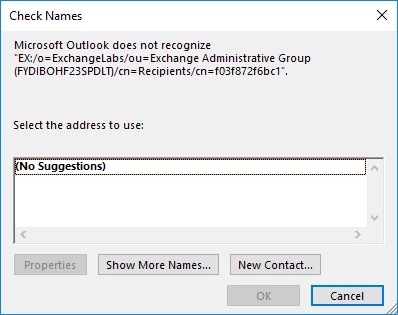
I try to replace that text with their exact email addresses, both by using the “Show More Names” browsing window and by pasting their full email addresses, but nothing works. Any help would be appreciated.

Thank you!

This topic has been closed for replies.

1 reply

pallavikothari
Adobe Employee
Adobe Employee
October 5, 2018

Hi

Apologies for the inconvenience thus caused.

Could you kindly help us with the following details so we could resolve the issue at our end:

  • The current version of acrobat you are at. You can find the info in Help->About Adobe Acrobat Pro DC...
  • Could you try adding the same email address using the Address Book option (the book-like icon in the e-mail address box)?
  • Are you able to send a PDF via e-mail to similar ID's using Microsoft Outlook?

Thanks

Pallavi.

laurab18990060
Participant
October 5, 2018

Thank you for responding!

It is Version 2019.008.20071

Yes, I've tried repeatedly with the Address Book browsing window at the initial stage of adding reviewers. I still get the same error message.

I am able to add a non-Outlook address, like a gmail one, as a reviewer. It just doesn't work with the Outlook addresses in my address book. This is a problem!

I can successfully send a PDF to my Outlook contacts via e-mail by right-clicking the file and selecting "Send to" and then "Mail recipient" from Windows Explorer. I have never used the "Send for Comments by Email" feature in Acrobat because my files are too large to send as an attachment.

Participant
January 14, 2022

Windows 10
Microsoft Outlook 365

PDF placed in a SharePoint Folder where all users have access rights
Adobe Acrobat DC v 2021.011.20039

Email addresses for Shared reviews will not resolve with Outlook

Is there a 64-Bit version of Acrobat Pro I should be using ?????