Participant
November 21, 2023
Question

Acrobat Pro Display Issue When Using Select or Highlight

  • November 21, 2023
  • 2 replies
  • 5673 views

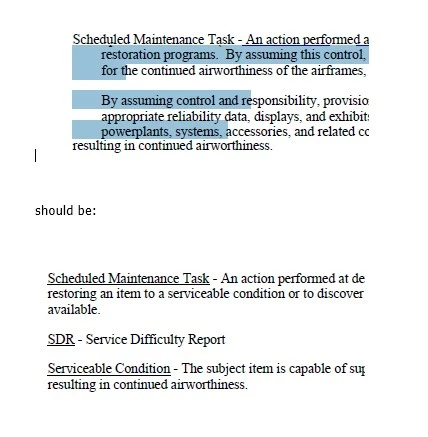
I have recently started having a display problem when I highlight using the select tool. In many cases when I high light text it will show text from other pages of the document. When I "let go" of the selection it sometimes leaves the other text as an artifact on my screen. If I scroll up or down in the document it resets shortly, but after a few selections it does the same thing. This is not particular to a single document. 


I have tried to repair the install and check various display settings and options but nothing works. 


Does anyone have any ideas? Example provided below:
This topic has been closed for replies.

2 replies

Participant
December 5, 2023

I have noticed the same problem for several weeks now. I don't have a solution for it, but I can replicate it, so I'm hoping someone can can offer a solution. Also, another user seems to have the same problem: https://community.adobe.com/t5/acrobat-discussions/marked-text-turns-into-text-from-previous-page/m-p/14230657


It seems that Adobe erroneously displays the text from a different page during the highlight selection process. Once the selection process is ended (either by terminating or completing the highlight command), the text from the correct page is displayed once again.


I can reliably replicate the problem on many different documents. I've made a mockup document to illustrate the process.  The document consists of one page of lorem ipsum in Times New Roman font, and one page describing my impression of the error in large Arial Black font. These two pages are then duplicated a handful of times.


The following steps replicate the issue *almost* every time:

1) make sure Acrobat is not running.

2) double click on the file to open (Windows 10 x64)

3) make sure the view is set to FIt One Full Page

4) scroll rapidly back and forth through the pages in the document

5) attempt to highlight some text. (If the problem doesn't occur, go back to step 4)


My series of images 1-6 illustrate the problem


Thanks so much to whoever can help!

Participant
December 12, 2023

We are experiencing the same issue, can our friends at Adobe please enlighten us as to if/when this issue may be addressed and/or resolved?

Participant
December 12, 2023

See Gregor's post from Dec 6, 2023 at:


https://community.adobe.com/t5/acrobat-discussions/marked-text-turns-into-text-from-previous-page/m-p/14230657


I think he's found a solution (or at least a temporary workaround for this issue.

try67
Community Expert
Community Expert
November 21, 2023

The file's internal structure is corrupt, probably because of how it was created.

You can re-create it by exporting all pages as (high-quality) image files, then create a new PDF from those images.

Then run Text Recognition on the new file and these issues should be resolved.

Participant
November 21, 2023

Thank you for the potential solution. I will give it a try but I would like to point out that this is happening on every docuement I load now, including documents that were just distilled / converted / created.

Participant
November 21, 2023

UPDATE:

I tried the method above with limited success. After running OCR on the exported and reimported images, the file seemed to act fine as long as all I was using was the select tool. However, once I highlighted some text with the highlight tool it started showing other parts of the document again.