Participant
February 17, 2023
Answered

Acrobat Pro, hinzugefügte Werkzeuge verschwinden immer

  • February 17, 2023
  • 4 replies
  • 2369 views

Hallo zusammen,
gibt es mittlerweile eine Lösung für folgendes Problem:

rechte Seitenleiste: hinzugefügte Werkzeuge verschwinden wieder.

Das ist wirklich ärgerlich und nach jedem Neustart zeitaufwändig. Jedesmal muss ich z.B "Druckproduktion" oder "Formulare" neu hinzufügen. Offensichtlich bleiben nur die Standards erhalten.

Bitte um Lösungsansätze. Danke und Gruß

Thomas
Correct answer S_S

Thanks, but no screenshot is visible. Latest version is installed.


@Gunther27487241ofwh Sorry for the broken image added above.


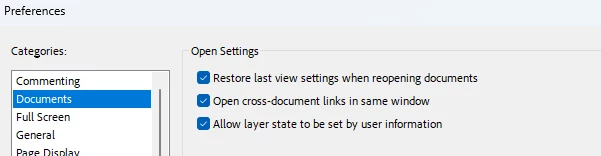
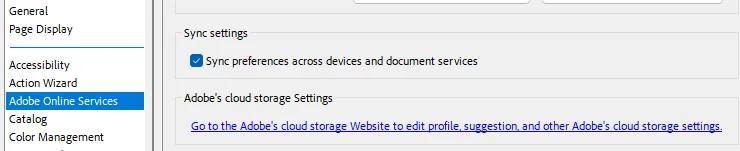
These are the settings I was referring to:


If checking both of these does not work, resetting the preferences should.


-Souvik

4 replies

Participant
August 9, 2024

Hallo,

ihr seid nicht allein, bei mir verschwindet immer wieder das Stempel-Werkzeug.

Windows 11 Pro

Adobe Pro Continous Release Version 2024.002.20991, 64 bit


Steter Tropfen ...

Vielleicht ändert sich mal was

Gruß

Gunther

S_S
Community Manager
Community Manager
September 29, 2024

Hi @Gunther27487241ofwh,


Hope you are doing well. Sorry for the trouble.


Would you mind checking if the preferences as shown in the screenshot below are checked?


Also, please ensure the application is updated to the latest version (2024.003.20112).

To do so, go to Menu-> Help-> Check for Updates.


If neither helps, try resetting the preferences of the application by following the steps here: How to reset Acrobat Preference settings to defaul... - Adobe Community - 4792082

Once done, try the steps shared above with the Preferences-> Documents.


Hope this helps.


-Souvik

S_S
Community Manager
S_SCommunity ManagerCorrect answer
Community Manager
October 1, 2024

Thanks, but no screenshot is visible. Latest version is installed.


@Gunther27487241ofwh Sorry for the broken image added above.


These are the settings I was referring to:


If checking both of these does not work, resetting the preferences should.


-Souvik

Participant
March 19, 2024

Hallo Thomas,

scheint kein Einzelfall zu sein. Auch ich habe das Problem mit der Menüleiste und bin bei den monatlichen Abokosten langsam säuerlich, dass rein gar nichts passiert.

Participant
February 21, 2024

Hallo, 

immer noch keine Lösung dafür? 

Bei mir fehlen auch alle paar Tage wieder meine 3 hinzugeüften Tools "Druckproduktion", "Formulare" und "PDF optimieren"...

Beste Grüße

Nils

AkanchhaS8194121
Legend
February 17, 2023

Hi @Thomas284573395eyd 

Sorry to hear about the trouble caused.

To further investigate the issue, please share the following details:

1- Exact version of Acrobat and OS

2- Does it happen during the session or when you reopen Acrobat?

3- How to collect and Share fiddler logs. [how to share the fiddler logs for that steps are shared via private message.]


Thanks,

Akanchha

Participant
March 8, 2023

Hi Akanchha,
I have the same issue here (for more than two years).
To answer your questions:

1 a) OS:
Microsoft Windows 11 Home - Version 10.0.22621 Build 22621 (happened also on WIN 10)

1 b) Acrobat:
Continuous Release | Acrobat Version: 2022.003.20322 | 64 Bit
Version File Version 22.003.20322.0
AGM Version 7.000.00002 | 64 Bit
Cool Type Version 8.001.00002 | 64 Bit
Basisversion 22.768 | 64 Bit
JP2K Version 4.000.00000.52132 | 64 Bit
2) During the session, everything is fine. Also reopening Acrobat several times works with the added tools still in place.
But "some days later", after reopening Acrobat, the sidebar shows only the default tools again.

Hope this helps.
Best regards Stephan

October 24, 2023

Das ist ja eine tolle Antwort. Ich ärgere mich auch schon seit Wochen damit herum. Früher gab es das Problem nicht.