


Inspiring
April 11, 2025
Answered

Acrobat Pro (latest) defaults to bold face for new bookmarks. How to revert to normal behavior?

  • April 11, 2025
  • 1 reply
  • 572 views

Acrobat Pro (latest) defaults to bold face for new bookmarks (this is new, two days old for me, possibly after a silent update). Is this just me or generally true? How to revert to normal behavior?


tx
Correct answer creative explorer

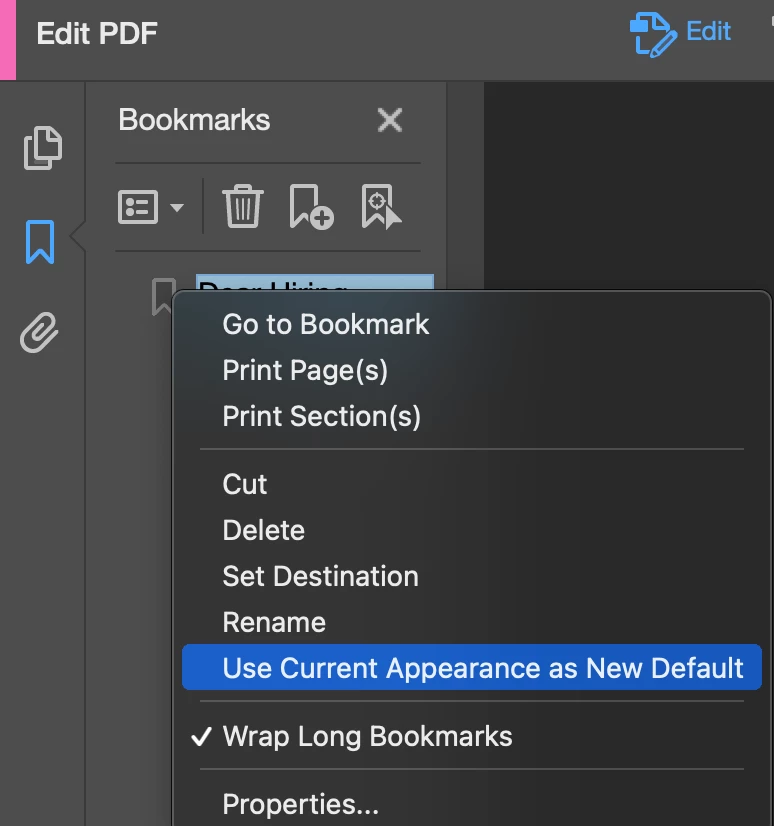
@JIPNET to add what @Tariq Ahmad suggested, another way to revert to the normal behavior, the easiest steps are to create a new bookmark with the desired non-bold formatting, then right-click on that bookmark and select "Use Current Appearance as New Default". This should instruct Acrobat to use the formatting of your selected bookmark for all subsequently created bookmarks.


1 reply

Community Manager
April 11, 2025

Hi @JIPJIPNET, 


Thanks for reaching out and always thanks for sharing your feedback and observations. 


Could you please share a couple of screenshots and check if the behavior is the same in classic Acrobat? To disable Modern Acrobat(assuming you have a Mac). Acrobat > View > Disable Modern Acrobat.


Will be waiting for your response.


~Tariq

JIPNETAuthor
Inspiring
April 11, 2025

Modern View:

Classic UI: