Inspiring
July 31, 2025
Answered

Acrobat Pro no longer supports batch .msg files to individual PDFs

  • July 31, 2025
  • 1 reply
  • 1890 views

As early as January of this year I was able to select hundreds of .msg files from Outlook and convert to individual PDF files using the Acrobat tool from Outlook. This was a quick seamless process and valuable tool. What has changed and is there another solution?

Correct answer cathy_0927

Thanks for the quick response, @cathy_0927

Now, enable the option, and click Ok. And then try converting emails again. 

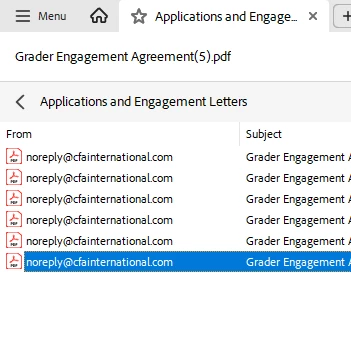
Take a screenshot of the converted document without revealing confidential information, especially on the left side portion of the file. 


You should be able to see the results like this. Double-click on the second item on the list "ahm.....(1)", of course, this will be different for you. Then the inbox will come up, and double-click on that, and you should be able to see all of your emails. Let me know how it works


Best regards,
Tariq | Adobe Community Team


That seems to have worked! Perhaps I wasn't drilling into that folder previously or something was reset when removal of this function and re-enabling again. I will try with a larger batch of 450+ .msg files now. Thanks very much!

 

1 reply

Legend
July 31, 2025

Hi @cathy_0927


Thanks for reaching out. 
Here are a couple of things we need to check: 
1. Ensure Acrobat is installed on the machine. 

2. Acrobat PDF Maker plugin is enabled in Outlook. For more information on PDFMaker on Windows machine: https://adobe.ly/4oechAb;


Please provide more details if the above suggestions don't help. And it would be helpful if you could provide the following details:

  1. Acrobat version installed:  https://adobe.ly/3PQQ7nE
  2. OS name and version.
  3. Screen recording showing the problem. 


Best regards,
Tariq | Adobe Community Team

Inspiring
July 31, 2025

Hi Tariq. Thanks for your response. I have Acrobat PDF Maker enabled in Outlook, with version in this clip.


Inspiring
July 31, 2025

Appreciate the information on the timeline. 

If you could provide the OS name and version and the Acrobat version number, I will escalate the case to product engineering.


Best regards,
Tariq | Adobe Community Team


Windows 11, version 23H2. We have an Adobe for Enterprise account under CFA Institute. Sorry I can't see version from my side.