Exit
  • Global community
    • Language:
      • Deutsch
      • English
      • Español
      • Français
      • Português
  • 日本語コミュニティ
  • 한국 커뮤니티
0

Acrobat Pro not working after new hard drive installed

New Here ,
Sep 22, 2018 Sep 22, 2018

Hi, and thanks for helping. My hard drive failed this month and I had a new one installed - same computer, same serial number. I bought it a number of years back, and use it exclusively to combine multiple files into a pdf. No need on my end for any upgraded features.

I copied it over from my application folder (mac) but when I try to use it is says "configuration error: please uninstall and reinstall the software." Though I still have my activation key, I have no way to enter it, and I assume I can't download a much-older version of the software into which I could put my activation key.
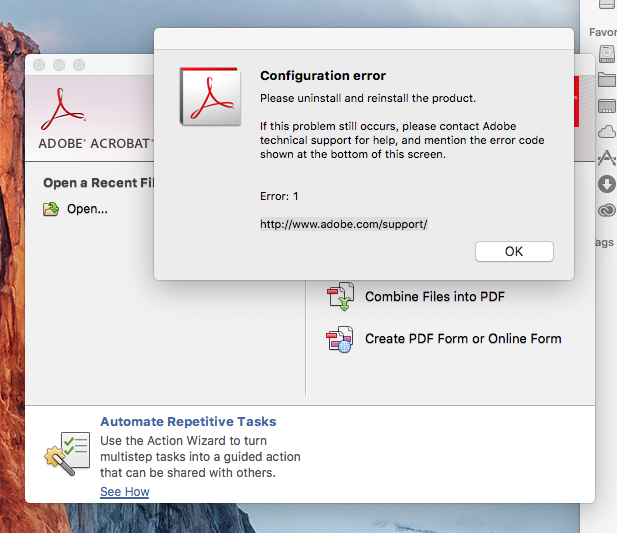
Screen Shot 2018-09-22 at 5.57.45 PM.png

Like I said, no need for a fancier version and no budget for a monthly subscription to a program I use six times a year to make a pdf. Anyone have an idea as to how I can get my program working again?

Thanks so very much!

TOPICS
Install update and subscribe to Acrobat
1.6K
Translate
Report
Community guidelines
Be kind and respectful, give credit to the original source of content, and search for duplicates before posting. Learn more
community guidelines
1 ACCEPTED SOLUTION
Community Expert ,
Sep 23, 2018 Sep 23, 2018

undo whatever you've done.

then download the installation file for your acrobat, install (assuming you have a compatible os) and activate with your serial number.

Single user licensee downloadable installation files available:


Updates

  • Download and installation help for Adobe links

  • Download and installation help for Prodesigntools links are listed on most linked pages.  They are critical; especially steps 1, 2 and 3 which also apply to eLearning Sute 2.5.  If you click a link that does not have those steps listed, open a second window using the Lightroom 3 link to see those 'Important Instructions'.

And a big thank you to Jim @ Prodesigntools for helping me with these links!

[ moved from Creative Cloud Download & Install to Installing, Updating, & Subscribing to Acrobat]

View solution in original post

Translate
Report
Community guidelines
Be kind and respectful, give credit to the original source of content, and search for duplicates before posting. Learn more
community guidelines
Community Expert ,
Sep 23, 2018 Sep 23, 2018

undo whatever you've done.

then download the installation file for your acrobat, install (assuming you have a compatible os) and activate with your serial number.

Single user licensee downloadable installation files available:


Updates

  • Download and installation help for Adobe links

  • Download and installation help for Prodesigntools links are listed on most linked pages.  They are critical; especially steps 1, 2 and 3 which also apply to eLearning Sute 2.5.  If you click a link that does not have those steps listed, open a second window using the Lightroom 3 link to see those 'Important Instructions'.

And a big thank you to Jim @ Prodesigntools for helping me with these links!

[ moved from Creative Cloud Download & Install to Installing, Updating, & Subscribing to Acrobat]

Translate
Report
Community guidelines
Be kind and respectful, give credit to the original source of content, and search for duplicates before posting. Learn more
community guidelines
New Here ,
Oct 03, 2018 Oct 03, 2018

That was just what I needed! Thanks so very much!

Translate
Report
Community guidelines
Be kind and respectful, give credit to the original source of content, and search for duplicates before posting. Learn more
community guidelines
Community Expert ,
Oct 03, 2018 Oct 03, 2018
LATEST

you’re welcome.

Translate
Report
Community guidelines
Be kind and respectful, give credit to the original source of content, and search for duplicates before posting. Learn more
community guidelines
