
Participant
August 30, 2022
Answered

Acrobat Pro "You do not have access to this feature"

  • August 30, 2022
  • 2 replies
  • 29629 views

I used the Acrobat Customisation Wizard to create a custom .mst file for our organisation.

I checked "Suppress sign-in in Acrobat. Note: This feature allows user to use non premium features in Acrobat without sign in, and paid features would be available post sign in if the user has a subscription."

This is explained in the Adobe documentation here: https://www.adobe.com/devnet-docs/acrobatetk/tools/AdminGuide/singleinstaller.html

I thought this was a great feature because now we could install Acrobat Pro on all our machines and the users that have licences could just sign in. The users without licenses could just use it as the Reader version.


I installed Acrobat Pro DC V22.0 like this:

  • Install Microsoft Visual C++
    "vcredist_x64.exe" /install /quiet
  • Install Adobe Acrobat Pro DC v21
    msiexec /i "AcroPro.msi" TRANSFORMS="Custom.mst" /qn /l*v "C:\ProgramData\Log\AdobeInstallerLog.log"
  • Update to Adobe Acrobat Pro DC v22
    msiexec /update "AcrobatDCx64Upd2200220191.msp" /qn /l*v "C:\ProgramData\Log\AdobeUpdateLog.log"


Everythings seems to install just fine.

The application seems to work perfectly without logging in (with the restrictions in place).

Logging in with an account with an Acrobat Pro License also works fine.

BUT when logged in with a Pro account, the restrictions still seem to be in place. See screenshot.
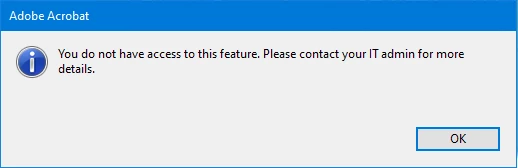
 

When I install AcrobatPro with the generated installed, logging in works fine and all features are available, but I can't apply my organisations customisation file that way. So the "Suppress sign-in" is also not applied.

 
Correct answer S_S

I also set a deny policy for the "FeatureLockDown" key for the pro user. Only way that worked for me.


Hi @mello32829471ac8s,


Hope you are doing well. Thanks for sharing the feedback that has worked for you.


There was a similar discussion on the forums. I would highly suggest having this a review: Solved: Disable SignIn / Sign Out (Adobe Acrobat DC) - Adobe Community - 7769133


Let us know if this works.


-Souvik

2 replies

Abambo
Community Expert
Community Expert
October 5, 2022

Moving this from Teams and Enterprise to the Acrobat Pro forum.

ABAMBO | Hard- and Software Engineer | Photographer
Participant
October 4, 2022

I'm having the same exact issue.  Did you every get a resolution?

Ruben5FEFAuthor
Participant
October 5, 2022

I did found a solution. I did not know this post finaly got aproved since it wasn't yet approved a week after I posted it.
Adobe Support really let me down.


What you need to do is change a registry value. This is not really well documented. And it really defeats the purpose of having the same software package installed on all computers since you still need admin interaction in order to be able to use the pro features. A better solution would be that when you log in with a valid licence, that pro features would be enabled by default. But this is not the case.


You need to change this value:

  • Location: "HKLM\SOFTWARE\Policies\Adobe\Adobe Acrobat\DC\FeatureLockDown"
  • Set the value of "bIsSCReducedModeEnforcedEx" to 0


I have created 2 packages to run remotely.

To enable the use of pro features:

  • REG ADD "HKLM\SOFTWARE\Policies\Adobe\Adobe Acrobat\DC\FeatureLockDown" /v "bIsSCReducedModeEnforcedEx" /t REG_DWORD /d 0 /F

To re-enable the use of reader mode:

  • REG ADD "HKLM\SOFTWARE\Policies\Adobe\Adobe Acrobat\DC\FeatureLockDown" /v "bIsSCReducedModeEnforcedEx" /t REG_DWORD /d 1 /F


Hope this helps.


Participating Frequently
October 30, 2023

I have the same issue. I have over 100 users with Acrobat Pro licenses but another 2000 users that just need basic Reader. If my users can't access PDFs without an account anymore I'm going to have to just remove Reader from everything and switch to an alternate application.