Exit
  • Global community
    • Language:
      • Deutsch
      • English
      • Español
      • Français
      • Português
  • 日本語コミュニティ
  • 한국 커뮤니티
0

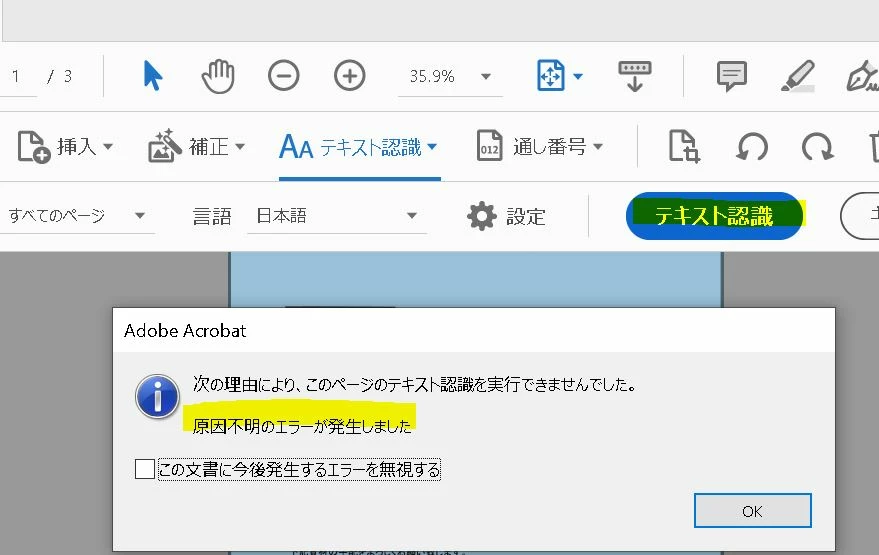
Acrobat pro: text recognition error

New Here ,
Oct 12, 2022 Oct 12, 2022

When I try to scan and OCR text recognition in Acrobat pro, it shows an unknown error and I cannot OCR the PDF and already have Adobe License also..
Please let me know the solution.OCR error.JPG
637
Translate
Report
Community guidelines
Be kind and respectful, give credit to the original source of content, and search for duplicates before posting. Learn more
community guidelines
Community Expert ,
Oct 12, 2022 Oct 12, 2022

This query is better suited for Acrobat forum. Moving it over

-Manan

Translate
Report
Community guidelines
Be kind and respectful, give credit to the original source of content, and search for duplicates before posting. Learn more
community guidelines
Adobe Employee ,
Oct 14, 2022 Oct 14, 2022

Hi,

Thanks for reporting this issue.

Can you please try the steps mentioned under-

https://helpx.adobe.com/in/acrobat/kb/acrobat-could-access-recognition-service.html

Let us know if this does not resolve your issue.


Thanks,

Gaurav Maheshwari

Translate
Report
Community guidelines
Be kind and respectful, give credit to the original source of content, and search for duplicates before posting. Learn more
community guidelines
New Here ,
Oct 14, 2022 Oct 14, 2022

Thanks for the reply.
There is no solution listed at that link.
Please let me know the solution.


Regards,

Translate
Report
Community guidelines
Be kind and respectful, give credit to the original source of content, and search for duplicates before posting. Learn more
community guidelines
Adobe Employee ,
Oct 14, 2022 Oct 14, 2022
LATEST

Hi,

Corrected the link.

Please try the steps-

https://helpx.adobe.com/in/acrobat/kb/acrobat-could-access-recognition-service.html


Thanks,

Gaurav Maheshwari

Translate
Report
Community guidelines
Be kind and respectful, give credit to the original source of content, and search for duplicates before posting. Learn more
community guidelines
