


Inspiring
March 21, 2024
Answered

Acrobat Pro unresponsive for first minute when opening

  • March 21, 2024
  • 1 reply
  • 721 views

My version of Acrobat Pro has just updated to V2024.001.20615 (64 bit). I'm using the new style interface, and find that every time I open Acrobat, it takes a full minute before it becomes responsive. During that first minute, the app constantly appears to be either logging me in or at least validating my Adobe ID before finally settling down and letting me use the app. You can see the behaviour on the top menu bar with your Adobe ID image appearing and disappearing as the app negotiates the validation process with Adobe. During this time, the app is unresponsive.

It’s plain annoying, is there a fix for this?

Regards,

Steve
This topic has been closed for replies.
Correct answer SteveD333

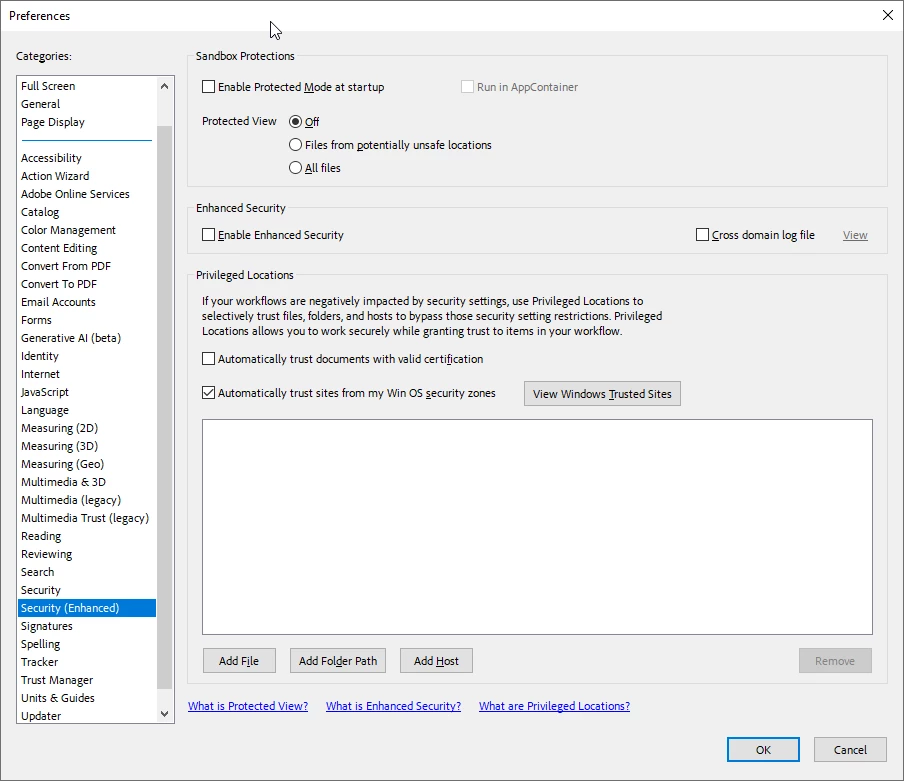
The issue has been corrected.  It’s to do with the security settings within Acrobat preferences.


You need to disable the following from Preferences>Security (Enhanced)


Remove the tick from checkbox Enable Protected mode at startup

Set Radio button for Protected View to Off

Remove the tick from Enable Enhanced Security


Steve


1 reply

Amal.
Community Manager
Community Manager
March 21, 2024

Hi @SteveD333 


Hope you are doing well and thanks for reaching out.


As you have the most recent version of the application, please try to repair the installation from the help menu and reboot the computer once and see if that works.


Let us know how it goes.


~Amal

SteveD333Author
Inspiring
March 22, 2024

I actually unistalled Acrobat, ran the Adobe Acrobat removal tool, then re-installed through Adobe CC.  So the installation is a clean installation, no update over the top of an existing Acroba installation.  However I've done what you asked, but it has made no difference.  I've also noticed that Acrobat behaves in a similar fashion as originally described by me whenever I open a pdf document, though the app is only unresonive for 10-20 seconds rather than the full minute.  Same symptoms, it's as if Acrobat is verfying my pdf document online before allowing me to use it.


Regards,


Steve

SteveD333AuthorCorrect answer
Inspiring
March 22, 2024

The issue has been corrected.  It’s to do with the security settings within Acrobat preferences.


You need to disable the following from Preferences>Security (Enhanced)


Remove the tick from checkbox Enable Protected mode at startup

Set Radio button for Protected View to Off

Remove the tick from Enable Enhanced Security


Steve