Participating Frequently
August 29, 2017
Answered

Acrobat Reader DC will not open excel files

  • August 29, 2017
  • 3 replies
  • 19002 views

I have always been able to open these files. I get an error message that says files are not supported file type or damaged or email attachment wasn't correctly decode?

I have re-installed the software. Still no change.

This topic has been closed for replies.
Correct answer lickwidsnake

The issue if I understand it is that Excel is not listed as a Supported Format Type in Acrobat Pro. When you are combining files, you should be able to combine any of the Supported File Types, such as PDF, Word, Excel, PowerPoint, etc.

This is what it should look like when you go to Tools > Combine Files > Add Files
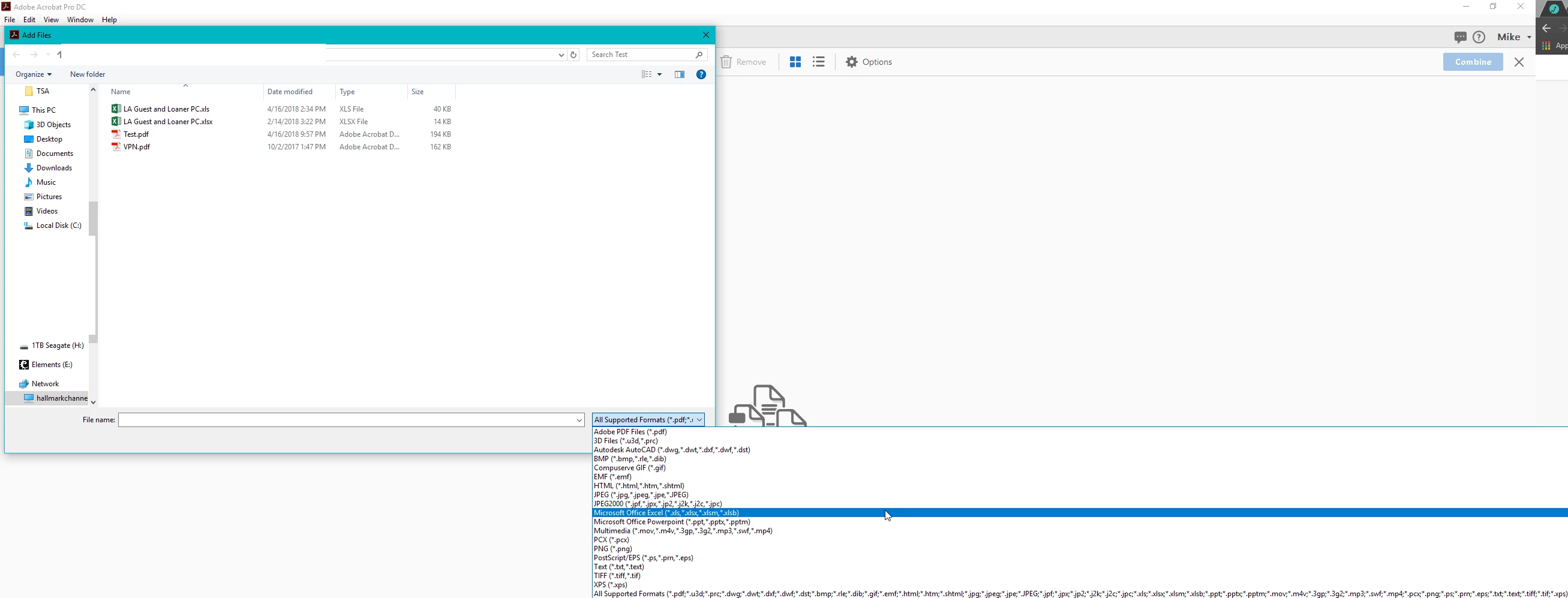
But in a recent update to either Acrobat DC Pro or Office 2016, Excel is no longer listed as a Supported File Type and attempting to combine them will result in an error.

I was running into the same exact issue. Microsoft says it's an Adobe issue. Adobe says it's a Microsoft issue. Neither were of any help. I have tried to un-install and re-install both, and for some machines, rolling back to an earlier version of Office worked. But not in all instances. How I fixed it was copying the registry key from a machine that worked to a non-working machine.

To have .xls files show as a Supported File Type in Acrobat DC this is the registry key that I copied and replaced:

Windows Registry Editor Version 5.00

[HKEY_CLASSES_ROOT\.xls]

@="Excel.Sheet.8"

"Content Type"="application/vnd.ms-excel"

[HKEY_CLASSES_ROOT\.xls\PersistentHandler]

@="{98DE59A0-D175-11CD-A7BD-00006B827D94}"

[HKEY_CLASSES_ROOT\.xls\ShellEx]

[HKEY_CLASSES_ROOT\.xls\ShellEx\{8895b1c6-b41f-4c1c-a562-0d564250836f}]

@="{00020827-0000-0000-C000-000000000046}"

For .xlsx files:

Windows Registry Editor Version 5.00

[HKEY_CLASSES_ROOT\.xlsx]

"PerceivedType"="document"

@="Excel.Sheet.12"

"Content Type"="application/vnd.openxmlformats-officedocument.spreadsheetml.sheet"

[HKEY_CLASSES_ROOT\.xlsx\Excel.Sheet.12]

[HKEY_CLASSES_ROOT\.xlsx\Excel.Sheet.12\ShellNew]

"FileName"="C:\\Program Files (x86)\\Microsoft Office\\Root\\VFS\\Windows\\ShellNew\\excel12.xlsx"

[HKEY_CLASSES_ROOT\.xlsx\PersistentHandler]

@="{4887767F-7ADC-4983-B576-88FB643D6F79}"

[HKEY_CLASSES_ROOT\.xlsx\ShellEx]

[HKEY_CLASSES_ROOT\.xlsx\ShellEx\PropertyHandler]

@="{33154C99-BF49-443D-A73C-303A23ABBE97}"

[HKEY_CLASSES_ROOT\.xlsx\ShellEx\{8895b1c6-b41f-4c1c-a562-0d564250836f}]

@="{00020827-0000-0000-C000-000000000046}"

[HKEY_CLASSES_ROOT\.xlsx\ShellEx\{BB2E617C-0920-11d1-9A0B-00C04FC2D6C1}]

@="{72B66649-3DBF-429F-BD6F-7774A9784B78}"

3 replies

lickwidsnakeCorrect answer
Participant
April 18, 2018

The issue if I understand it is that Excel is not listed as a Supported Format Type in Acrobat Pro. When you are combining files, you should be able to combine any of the Supported File Types, such as PDF, Word, Excel, PowerPoint, etc.

This is what it should look like when you go to Tools > Combine Files > Add Files

But in a recent update to either Acrobat DC Pro or Office 2016, Excel is no longer listed as a Supported File Type and attempting to combine them will result in an error.

I was running into the same exact issue. Microsoft says it's an Adobe issue. Adobe says it's a Microsoft issue. Neither were of any help. I have tried to un-install and re-install both, and for some machines, rolling back to an earlier version of Office worked. But not in all instances. How I fixed it was copying the registry key from a machine that worked to a non-working machine.

To have .xls files show as a Supported File Type in Acrobat DC this is the registry key that I copied and replaced:

Windows Registry Editor Version 5.00

[HKEY_CLASSES_ROOT\.xls]

@="Excel.Sheet.8"

"Content Type"="application/vnd.ms-excel"

[HKEY_CLASSES_ROOT\.xls\PersistentHandler]

@="{98DE59A0-D175-11CD-A7BD-00006B827D94}"

[HKEY_CLASSES_ROOT\.xls\ShellEx]

[HKEY_CLASSES_ROOT\.xls\ShellEx\{8895b1c6-b41f-4c1c-a562-0d564250836f}]

@="{00020827-0000-0000-C000-000000000046}"

For .xlsx files:

Windows Registry Editor Version 5.00

[HKEY_CLASSES_ROOT\.xlsx]

"PerceivedType"="document"

@="Excel.Sheet.12"

"Content Type"="application/vnd.openxmlformats-officedocument.spreadsheetml.sheet"

[HKEY_CLASSES_ROOT\.xlsx\Excel.Sheet.12]

[HKEY_CLASSES_ROOT\.xlsx\Excel.Sheet.12\ShellNew]

"FileName"="C:\\Program Files (x86)\\Microsoft Office\\Root\\VFS\\Windows\\ShellNew\\excel12.xlsx"

[HKEY_CLASSES_ROOT\.xlsx\PersistentHandler]

@="{4887767F-7ADC-4983-B576-88FB643D6F79}"

[HKEY_CLASSES_ROOT\.xlsx\ShellEx]

[HKEY_CLASSES_ROOT\.xlsx\ShellEx\PropertyHandler]

@="{33154C99-BF49-443D-A73C-303A23ABBE97}"

[HKEY_CLASSES_ROOT\.xlsx\ShellEx\{8895b1c6-b41f-4c1c-a562-0d564250836f}]

@="{00020827-0000-0000-C000-000000000046}"

[HKEY_CLASSES_ROOT\.xlsx\ShellEx\{BB2E617C-0920-11d1-9A0B-00C04FC2D6C1}]

@="{72B66649-3DBF-429F-BD6F-7774A9784B78}"

AnandSri
Community Manager
Community Manager
June 29, 2018

Hello Lickwidsnake,

Thank you for sharing the fix/workaround which will be helpful for the users facing a similar issue.

Regards,

Anand Sri.

Karl Heinz  Kremer
Community Expert
Community Expert
August 29, 2017

Adobe Reader (which is free) has never been able to open Excel files. Only Adobe Acrobat Standard or Pro can do that. What software do you have exactly? You can find out on the About dialog (if you are on Windows, it's under the Help menu).

If you have both the free Reader and Acrobat installed on your system, make sure you are using the correct application.

Participating Frequently
August 29, 2017

Thanks for the info. I had reader 11.0 on my other computer that open these files before. Did they change something. Do I have to buy this now?

try67
Community Expert
Community Expert
August 29, 2017

Impossible. Either you didn't have Adobe Reader, or they were not Excel files. NO VERSION OF READER WILL DO IT!

try67
Community Expert
Community Expert
August 29, 2017

Reader never could, and can't now, open files that are not PDFs. If you were able to do it you probably had the paid-for Acrobat, not the free Reader.
