
Inspiring
November 3, 2020
Answered

Acrobat Reader superscipts in comments

  • November 3, 2020
  • 2 replies
  • 1337 views

I receive many reports in PDF format from students studying chemistry, on which I comment using Acrobat Reader. I frequently need to correct their typography, e.g. to show subscripts etc in my "sticky note" comments - such as Zn2+ [whose 2+ superscript has just been rejected and "corrected" by the community editing tools].


How do I input this directly into Acrobat? 

It is possible to create the subscript/subscript in Word then copy it across to the comment, but then I might as well ask the students to submit in Word to start with (but that causes other problems).

Thank you
 

This topic has been closed for replies.
Correct answer BarlaeDC

HI,


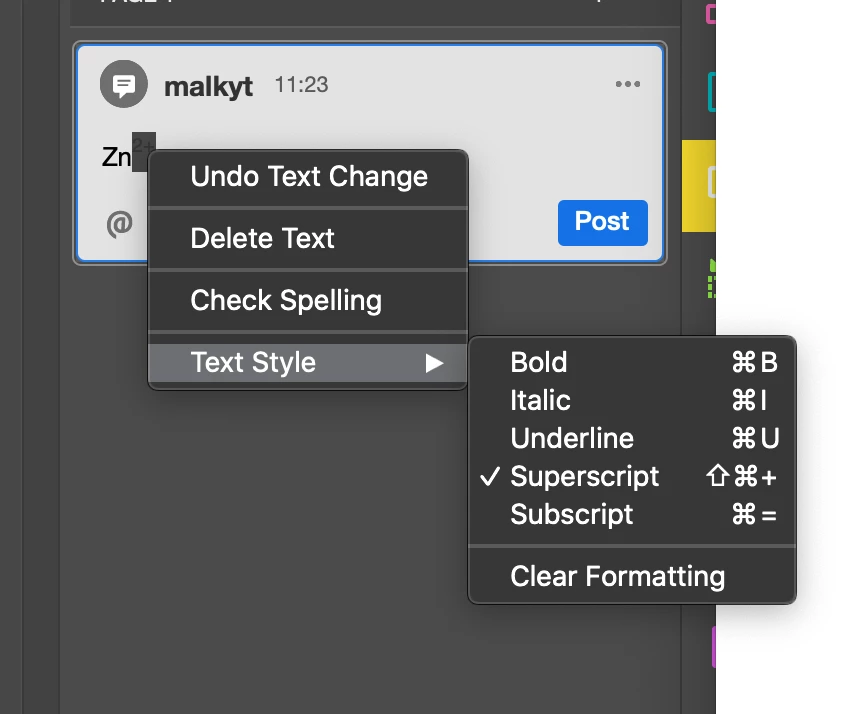
If you highlight the text you want to sub or superscript in the comment and right click you should see this option.


Regards


Malcolm

2 replies

try67
Community Expert
Community Expert
November 3, 2020

Test superscript 2: ²

try67
Community Expert
Community Expert
November 3, 2020

Seems to work fine...

BarlaeDC
Community Expert
BarlaeDCCommunity ExpertCorrect answer
Community Expert
November 3, 2020

HI,


If you highlight the text you want to sub or superscript in the comment and right click you should see this option.


Regards


Malcolm

Inspiring
November 4, 2020

Thank you.  I didn't even know it was there, for so many years.

Solves a real problem.