
Acrobat UI Issues on 4K Displays
Hello user community and Acrobat Support,
I'm using Acrobat DC Pro on a Dell XPS 15 9500 with a 4K display.
I'm noticing some of the UI elements don't scale well. For example, while trying to resize a text box.
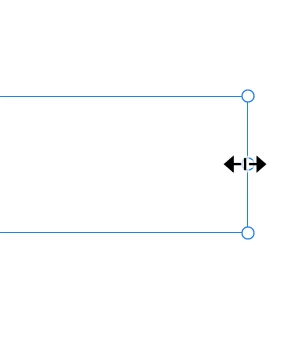
In the example below, I was trying to horizontally resize a text box but the cursor would not give me the horizontal resize tool no matter how much I hover and move the cursor around that dot.
It isn't until I zoom into the document at 200% or so where I have a much better chance at landing on this resize tool, but it's still hit-or-miss, and this UI scaling issue is really hampering my workflow.
Outside of my employment environment, as a Lightroom and Photoshop user, I've also noticed this to be an issue in those apps on a 4K display as well.
I imagine that someone without the ability to have fine-motor control of a mouse cursor would have HUGE usability issues... is there a fix for this?
 AdChoices