
Acrobat won't let me edit text
I have a professional PDF from a previous customer that is identical except for one thing: the serial number of our product changed (because they are different on each item).
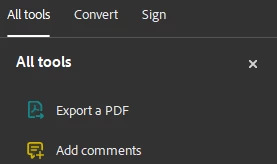
I am trying to change only the serial number on the PDF to print this for our new customer, but when I look for answers, they point me to the top left corner of the program for the sub menu (All tools, Convert, Sign). Edit should be located here but is not.
Alternately, I have attempted to draw a white box over the existing text and then write new text in its place. I could be doing something wrong, but it seems that the box is considered the "frontmost" object regardless of whether it was placed before/after text.
I have definitely done this before on similar files, so I don't understand why this is happening now.
For reference: this was an InDesign file exported for print (if that matters... I'm not sure it does). "Re-exporting the files" may cause the original PDF to change (it's happened before), and this is a few hundred page document, so rewriting it in the timeframe it's needed isn't feasable (I did not create the original document/s for this book).
Any advice is appreciated.
OS: Win 11
 AdChoices