
Participating Frequently
August 13, 2024
Answered

Acrobat won't open my files- Windows 10 Acrobat XI Pro

  • August 13, 2024
  • 2 replies
  • 1104 views

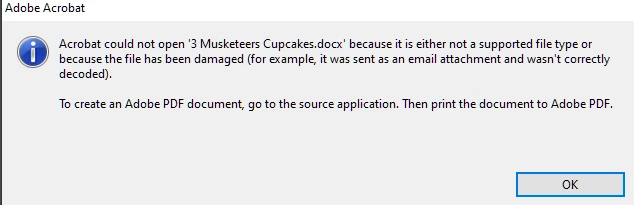
When trying to open the majority of PDFs recently I get the below message. It was working fine until I got a message not long ago that said support was discontinued or something to that effect. Any help is greatly appreciated. I just want to fix the issue so I can open files.
 

This topic has been closed for replies.
Correct answer try67

Opening non-PDF files in Acrobat requires them to be converted via the associated application, which is done via the OS. Since Acrobat XI is quite an old version, not officially compatible with Windows 10, it's not surprising that such connections are malfunctioning. You need to convert the file directly from Word (via the Adobe PDF printer, as mentioned in the error message, or the Acrobat plugin, if it works), and then you should be able to open the resulting PDF file in Acrobat.

2 replies

Participating Frequently
October 12, 2024

Ok, so now I am getting a notice:

I have not been able to figure out where to find this file and to download it. Any suggestions?

try67
Community Expert
try67Community ExpertCorrect answer
Community Expert
August 13, 2024

Opening non-PDF files in Acrobat requires them to be converted via the associated application, which is done via the OS. Since Acrobat XI is quite an old version, not officially compatible with Windows 10, it's not surprising that such connections are malfunctioning. You need to convert the file directly from Word (via the Adobe PDF printer, as mentioned in the error message, or the Acrobat plugin, if it works), and then you should be able to open the resulting PDF file in Acrobat.

Participating Frequently
August 13, 2024
It has been opening files just fine until the last week or so. The files
were originally PDF.
I'm wanting to find out how to fix this so that I don't have to convert
100's of documents individually.
Community Manager
October 11, 2024

Hi @SMolsbee1969


Even if you launch Acrobat, click File > Open, and choose a docx file, the file will first be converted to PDF, and then you will be rendered with a PDF file preview. As @try67  mentioned, viewing doc and docx files natively in Acrobat is impossible. 


Let us know if you have more questions.