
Inspiring
March 24, 2020
Answered

Acrobat XI selection tool not working in certain docs - new bug?

  • March 24, 2020
  • 1 reply
  • 2122 views

I recently noticed that some pdfs no longer support text selection, even without security set enabled. This is particularly true with docs generated from Chrome. When I try to select, I get a bar that fills about 1/4 of the page and the selection only contains gibberish when pasted into a Word doc (see below).


I'm using VirtualPC on a MacBook Pro and have updated that software, have the latest Windows 10 Pro v1903, and ran the Acrobat repair facility without any change in this behavior. Any suggestions?
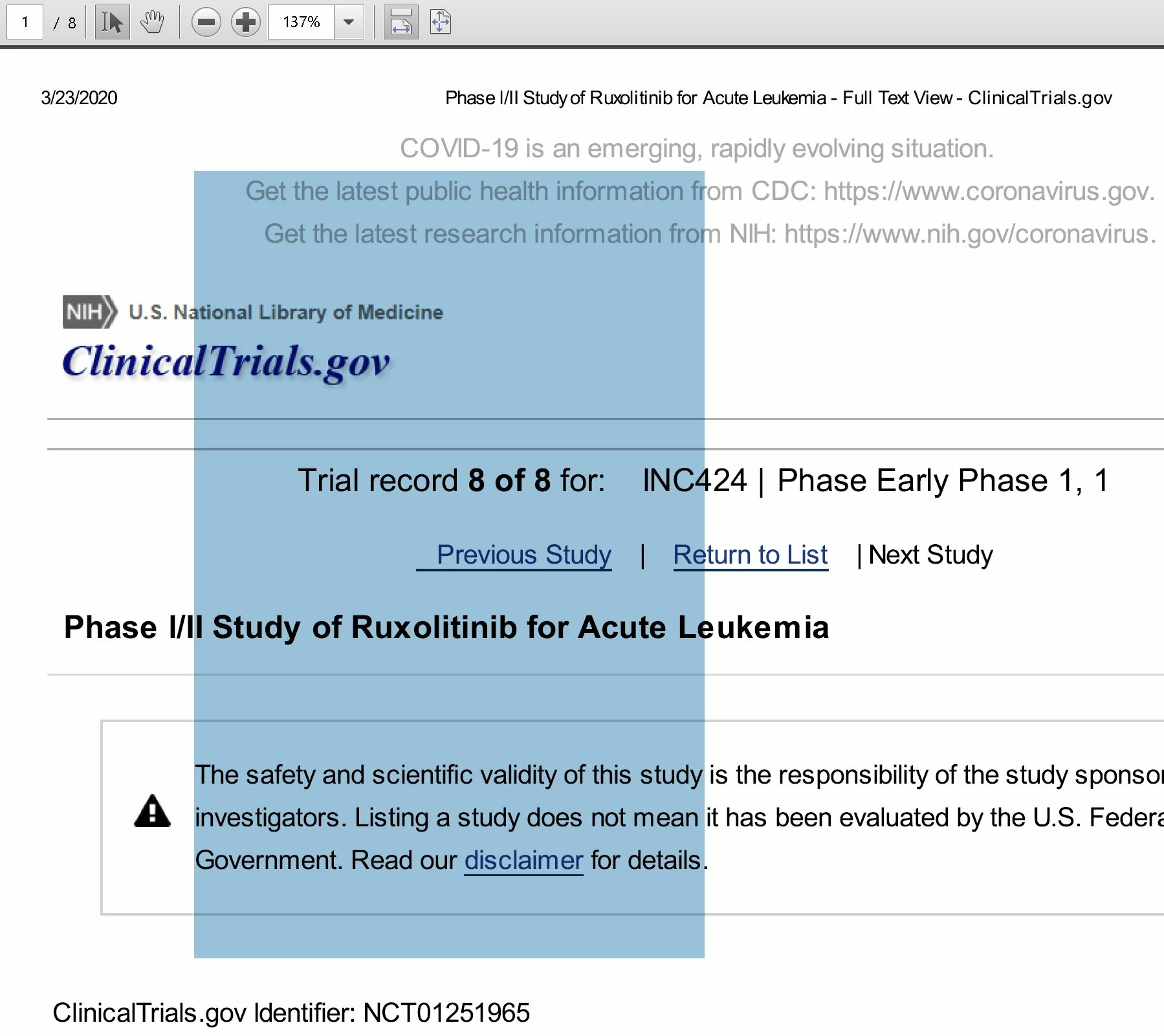
 

This topic has been closed for replies.
Correct answer MDRider

Hi there 


Thanks for sharing the file with us. We have checked the file details and found that the file was created using a third-party application PScript5.dll  version 5.2.2  


Please try to create the file using Adobe Acrobat. Go to File > Create > PDF from Web Page and see if that works for you.


Regards

Amal


Amal -

Thanks for getting back to me. Unfortunately, printing from Acrobat didn't work - you get a doc that has no useable content (see https://documentcloud.adobe.com/link/review?uri=urn%3Aaaid%3Ascds%3AUS%3Ad328b4de-ecc2-4e8b-965a-561a492fd716). 


I did find that this website automatically repositions columns on the right side of the page at the bottom of each row if you narrow the winidow enough. When you use the 'Save to PDF' function in Chrome rather than printing to Adobe PDF, you get a document that seems to solve the problem (see https://clinicaltrials.gov/ct2/results?cond=covid-19&term=vaccine&cntry=&state=&city=&dist=&Search=Search). Thanks for the help! 

1 reply

Amal.
Community Manager
Community Manager
March 24, 2020

Hi MDRider


We are sorry for the trouble. As described the Adobe Acrobat XI selection tool is not working in certain documents.


Would you mind sharing the workflow or steps you are doing to create the PDF file from chrome? What is the version of the Acrobat XI you are using? To check the version of the application please use the link (https://helpx.adobe.com/acrobat/kb/identify-product-version.html)  Also, please share the PDF file with us for testing. Upload the file to the document cloud (https://documentcloud.adobe.com/link/home/) generate the link and share the link with us.


The last update for Acrobat XI was released on 14th Nov 2017 version  11.0.23. Please try to update the application. Go to Help > Check for Updates. You may also download the patch manually from the link (https://www.adobe.com/devnet-docs/acrobatetk/tools/ReleaseNotes/index.html) and see if that works for you.


Acrobat Xi is an old application and no longer supported. For more information please refer to the help article (https://helpx.adobe.com/in/acrobat/kb/end-of-support-acrobat-xi-reader-xi.html)


Let us know how it goes. 


Regards

Amal

MDRiderAuthor
Inspiring
March 25, 2020

Amal -

Thanks for the quick reply. I'm using Acrobat XI v11.0.23 and can replicate the bug reliably, even after updating VMWare just now (sorry - not Virtual PC as I mentioned before).


You can find a copy of a new file that I made after that update at https://documentcloud.adobe.com/link/file/?uri=urn%3Aaaid%3Asc%3AUS%3Ac78db5a1-483f-4db8-86b1-13a9ba7b08df&filetype=application%2Fpdf&size=73893 - same problem not being able to select text. Let me know if you need anything else.

Amal.
Community Manager
Community Manager
March 25, 2020

Hi there


Thanks for sharing the information. We tried to open the file that you have uploaded to the document cloud. However, we are not able to open the file as it's either corrupted or not supported.


Please try to recreate the file and upload it again for testing.


Regards

Amal