Answered
Activate a row of text boxes - Javascript
Hello
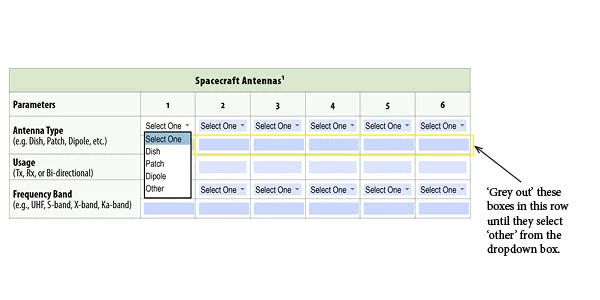
I'd like to grey out a row of boxes so they are inactive.
If the user selects 'other' from a dropdown box then the row of boxes become 'active', white in colour with black text.

Hello
I'd like to grey out a row of boxes so they are inactive.
If the user selects 'other' from a dropdown box then the row of boxes become 'active', white in colour with black text.
The above works only if i click the dropdown box and choose one of the options except 'select one'.
I can still type in the text field if:
I click the dropdown box and choose 'select one'.
I don't click the dropdown box and go directly to the text field.
I can not type in the text field if:
I click the dropdown box and choose one on the options apart from 'other' and 'select one'.
I choose one of the options and then change it to 'select one'.
You have to set the fields as read-only by default.
I don't understand what you mean about the "select one" option. Do you want the text fields to be enabled when it is selected?
Already have an account? Login
Enter your E-mail address. We'll send you an e-mail with instructions to reset your password.
 AdChoices