Sandee Cohen
Legend
January 26, 2016
Answered

Add a date field to a document?

  • January 26, 2016
  • 5 replies
  • 28653 views

I have received a W9 PDF (US Tax form) to sign. There is a space for my signature where I have been able to insert a signature using Fill & Sign.

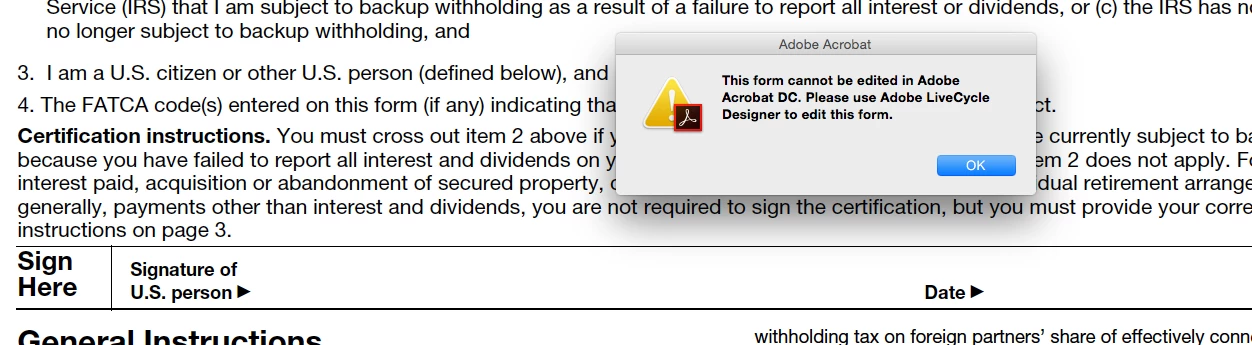
But when I try to use the Add Text in Edit PDF, I get an error message that I have to use Adobe LiveCycle to edit the document.

Is there no way to add the text to the existing document.

It seems strange that I can sign, but not date.
Correct answer Bernd Alheit

try67,

You are absolutely right. I was not clear in my original post that there were form fields in the file.

So I got frustrated by your replies. But you answered my question in good faith.

I apologize.

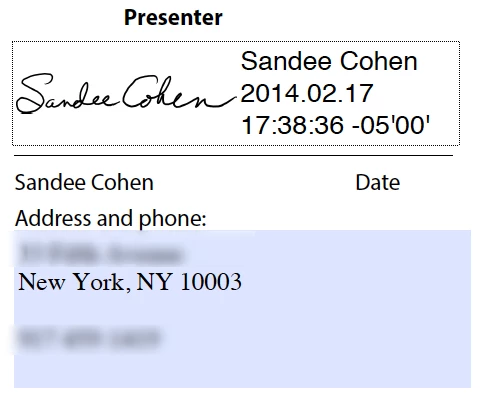
Now, here is a screen shot of what the older dig sigs looked like. You had a space for a sig image as well as printed name, date, and "reason" for signing. There was also any option to watermark the sig with a version of the Acro logo but I couldn't find a screen shot example.

Is there a way to have this info appear in the digital signature available for Fill and Sign?


For a digital signature use Tools > Certificates > Digitally Sign

5 replies

Participant
August 15, 2024

Hai good morning sir..  I can't add my union card .. can you explain 

Participant
August 15, 2024

In order to date a PDF that was not set up as a digital document to be signed and dated, use the following:

  1.   Click the signature icon (the old-fashioned fountain pen) first. 
  2.   Second, click on the More E-file Options language
  3.   Click the Fill and Sign Yourself option
  4.   Click on the large A (first icon) to get a text box
  5.   Drag the text box to the date field in the document
  6.   Drop the text box on the date line (field)
  7.   Add the date in any format you want
  8.   Save your document  


If you have a PDF that was designed to be filled-in but the signature line and date lines were designed to be signed with a wet signature and date, follow numbers 1 through 3 above and then follow these steps below:

  1.   Print to a PDF printer
  2.   Save the document with a new name
  3.   Find your edit tab
  4.   Click the edit tab
  5.   Find the text menu (tab, language, or box) or
  6.   If you see the large A text icon, simply click it
  7.   Click the text menu (from step number 😎 if you didn’t see the large A in step number 9
  8.   Drag the text box to the date line
  9.   Drop the text box on the date line
  10.   Type the date in any format you want

11.  Save your document through the Save As function to make sure you have the document exactly as you want it

TechyButter
Participant
January 5, 2022

This is still an issue and I'd like to share my workaround. 

Fillout the provided text fields (full name, address, SSN).

Print to PDF (available in the printer select dropdown). This removes the edit restrictions.

Bring new PDF into Acrobat and add a text field for date.

Only downside I've found is that this process give the form a washedout look.

Bernd Alheit
Community Expert
Community Expert
January 26, 2016

‌Print the form and fill the printout.

Sandee Cohen
Legend
January 26, 2016

Bernd,

You are kidding?

Please tell me you are kidding.

Participant
January 16, 2021

why would she want to know about digitally inserting a signature or a date if she was creating a manual paper document?

try67
Community Expert
Community Expert
January 26, 2016

Is this a digital signature field? If so, it will automatically contain the date when signed. Also, it's possible a script will populate the Date field when you sign it.

If not, there's not much you can (or should) do about it. If you believe it's not working correctly you should report the issue to the authors of the file.

Sandee Cohen
Legend
January 26, 2016

I don't know where the company got the form, but I suspect it is from the US IRS.

As I said, "There is a space for my signature where I have been able to insert a signature using Fill & Sign."

When I use Fill and Sign, my signature shows in that area. But unlike the older "signatures" in previous versions of Acrobat, this contains only a simulation of handwriting.

It would be great to know if a date is hiding electronically in the Fill and Sign signature, but I can't see where.

So, once again I ask, "Is there no way to add the text to the existing document?"

Sandee Cohen
Legend
January 27, 2016

For a digital signature use Tools > Certificates > Digitally Sign


YES!!!

That's what I've been looking for!

Thank you!!!