
Participating Frequently
December 13, 2016
Answered

add attachment - NotAllowedError

  • December 13, 2016
  • 2 replies
  • 3392 views

We have PDF form with digital signature.

The form is developed in LiveCycle designer. The form is dynamic.

One specific User wants to be able to add an attachment sometimes later after she signed the form.

She was able to do that before Adobe Pro XI was installed on her PC (I think she had Adobe Pro 8 before).

Now the standard "Add" icon in Attachments is grayed out.

It looks like there is a workaround to overwrite the enhanced restrictions implemented by Adobe by using JavaScript API “importDataObject”.

I implemented the solution recommended by Adobe experts (see the links in the end of this post).

But it doesn't work.

I am receiving an error "NotAllowedError: Security settings prevent access to this property or method".

1. According to the links - API “importDataObject” can be executed only by another API “app.trustedFunction”.

2. “importDataObject” can only be executed in Privileged context.

3. Privileged context is Folder Level.

What I did:

1. Created config.js in C:\Program Files (x86)\Adobe\Acrobat 11.0\Acrobat\Javascripts:

     var importMyAttachment = app.trustedFunction(function(oDoc, sFile){
      app.beginPriv();
      var rtn = oDoc.importDataObject(sFile);

      app.endPriv();
     });

2. In LiveCycle designer created custom button "Add Attachment"

     On click event created JS code:

var myDoc = event.target;
if(typeof(importMyAttachment) == "function"){

var sFile = "myLittleFile";
importMyAttachment(myDoc,sFile);   
}else{
console.println("Missing Attach Fucntion");
}

3. Opened the form in Adobe pro XI.

- signed the form.

- clicked button my custom "Add Attachment".

- received error "NotAllowedError: Security settings prevent access to this property or method."

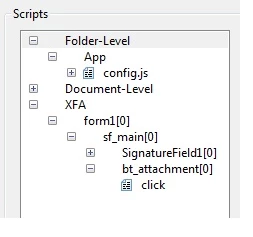
From JS debugger  - I can clearly see that importDataObject is called by trusted function in folder level:
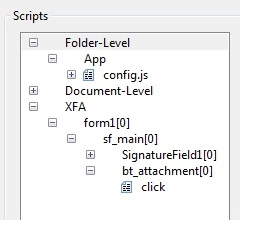
Here are the links I used for the workaround:

https://acrobatusers.com/tutorials/folder_level_scripts

https://acrobatusers.com/tutorials/using_trusted_functions

http://help.adobe.com/livedocs/acrobat_sdk/9/Acrobat9_HTMLHelp/wwhelp/wwhimpl/common/html/wwhelp.htm?context=Acrobat9_HTMLHelp&file=JS_API_AcroJS.88.323.html

http://help.adobe.com/livedocs/acrobat_sdk/9/Acrobat9_HTMLHelp/wwhelp/wwhimpl/common/html/wwhelp.htm?context=Acrobat9_HTMLHelp&file=JS_API_AcroJS.88.323.html

How to get thru error "NotAllowedError: Security settings prevent access to this property or method"?

Thanks.
This topic has been closed for replies.
Correct answer try67

My user has Adobe Pro XI.

Before she had Adobe 8,

In Adobe 8 she was able to add attachment after she signed the form. She was doing that using Adobe side panel. She would click standard adobe "Add" button, select the file and file is added to the attachment list.

Her business process is such that she may need to add  a new document not available at the time she signs the form.

Now she opens the form in Adobe XI and signs the form.  Couple days later she opens the signed form again, opens side panel -  oops -  "Add" button is grayed out now,

As you see - Adobe 8 didn't consider that adding attachment is a form change.

Adobe XI does consider that adding attachment is a form change, This is why in Adobe Xi the side panel Add button becomes disabled (grayed out) after the form is signed.

My understanding is that there is a workaround to overcome this Adobe XI behavior,

This can be done using trusted function in a privileged location which is folder level.

Try67,

Before you tested my form - did you create config.js in C:\Program Files (x86)\Adobe\Acrobat 11.0\Acrobat\Javascripts?

The config.js is folder level, Not doc level:


Here is the code in config.js:

var importMyAttachment = app.trustedFunction(function(oDoc, sFile){
      app.beginPriv();
      var rtn = oDoc.importDataObject(sFile);

      app.endPriv();
     });

In debugger I can see that importData is being called from config.js which is trusted function in a privileged location.

By all means  - this should work, But it doesn't. I get NotAllowedError.

Maybe - some settings in Security, Security(enh), Digital signature, Javascript are such that docImportData cannot run even from Trusted function in a privileged location?

Maybe I just need to have the corrrect settings?

I wish I knew the correct settings...


Yes, I did, and I even did something else to verify that my analysis of the problem is correct. I ran the importMyAttachment command from the JS Console on the original file, before signing it, and then it worked... So maybe what you saw before was a bug in Acrobat 8, or maybe the security settings changed since then, but I don't think you will be able to get it to work now as it did before.

2 replies

rigateikaAuthor
Participating Frequently
December 15, 2016

This discussion was completed in Can this be done in a PDF form?

Read the above mentioned discussion starting with Tatyana Rinkenbaugh post Dec 15, 2016 7:22 AM

try67
Community Expert
Community Expert
December 13, 2016

To be able to attach files to an LCD form a very special right needs to be applied to the file, and you can't do it with Acrobat, but with another application from the LiveCycle family. This application can cost thousands of dollars, if not tens of thousands.

And you also can't use Acrobat JS commands in an LCD file and expect them to work as-is. LCD has its own set of JS objects and methods.

rigateikaAuthor
Participating Frequently
December 14, 2016

Try67,

Thanks for the reply.

I am using Acrobat API's supported by LCD per LCD help:

Scripting > Scripting Using
LiveCycle Designer ES > Moving from Scripting in Acrobat
to LiveCycle Designer ES
> JavaScript objects from Acrobat supported in

LiveCycle Designer ES:

How can I attach to this post my simple form I created to test the issue?

Any help is greatly appreciated,

Tatyana

try67
Community Expert
Community Expert
December 14, 2016

I don't see any buttons in this file... Where is the code located?

Yes, importDataObject opens a dialog to select the attachment when you don't specify the cPath parameter, but in order to do that you don't need to use a doc-level script. You can simply call it directly from your button's MouseUp event.


I see the button now, and I think I know what's the issue. Once the file has been digitally signed (the pre-condition to showing the button), it can't be edited anymore, so you can't add a new attachment to it. You need to prompt the user to add the attachment ​before​ they sign the file.