
Participant
March 20, 2020
Question

Adding Important Info to the top of a PDF

  • March 20, 2020
  • 3 replies
  • 1503 views

Hello folks, 


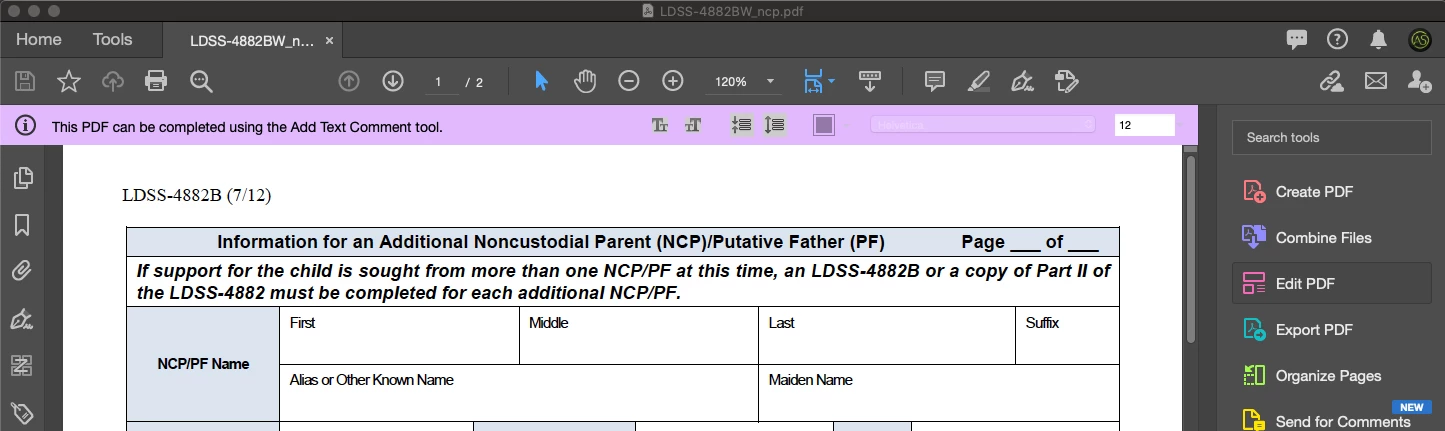
I'm trying to add important information as a menu bar at the top of a pdf file (see image below). I have no clue how to create this in either Acrobat or InDesign. Does anyone know how this could be achieved?


Thank you in advance. 

-AS
 

This topic has been closed for replies.

3 replies

Bernd Alheit
Community Expert
Community Expert
March 20, 2020
BarlaeDC
Community Expert
Community Expert
March 20, 2020

Hi,


Are you wanting to recreate the purple section, as I don't think that is possible and it totally in the control of Adobe.


You could probably create something similar but actually in the PDF without too much trouble, using InDesign and Acrobat form fields.


Regards

Malcolm

Participant
March 20, 2020

Malcolm, 


That's exactly what I'm trying to do. Have that purple bar pop up with slightly different information. If I can't customize it in Acrobat, do you know where I could do that in InDesign? Already, thank you so much for your assistance. 


Gratefully, 

Andrew

BarlaeDC
Community Expert
Community Expert
March 23, 2020

HI,


I think there has been a little mis-understanding, we cannot modify the purple bar, that is controlled by Adobe, and it is normally used when the file has been extended.


The best you could do would be to add a textframe in InDesign and colour it to look similar, however it would not be displayed above the PDF , or replace the one that is shown. 


Regards


Malcolm

Inspiring
March 20, 2020

Are you referring to the purple message bar or something else?

Participant
March 20, 2020

Yes, I'm referring to the purple message bar. Is there a way to customize it?

Inspiring
March 20, 2020

No, as Malcolm said, it is controlled by Acrobat/Reader and is not part of the PDF. You can use JavaScript in a PDF to display messages in popup windows. You could also use layers (which includes what Acrobat refers to as Headers/Footers/Watermark/Background), or form fields (text field, button).