
Adding verification information to a signed PDF makes signature validation fail
Reproducing the problem is easy:
- First, disable “Include signature’s revocation status” from the Signature Creation and Appearance Preferences.
- Then sign with any certificate the attached PDF.
- And finally “Add Verification Information” for this signature.
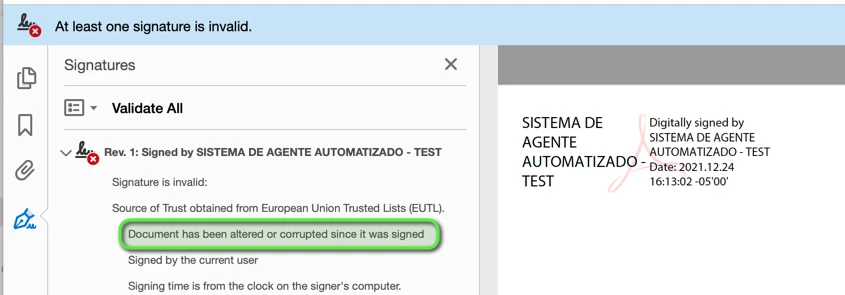
With a result like the following:
Now, the particularity of the attached PDF is that it includes an attachment with its file specification dictionary (/Filespec) added to the Names entry as a direct object:
8 0 obj
<<
/Names[
(attachment.txt)
<</AFRelationship/Unspecified
/EF<</F 4 0 R/UF 4 0 R>>
/F(attachment.txt)
/Type/Filespec
/UF(attachment.txt)>>
]
>>
endobj
Instead of using an indirect object reference as PDF 32000-1:2008, "7.9.6 Name Trees" recommends, but doesn't mandate:
7.9.6 Name Trees
A name tree serves a similar purpose to a dictionary—associating keys and values—but by different means.
...
• The values associated with the keys may be objects of any type. Stream objects shall be specified by indirect object references (7.3.8, "Stream Objects"). The dictionary, array, and string objects should be specified by indirect object references, and other PDF objects (nulls, numbers, booleans, and names) should be specified as direct objects.
Is this a bug in Adobe Acrobat?
PS: I’ve identified the cause for the previous problem by a painful trial and error process, so for future reference I would like to know if there is any way to make Adobe Acrobat to produce detailed logging during the processing of the PDF structure and digital signature validation. Having such a log would be a lifesaver for similar problems!
 AdChoices