


- Home
- Acrobat
- Discussions
- Re: Adobe 10.1.7 will not close in task manager af...
- Re: Adobe 10.1.7 will not close in task manager af...

Copy link to clipboard
Copied
Hello,
Updated to 10.1.7 and noticed that when you close the program an instance of acrobat stays open in task manager with high 50%+ cpu usage. Will not close at all unless you end task. if you open adobe again a new instance opens again consuming more cpu and cripples the machine with high cpu. This is on win 8 64bit machine. Had the previous release 10.1.6 working for some time on the same machine with no issues.
Thank you in advance




Copy link to clipboard
Copied
Rollback procedure for me
1/
Uninstall Acrobat X
2/
Used my initial installationfile of AcrobatX 10.0.0
3/
Downloaded update for 10.1.5 from ftp://ftp.adobe.com/pub/adobe/acrobat/win/10.x/
List of compatible updates are found here; http://helpx.adobe.com/acrobat/release-note/release-notes-acrobat-reader.html
 99
Replies
99
99
Replies
99


Copy link to clipboard
Copied
Already done, as suggested from other users, but it does not work.

Copy link to clipboard
Copied
Hi Gladys,
Nope, no effect at all.
Copy link to clipboard
Copied
Gladysliu, I've tried that in the beginning. No effect at all.
I'm running 10.1.5 right now and it works fine. Though I have annoying reminders to update....


Copy link to clipboard
Copied
Thank you everyone for helping to debug this. Next question: has anyone tried running process explorer and capturing the log files when this situation happens? If we can see the log files, that will give us some clues. Again, thanks in advance for the help!

Copy link to clipboard
Copied
Gladyslu:
I wonder if Acrobat is having a conflict with some Dell program? I only have a problem with my new Dell XPS 18 Window 8. I have had to remove Acrobat from this machine
I do not have a problem with my four other machines:
1. Samsung Windows 8 All-in-one
2. HP desktop Windows 7 machine
3. HP desktop Window 8 machine
4. HP Windows 7 All-in-one
Copy link to clipboard
Copied
Hi Allie,
Nope!
As i've said in a post before: I have built my PC for my own, and i have no Dell Apps installed.
Copy link to clipboard
Copied
Hi gladysliu,
There you go:
I've closed all Running Programs, and killed most of my background apps from the task bar.
Then i have startet Acrobat without opening a PDF Document, and closed it.
On https://www.dropbox.com/sh/4q98olisvw8xbpf/c40ZzeXBc6 you'll find 3 Logfiles and 1 Mini Dump:
1 Logfile showing all processes while Acrobat is running
1 Logfile showing all processes AFTER the close command (Alt+F4 or Clicking the X Button) but BEFORE the Acrobat Window disappears
1 Logfile showing all processes after the Acrobat Window disappears
+
1 dmp File of the Acrobat Process after the Window has been closed
I hope that helps. If you need anything, just tell us

Copy link to clipboard
Copied
Thanks. We are looking into these logs.

Copy link to clipboard
Copied
I reported this to tec support in the UK and they had never heard of it and did not have any solution. I have to use AutoKillAnyProcess to kill the processes nearly every time that that I exit Acrobat. I am using Acrobat XI on Windows 8. Without killing the processes my computer slows down to a crawl. Not only is the process still running, but each one is using a high level of CPU so sometimes after closing a number of Acrobat instances, over 90% of CPU is being used - and this continues until I kill them. Closing every other program and waiting hours does nothing.
Copy link to clipboard
Copied
Dear AbhigyanModi,
yet another dump from my machine: https://www.dropbox.com/s/4p0gjy631ibg0wt/Acrobat-dumps.zip
1. I ran process monitor.
2. I started Adobe Acrobat from the Start Menu without opening any PDF file.
3. I closed Acrobat clicking on
4. Acrobat process CPU usage went to about 50%
5. In PM I dumped the Acrobat process (both mini and full dumps).
6. Finally I killed the process
Kind regards.

Copy link to clipboard
Copied
Same Problem here - Runnin 11.03 on Windows 8 / Bootcamp / Macbook Retina 15"
Edit:
This User seems to have a solution:

21.06.2012 13:56 in reply to argh1961

Copy link to clipboard
Copied
We are also experiencing this accross our organization. Lenovo or Dell hardware makes no difference. Windows 8, Acrobat XI 11.0.3. We have tried all suggestions on this thread but it does not resolve this problem. Only method is to kill all acrobat tasks in Task Manager on a repetitive basis manually. We hope there will be a fix in the near future.

Copy link to clipboard
Copied
Same pb as everyone here. Running Win 8 64bits and Acrobat XI 11.03.
The compatibility trick works well on local files but if I try to open a file located on sharepoint or attached to an email (Outlook 2013) the problem is back.

Copy link to clipboard
Copied
Yeah, it get's really annoying with all the processes, that stay open and drain the power.
- Win 8 Enterprise x64
- Office 2013
- Dell Latitude E6430
- Adobe Acrobat 11.0.3
Copy link to clipboard
Copied
A possible solution. I have been given this to try by Adobe tec support after providing them with some information and it has worked for the last few days. I have no idea what it is meant to do but it seems to have solved the problem.
If you have Acrobat 11.0.3 or 10.1.7 installed, and are seeing the issue, can you please following the steps:
- Launch Regedit. OK on the UAC dialog if asked.
- Navigate to the key [HKEY_CURRENT_USER\Software\Microsoft\Windows NT\CurrentVersion\AppCompatFlags\Layers]
- Under this key, find a value that matches the Acrobat.exe installation location on your machine. For example, it could be ""C:\Program Files (x86)\Adobe\Acrobat 11.0\Acrobat\Acrobat.exe"".
- Delete just this value (for Acrobat.exe) by right-clicking on the value, and select delete.
Bakup either the registry or that key before carrying this out depending on your level of confidence working with the registry and please feedback if it works for you.
Copy link to clipboard
Copied
Great, great and great, slselwyn!
I hope I have not spoken too soon, but I tried this workaround and it seems to work in my case.
I'll let you know if the problem shows up again.
Thank you.
Copy link to clipboard
Copied
It works for me as well
I've got this instruction from Adobe support.

Copy link to clipboard
Copied
Hi all,
Adobe is aware of this issue and investigating the same. We would like to thank all the users who helped us in investigating this issue. From preliminary investigations this appears to be a compatibility issue with Microsoft's "Program Compatibility Assistant" on Windows 8.
Users facing this issue may use following steps to solve this issue (as posted by slselwyn):
(Please take backup of system’s registry information before making following changes.)
- Launch Regedit. Click OK on the UAC dialog if asked.
- Navigate to the key [HKEY_CURRENT_USER\Software\Microsoft\Windows NT\CurrentVersion\AppCompatFlags\Layers]
- Under this key, find a value that matches the Acrobat.exe installation location on your machine. For example:
For Acrobat 11.0.03 it could be: "C:\Program Files (x86)\Adobe\Acrobat 11.0\Acrobat\Acrobat.exe"
For 10.1.7 it could be: "C:\Program Files (x86)\Adobe\Acrobat 10.0\Acrobat\Acrobat.exe"
4. Delete just this value (for Acrobat.exe) by right-clicking on the value, and select delete.
Thanks,
Ashu

Copy link to clipboard
Copied
I am using 10.1.7 in a Windows 7 environment and "Layer" does not exist in that registry location on my machine. So it may only be a fix for some people.
Copy link to clipboard
Copied
I have just looked on a Windows 7 computer and 'Layers' is present at the above registry location, although Acrobat is not listed among the programs there. However I was not having any problems on my Win 7 computer with processes with the same version of Acrobat.
Copy link to clipboard
Copied
Works great for me. Thank you!

Copy link to clipboard
Copied
Thank-you.
This issue has been resolved for us with this fix.

Copy link to clipboard
Copied
Ashu,
Thank you and slselwyn for posting this solution. It has resoved the issue.

Copy link to clipboard
Copied
This solution did not fix the problem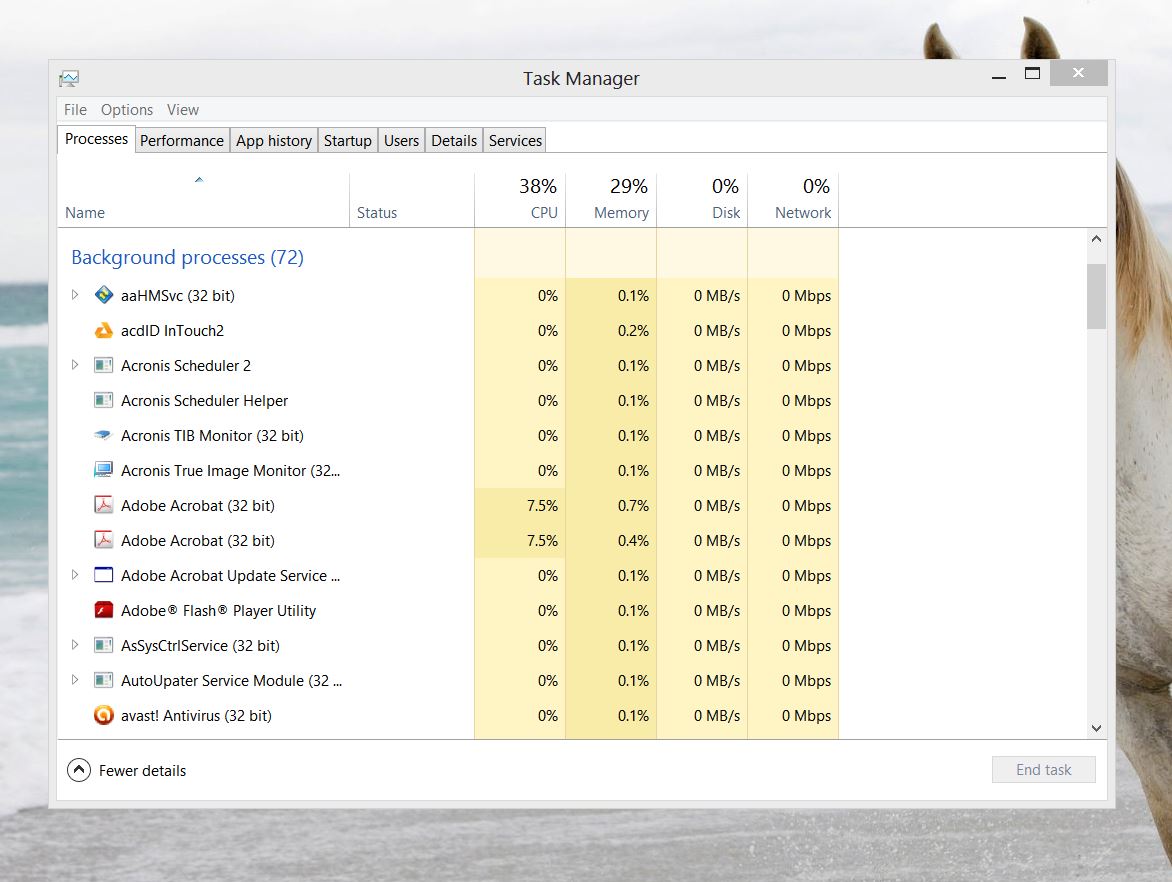
Copy link to clipboard
Copied
All acrobat windows closed at there are still two instances of Acrobat Running each consuming 7.5% of my CPU.
PLEASE FIX THIS PROBLEM!!!!!!!!!!!!!!!!!!!!!!


Get ready! An upgraded Adobe Community experience is coming in January.
Learn more
 AdChoices