
Adobe acrobat adds margins when I go to print
I created a booklet with the exact margins I need, and it shows up on my screen in acrobat exactly as I created it. Great. Except...when I go to print, the print preview shows some weird margins. They're not even equal all the way around, they're bigger on one side. So it adds margins in when printing, and only when printing.
I have spent HOURS trying to figure out how to solve it with no changes.
It does it on my husbands computer too, but the margins it adds on his computer are a little smaller than on mine, using the same settings.
But it doesn't add margins when I print from any other program, so it's not my computer, and it's not the PDF, and it's not the printer. The problem HAS to be with Acrobat.
Doing a google search just gives me instructions for settings under the "edit" tab that aren't there.
I can't open and print from Chrome, because it doesn't give me booklet options. I don't have any other PDF reader and shouldn't have to anyway. I'm paying for acrobat, for crying out loud, and I don't have any extra space on my hard drive for another program anyway.
In this screenshot of the print preview, you'll see everything in the white is my original PDF. The grey are the margins it adds.
Any ideas??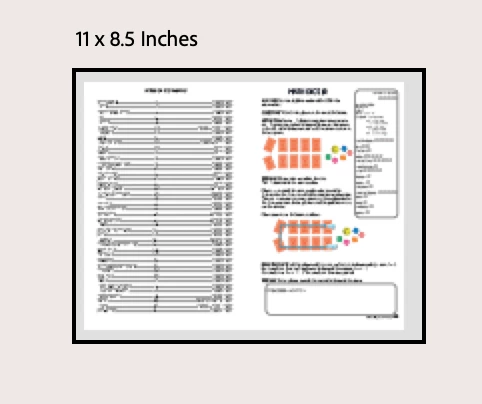
 AdChoices