Participant
May 10, 2021
Answered

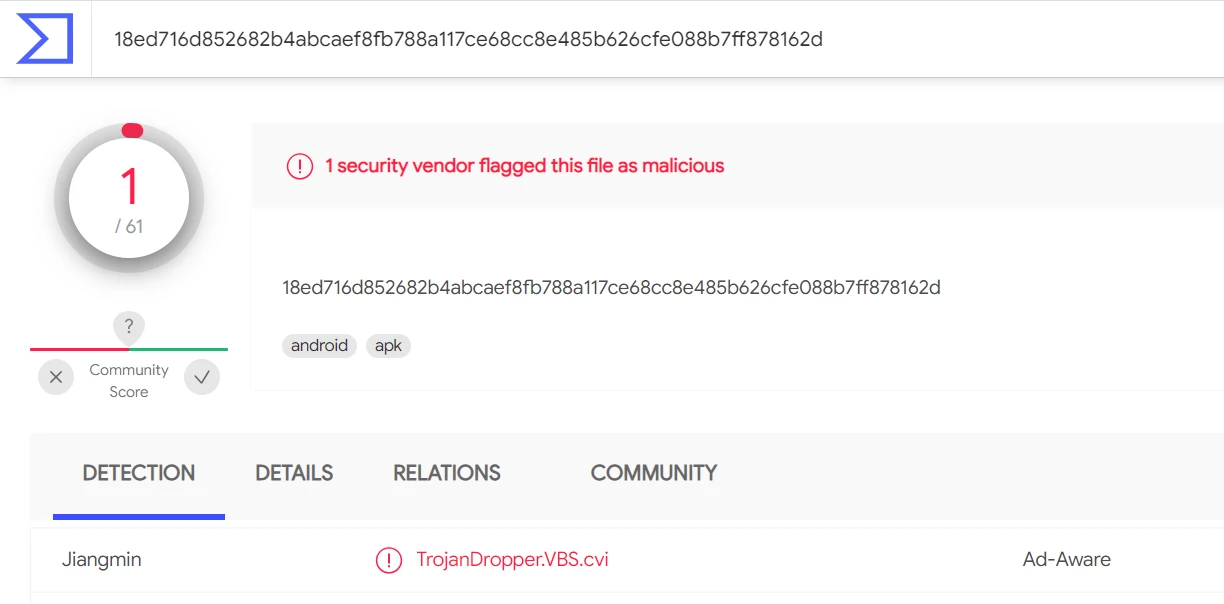
Adobe Acrobat apk version is detect in Virus Total- TrojanDropper.VBS.cvi

  • May 10, 2021
  • 4 replies
  • 8443 views

Dear Sir/Madam,

We have downloaded Adobe Acrobat android apk version from Adobe Inc. on Google playstore and scanned on Virus Total. The result was one Trojan was detected as you could see in screenshot. We would like to know whether it is false positive or there is missing point that Adobe team have not checked. Pleased kindly check and update us. Thank you!


This topic has been closed for replies.
Correct answer ls_rbls

Dear @ls_rbls, thank you for your suggestion and recommendation. 

It was my fault that I did not mention much about my purpose last time. In my orgazation we are using tablet and we need to install pdf in order to be able to open some file, so Adobe Acrobat first came to our mind because we could say it is world-wide used and such a well-known company we can trust. We need to install pdf on many tablets by using MDM and to be able to scan apk version before push to those tablets we downloaded it from Google playstore on a mobile phone and took out that file to upload on Virus Total. The resutl of scanning was Trojan detected as in previous screenshot.  So what we need now is confirmation that this apk version is clean or not.  If it is clean, no any malicious code embeded we will use this apk version to push to our tablets. If it is not clean please check it and advise us which version to use. 

I have not notified to Google support about this yet. 


Thank you!


Well, you can re-test yourself with the link below:


https://get.adobe.com/reader/enterprise/


Select Android from the dropdown 64 bit version for ARM for Android devices verion 5 and above.


If you run the Virus Total scan again on this apk file you will get the same results.


Curious enough though, Jiangming is the only security vendor that flags the Adobe app as having the  the trojan dropper. 


If you research a little bit about them, they seem to be operating from China amd providing services since 1990. But, in other security forums that I researched, Jiangmin also pops up as a malicious process when you use other scanners.


If you go to the Details tab of the Virus Total scan results, you'll notice that many of the third party files embedded with the apk are URL  routines that points to Google PlayStore and Microsoft, and of course other Adobe online services.


So I am unsure if Jiangmen is trying to advertise themselves through Virus Total giving false positive results to users so they subscribe to their premium service, or, if indeed the file is infected in both Google Playstore and Adobe download servers.


I would sayd to submit this finding to Adobe directly using the link that I provided for you earlier and see if Adobe can confirm that this virus scanner is accurate or not.

4 replies

ls_rbls
Community Expert
Community Expert
May 15, 2024

@maz37399312q1yl ,


Thank you for updating this thread !

Participant
November 5, 2023

Is this an adobe virus? What is this?

ls_rbls
Community Expert
Community Expert
November 12, 2023

Hi @Ricky33398057b1x0 ,


Please elaborate on what were you trying to install when you got that message.


Based on the screenshot alone is hard to tell what exactly you were trying to accomplish. The message doesn't necessarily indicates that you have a malformed installation package or corrupt, it may also be the wrong version forced onto your current mobile device's operating system (for example).


Did you run an anti-virus scan before executing the installation of the packaged software ?

Participant
September 22, 2023

The detection of a TrojanDropper.VBS.cvi in the Adobe Acrobat APK version on VirusTotal is a concerning issue that should not be ignored. It suggests that the APK file may be compromised or infected with malicious code. Here's what you should consider doing:

  1. Delete the Suspicious APK: Do not install or open the APK file if it's flagged as containing malware. Delete it immediately from your device to prevent any potential harm.

  2. Official Sources: Always download software or apps from official sources, such as the Google Play Store for Android apps or the official Adobe website for Adobe Acrobat. Avoid downloading files from third-party websites or untrusted sources.

  3. Scan Your Device: After deleting the suspicious APK, perform a thorough scan of your device using reputable antivirus or anti-malware software to ensure that there are no lingering threats on your device.

  4. Report the Issue: If you believe that the Adobe Acrobat APK file was obtained from an official source and should not contain malware, consider reporting the issue to Adobe. They can investigate and take appropriate action.

  5. Stay Informed: Keep an eye on official announcements from Adobe regarding security issues and updates. It's possible that they may release a fix or update for the issue.

  6. Avoid Side-loading Apps: Whenever possible, avoid side-loading apps (installing apps from sources other than official app stores) to reduce the risk of downloading compromised files.

Remember that security should always be a top priority when downloading and installing software or apps on your device. If you're in doubt about the legitimacy of a file or encounter any suspicious activity, it's best to err on the side of caution and seek guidance from trusted sources or security experts.

ls_rbls
Community Expert
Community Expert
May 11, 2021

Are you using Whatsapp and Facebook apps in your mobile device?


You may need to provide more information. The screenshot that you've provided doesn't says anything.


Where did you run the scan?


What is the original name of the apk file that you claim was downloaded from the Google Playstore?

Participant
May 11, 2021

@ls_rbls 

On the mobile phone that I downloaded apk file has Facebook and Whatsapp. 

I upload downloaded file to Virus Total and the result was like in the previous screenshot.  This the file name Adobe Acrobat 21.4.0.17702. 


ls_rbls
Community Expert
ls_rblsCommunity ExpertCorrect answer
Community Expert
May 12, 2021

Dear @ls_rbls, thank you for your suggestion and recommendation. 

It was my fault that I did not mention much about my purpose last time. In my orgazation we are using tablet and we need to install pdf in order to be able to open some file, so Adobe Acrobat first came to our mind because we could say it is world-wide used and such a well-known company we can trust. We need to install pdf on many tablets by using MDM and to be able to scan apk version before push to those tablets we downloaded it from Google playstore on a mobile phone and took out that file to upload on Virus Total. The resutl of scanning was Trojan detected as in previous screenshot.  So what we need now is confirmation that this apk version is clean or not.  If it is clean, no any malicious code embeded we will use this apk version to push to our tablets. If it is not clean please check it and advise us which version to use. 

I have not notified to Google support about this yet. 


Thank you!


Well, you can re-test yourself with the link below:


https://get.adobe.com/reader/enterprise/


Select Android from the dropdown 64 bit version for ARM for Android devices verion 5 and above.


If you run the Virus Total scan again on this apk file you will get the same results.


Curious enough though, Jiangming is the only security vendor that flags the Adobe app as having the  the trojan dropper. 


If you research a little bit about them, they seem to be operating from China amd providing services since 1990. But, in other security forums that I researched, Jiangmin also pops up as a malicious process when you use other scanners.


If you go to the Details tab of the Virus Total scan results, you'll notice that many of the third party files embedded with the apk are URL  routines that points to Google PlayStore and Microsoft, and of course other Adobe online services.


So I am unsure if Jiangmen is trying to advertise themselves through Virus Total giving false positive results to users so they subscribe to their premium service, or, if indeed the file is infected in both Google Playstore and Adobe download servers.


I would sayd to submit this finding to Adobe directly using the link that I provided for you earlier and see if Adobe can confirm that this virus scanner is accurate or not.