Participant
March 31, 2025
Answered

Adobe Acrobat automatically opens files which are downloaded

  • March 31, 2025
  • 1 reply
  • 474 views

Hi Adobe Community,


I am using Adobe Acrobat on Windows 10 Home.

Preferences -> General "Open PDFs automatically in Reader when they are downloaded in Chrome browser" is un-ticked.

Regardless, Adobe Acrobat opens all files downloaded by Chrome from Gmail.


Any advice would be much appreciated.
Correct answer creative explorer

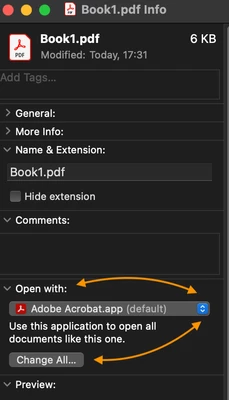
@brilliant_individual6098 you can also turn off on the PDF themselves. If you don't want to open them in Acrobat, for example, select your PDF. Right-Click - Go to Open with - Choose something else. And check that box that says 'Always use this app to open PDF files. And then click OK!  

For example, I am the total opposite of you.  I always have Acrobat open in Acrobat Pro. I made
 sure that it says Adobe Acrobat and 'Change All' to Adobe Acrobat as well:


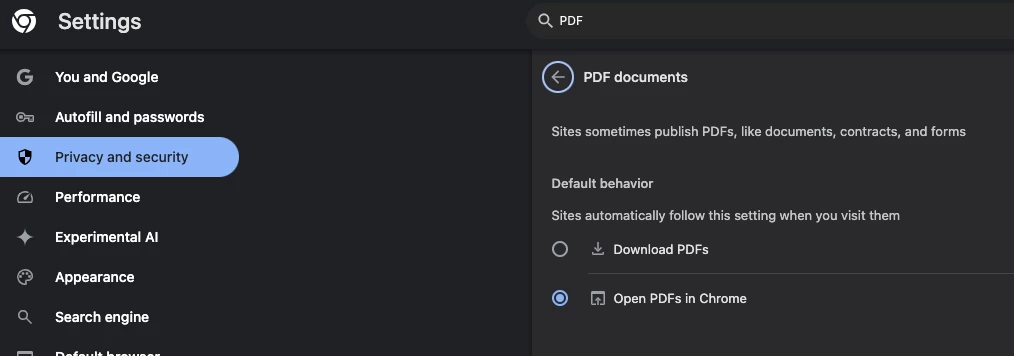
Also, in your Chrome preferences, under 'Privacy and security,' change to 'Download PDFs' too. Sorry, I am the opposite here again! 


1 reply

creative explorer
Community Expert
creative explorerCommunity ExpertCorrect answer
Community Expert
April 3, 2025

@brilliant_individual6098 you can also turn off on the PDF themselves. If you don't want to open them in Acrobat, for example, select your PDF. Right-Click - Go to Open with - Choose something else. And check that box that says 'Always use this app to open PDF files. And then click OK!  

For example, I am the total opposite of you.  I always have Acrobat open in Acrobat Pro. I made
 sure that it says Adobe Acrobat and 'Change All' to Adobe Acrobat as well:


Also, in your Chrome preferences, under 'Privacy and security,' change to 'Download PDFs' too. Sorry, I am the opposite here again! 


m