
Participant
March 3, 2020
Question

Adobe Acrobat crashes while scanning from Fujitsu FI-7460

  • March 3, 2020
  • 1 reply
  • 818 views

Hi There,


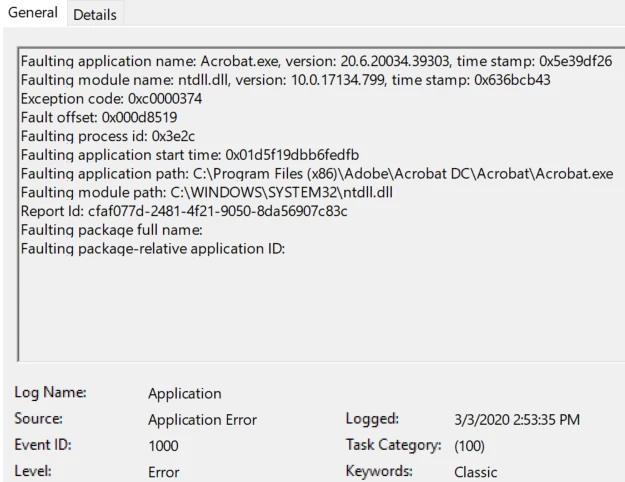
I'm wondering if anyone else has experienced this and has a solution.  I have a couple users in my organization who frequently scan from Fujitsu Fi-7460 desktop scanners into Adobe Acrobat on Windows 10 PCs.  They are also using Kofax VRS 5.1.  They intermittently experience application crashes in Acrobat while the images are being imported.  We've tried uninstalling and reinstalling all of the devices, drivers, and software, and everything is up to date.  I've tried all of the troubleshooting steps in the "Resolve Acrobat DC Intermittent Crashes in Windows" guide.  I've attached a screenshot of the most recent event log entry, and I've explored some solutions for the NTDLL.DLL piece of the puzzle, with no success.  Any suggestions for additional troubleshooting are greatly appreciated!
 

This topic has been closed for replies.

1 reply

Amal.
Community Manager
Community Manager
March 4, 2020

Hi Aaron, 


We are sorry for the trouble. As described the application is crashing while scanning the documents. Is this a behavior with a particular PDF file or with all the PDFs that you are trying to scan. Please try to scan a different PDF file and check. If its a file specific issue please upload the file on the document cloud (https://documentcloud.adobe.com/link/) generate the link and share it with us for testing.

As you are using the most recent version of the application. Please try to repair the installation and see if that helps. Go to Help > Repair Installation. Also, please try to update the scanner driver and firmware and check. if it still doesn't work please uninstall the scanner driver and firmware and reinstall.

If it still doesn't work please create a new test user profile with full admin rights and try using the application there and check.


Let us know how it goes.


Regards 

Amal