
Participant
August 27, 2025
Answered

Adobe Acrobat Crashing Error Code "c0000005"

  • August 27, 2025
  • 1 reply
  • 382 views

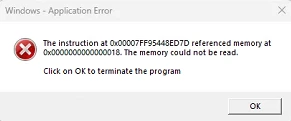
The Adobe Acrobat Error Reporter doesn't show up when these crashes happen. An error dialog like below shows up instead. I cannot attach the .dmp files from Adobe Acrobat due to the community forum restrictions.
 

Correct answer S_S

Hello,


Hope you are doing well. 


We are live with a new update (25.1.20744) that fixes this issue. Please update the app to the latest version and let us know if the issue is fixed for you.

To check for updates, go to Menu > Help > Check for Updates.


To know more: https://adobe.ly/480NQR9


Regards,
Souvik.

1 reply

AnandSri
Legend
August 27, 2025

Hello @onan_5027


I hope you are doing well. Thanks for reaching out. We're sorry for the trouble you had with the app.


The error you’re seeing (c0000005 with “memory could not be read”) is a Windows application crash rather than the standard Acrobat Error Reporter dialog. This usually points to memory access issues, conflicts with other software, or corrupted Acrobat components. Please ensure you have the latest version of Acrobat installed on the machine: 25.001.20643, Optional update, Aug 25, 2025. Check for any pending updates from the Menu > help > check for updates, install the updates, restart the app and the machine, and try again.


If you are not able to update the app, then please reboot the machine once, use the Acrobat Cleaner tool to remove the current installed app, restart the machine, and install Acrobat. Use the Adobe ID (email) associated with the license to activate the app on the machine.

Also, ensure that all the mandatory and optional updates of the operating systems are installed.


Let us know how it goes.

Thanks,
Anand Sri | Acrobat Community Team
Meet Acrobat Studio

onan_5027Author
Participant
August 28, 2025

I went through the steps that you mentioned on updating the software through the in software menu. The software reported it was up to date, and same for windows on both machines. Is there a log file I can submit as a source of more information possibly?

AnandSri
Legend
August 28, 2025

Hello @onan_5027


Thank you for sharing the details. Please try a clean installation once using the Acrobat Cleaner tool, and reinstall Acrobat. Also, for testing purposes, create a test user profile with full admin rights, and install Acrobat. Check if you still get the error message.


If the issue continues, please provide the following information: the current version of the operating system on your device and the logs from the affected machine. To collect the logs, download and run the Log Collector tool. Make sure to select all log options and attempt to reproduce the issue. After that, close the Log Collector tool; it will generate the logs along with a log ID. Please share this log ID with us for further investigation.