
Participant
October 7, 2021
Question

adobe acrobat dc freezes when password protecting windows 10

  • October 7, 2021
  • 1 reply
  • 13127 views

When password protecting a pdf the password protect dialog box ("white") freezes on top of a blacked out background of the Adobe Acrobat DC Standard. The only way to resolve is to reboot, and you have to use taskmanager to close the frozen program.

Publisher: Adobe Systems Incorporated, Installed Date: Sep 30, 2021 Size: 6.7 GB Version: 21.007.20095

 Adobe Acrobat DC  Note: When the issue happens the Password Protect is completely whited out. Publisher: Adobe Systems Incorporated, Installed Date: Sep 30, 2021 Size: 6.7 GB Version: 21.007.20095
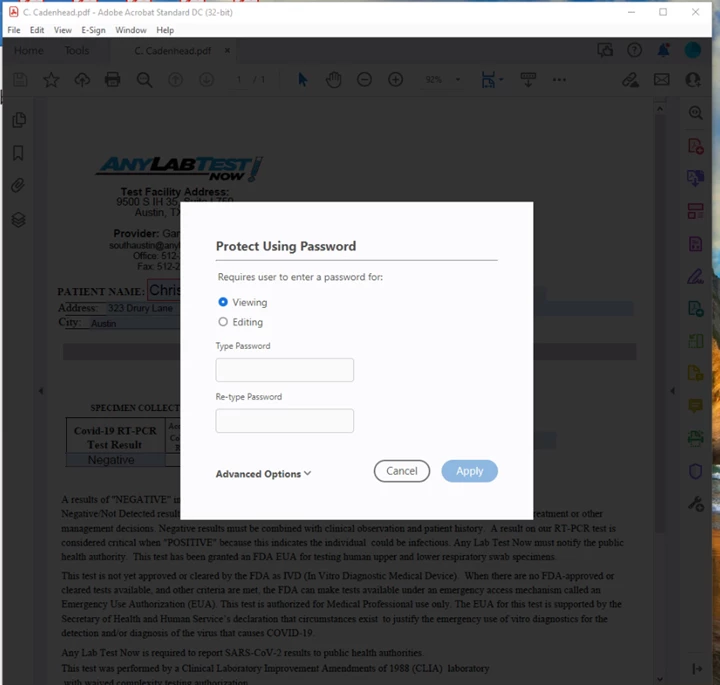
This topic has been closed for replies.

1 reply

Amal.
Community Manager
Community Manager
October 7, 2021

Hi there


Hope you are doing well and sorry for the trouble. As described the application is freezing on applying password protection.


Is this a behavior with a particular PDF file or with all the PDFs that you try to password protect. Please try with a different PDF file and check. If the file is stored on a shared network/drive please download it to your computer first and then try again and check.


You may also try to reset the Acrobat preferences as described here - https://community.adobe.com/t5/acrobat-discussions/how-to-reset-acrobat-preference-settings-to-default/m-p/4792082


Also try to create a new test user profile with full admin rights in Windows and try using the application there and check.


Also, please check the steps shared in the help page https://helpx.adobe.com/x-productkb/global/troubleshoot-system-errors-freezes-windows.html


Regards

Amal


Participant
October 7, 2021

It happens with all PDF's. A reboot typically resolves however not a conveinant way to resolve when you are in the middle of helping a customer who wants to get in aout out quickly. I have uninstalled and reinstalled prob,e still exists. Ran repair and checked for updates. All this started hapening after the latest release on September 14, 2021. Anyway we can roll back or are there any update since?

Publisher: Adobe Systems Incorporated Installed Date: Sep 30, 2021
Size: 6.7 GB Version: 21.007.20095

Participant
December 15, 2021

Hi there


We are sorry to hear that. Please go to Edit > Preferences > General > Uncheck 'Show online storage when opening file' And 'Show online storage when saving file' > Click OK and reboot the computer once and check. 


Regards

Amal


I am still having issues with Adobe freezing when password protecting the PDF. If I reboot the POC it works again for a while however inevitably fails again.


When password protecting a pdf the password protect dialog box ("white") freezes on top of a blacked out background of the Adobe Acrobat DC Standard. The only way to resolve is to reboot, and you have to use taskmanager to close the frozen program.

Publisher: Adobe Systems Incorporated, Installed Date: Sep 30, 2021 Size: 6.7 GB Version: 21.007.20095

 Adobe Acrobat DC  Note: When the issue happens the Password Protect is completely whited out.