
Participant
July 7, 2022
Answered

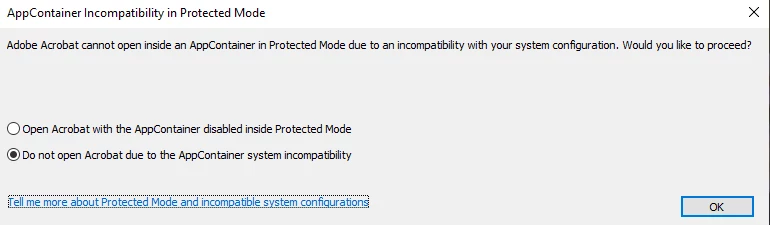
Adobe Acrobat DC Pro just installed in Windows 10 Pro desktop and pc rebooted open attempt gets pop

  • July 7, 2022
  • 1 reply
  • 330 views

I have Avast Premium Security, I set it to add all listed Adobe apps in allow list. It has no notifications of issues. I'm also using it's VPN. Is it causing this issue ?? Or could Win10 Pro need permissions or something edited ??
 

This topic has been closed for replies.
Correct answer CAMPBELL25155663dsv4

I figured it out. 🙂 I usually work from Non Windows Admin desktop for extra safety. Except stuff I know or suspect or told by pop ups to do from admin desktop log in sign in. During installation from my Cam non admin desktop the installer asked for win admin system password. I entered it and it proceeded. But it was very long with the Creative Cloud desktop installer. Pop up I followed instructions to trouble shoot stalled install. Also took long time but finished. So I guess all these issues were because I didn'y think to open the 1st installer downlaod as admin which I didn't remember is preferable to avoid system install issues. So I opened Cam Standard Adobe Acrobat Pro shortcut as admin. It opened fine. It opened a pdf I selected. I need to fill it out and sign now to email for an application. It's all good now. Maybe this post will be helpful to others. 😉  

1 reply

CAMPBELL25155663dsv4AuthorCorrect answer
Participant
July 7, 2022

I figured it out. 🙂 I usually work from Non Windows Admin desktop for extra safety. Except stuff I know or suspect or told by pop ups to do from admin desktop log in sign in. During installation from my Cam non admin desktop the installer asked for win admin system password. I entered it and it proceeded. But it was very long with the Creative Cloud desktop installer. Pop up I followed instructions to trouble shoot stalled install. Also took long time but finished. So I guess all these issues were because I didn'y think to open the 1st installer downlaod as admin which I didn't remember is preferable to avoid system install issues. So I opened Cam Standard Adobe Acrobat Pro shortcut as admin. It opened fine. It opened a pdf I selected. I need to fill it out and sign now to email for an application. It's all good now. Maybe this post will be helpful to others. 😉