Adobe Acrobat DC Problem with annoying info message for pdfs with Tags for text-to-speech software
Hi,
I recently got support inquiry for helping closing this info message as below.
She got info message when she open any PDF file with special tags for text-to-speech software as in attachment below.
The problem is that this person is visually impaired and need to use text-to-speech software to be able to work on her laptop. And for her it's difficult to close this message every time it opens.
I have tried already:
1. Closing this info message wich checking on (x) "don't show it again" - but this is still showing up every time she open pdf file with tags. I also tried to set open Adobe Acrobat as system administrator.
2. I checked and tested all options and possibilities in tab Edit->Settings->Accessibility but this message is still showing up.
3. I made repair of Adobe Acrobat DC
4. I reinstalled Adobe Acrobat DC
But nothing helped.
She is using:
Adobe Acrobat DC
version 2022.001.20117 64-Bit
Windows 10 with newest updates installed
Dolphin Super Nova 2022 - Text to Speach Software
Below I send screenshot of this message which is showing up during opening pdf file and english translation to it:
Untagged document is being read with assistive technology
Your machine may be running assistive technology, such as a speech output program. This 33-page untagged document must be prepared to be read with assistive technology. If you are not using assistive technology, check the box next to Do not show this dialog again at the bottom of the page.
Options for reading direction
Reading direction : Derive reading direction from document (recommended)
Options for reading mode
Read only currently visible pages
Read entire document
Do not show this dialogue again . Take over settings from the reading preferences.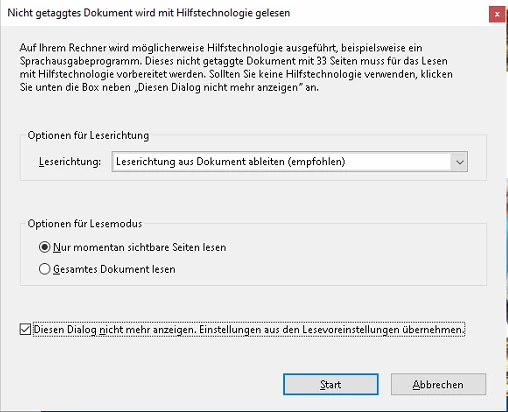
Diesen Dialog nicht mehr anzeigen - means do not show this message any more.
Have anyone ideas what how to solve it? This will be very appreciated
 AdChoices