New Participant
March 28, 2024
Question

Adobe Acrobat error (Instruction at 0x00)

  • March 28, 2024
  • 2 replies
  • 1129 views

I have a user who randomly gets the following error 
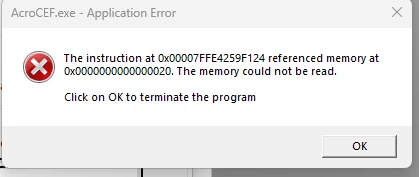
 

I have updated acrobat, repaired it, reinstalled it.

I've removed it with Acroclean and reinstalled it.

Ran SFC /scannow and Chkdsk /f in cmd

Unchecked compatibility mode

Checked for windows udpates

Checked event viewer for application crash logs and there were none.

Disabled plug ins

Changed the page file size in windows settings to set it manually.

Tried a different version of acrobat

Increasing priority in task manager


Currently on version 24.001.20604

Have also tried version 24.001.20615


I have referenced the Acrobat KB articles such as: Resolve Acrobat intermittent crashes on Windows (adobe.com) (Nothing worked)


I am unable to figure out why these crashes/error messages keep occurring. Please help.


This topic has been closed for replies.

2 replies

New Participant
August 28, 2024

Happening the same with me for the last 3 updates. I'm on the version 2024.003.20054 the this error still happening. I also have done the procedure with SFC /scannow and Chkdsk /f in cmd. No success.

I'm using Windows 11, latest update 23H2 . Comp 22631.4112.

Amal.
Community Manager
Community Manager
April 4, 2024

Hi there


Hope you are doing well and thanks for reaching out.


Please go through the correct answers marked in the similar discussions listed below and see if that works:

- https://adobe.ly/4ar95tJ

- https://adobe.ly/3U25aOi


If it still doesn't work try the steps below:

1. Open Command prompt in Windows and run as administrator
2. Type "sfc/ scannow" and press enter
3. Wait till 100% completion.
4. Type "Exit" and press enter and see if that helps.


Screenshot for reference:


Let us know how it goes.


~Amal