

DNeed77
Participating Frequently
January 6, 2022
Answered

Adobe Acrobat Extension for Edge Browser

  • January 6, 2022
  • 3 replies
  • 6527 views

Hi,


I use MS Edge as a browser and have installed the Adobe Acrobat extension. I was expecting it to look like the screenshots in the Edge store. However, Edge still opens PDFs in their own viewer and all I get is a button to open in Acrobat. I have checked and Acrobat is the default application for PDF files.


How can I force Edge to use the Acrobat Extension instead as it should?
This topic has been closed for replies.
Correct answer ddn2003

Thanks for that ddn2003! Much Appreciated!


@Meenakshi Negi : Does that help you out or do you still need a visual of the process?


Happy news!


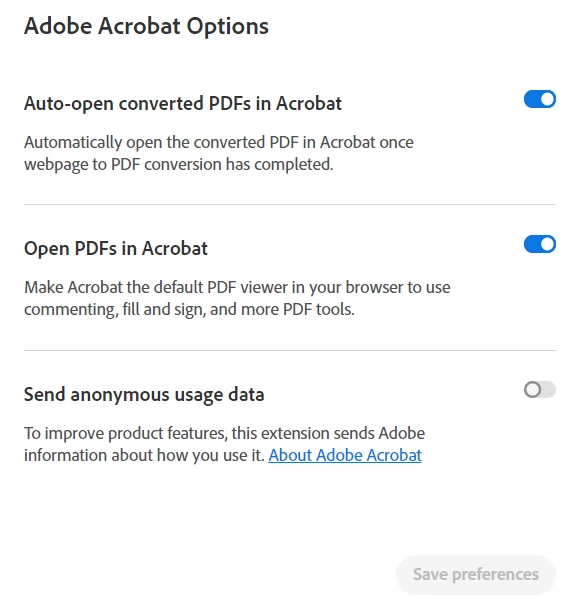
Adobe updated the extension to v15.1.3.6. In the extension options there are now two new options, which have resolved my issue!


3 replies

Chris 486
Community Expert
Community Expert
January 7, 2022

Editing this post to remove outdated information in it.

Participating Frequently
January 7, 2022

I tried the extension on another Windows 10 PC and it worked as per the screenshots.


There is something else missing.

Chris 486
Community Expert
Community Expert
January 7, 2022

Could you provide a screenshot of the address you are opening that from? I have not been able to replicate any features outside of document cloud, or document cloud being embedded in the site.

Chris 486
Community Expert
Community Expert
January 6, 2022
  1. Open Microsoft Edge
  2. Click on the three dots (…) from the right top corner.
  3. Select Settings from the drop down and click on "Cookies and Site permissions" from the left pane.
  4. Scroll down and click on PDF documents, Toggle the switch to On for "Always download pdf files".

You may have to restart edge browser.


DNeed77
DNeed77Author
Participating Frequently
January 6, 2022

That bypasses the Acrobat extension entirely and does not accomplish what I want and what the extension is supposed to do. Adobe Acrobat for Microsoft Edge - Microsoft Edge Addons

Chris 486
Community Expert
Community Expert
January 6, 2022

I apologize. I misunderstood your question. I downloaded the plugin and see teh issue you are having. Let em see if I can find a solution or if another user may chime in before me.

Chris 486
Community Expert
Community Expert
January 6, 2022

HI DSNeed!


Is this all pdf's on your computer, or when you download and open a file in the edge browser?

DNeed77
DNeed77Author
Participating Frequently
January 6, 2022

This is only for online PDFs. All my local PDFs open fine in Acrobat DC.