
Answered
Adobe Acrobat is NOT closing immediately
We have multiple users of Adobe Acrobat reported to us that their PDF files are not closing immediately when opened.
When they close the PDF documents, it freezes up for 3 to 5 seconds before closing.
We've found out that it is waiting for the "7-day trial" banner at the bottom left of the application before it closes.
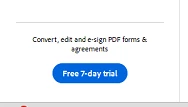
Once that banner shows up, the file can be closed immediately.
But if not showing up, the PDF files will freeze for 3 to 5 seconds before it closes up.
How do we get rid of that "7-day trial banner" without signing in?
Some of the users are annoyed that they need to wait for that banner to show up within 3 to 5 seconds before they can close PDF files quickly.
 AdChoices