
Adobe Acrobat Links Not Working Correctly
Hello! I recently updated to the new version of Adobe Acrobat - yay! I am having issues with creating links, though. It seems that whenever I create a link it embedds the link of the folder the file is in as well. So for example if I create a link for www.xyz.com it will try to open C:/Folder/Folder/www.xyz.com
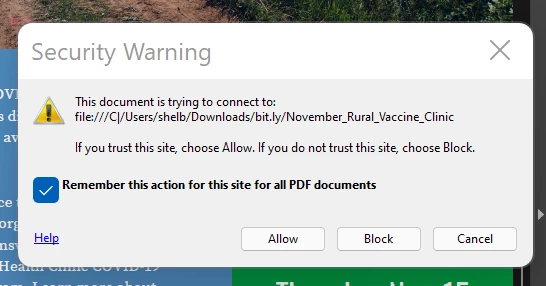
I turned on the security warning to preview the link before it left so I could understand what was going on. I have been using the same techniques to create links for years (Edit PDF > Link > Add/Edit Web or Document Link > Open a web page > type in webpage URL > Okay> Save PDF). I've tried saving PDFs to multiple places on my computer, in different clouds, etc. to see if that was it, but no change, and I've tried multiple PDFs so I know it is not just the one I am working on. Thoughts? Suggestions?
Thank you!
 AdChoices