
Exit
  • Global community
    • Language:
      • Deutsch
      • English
      • Español
      • Français
      • Português
  • 日本語コミュニティ
  • 한국 커뮤니티
0

Adobe Acrobat Mac bookmarks panel icons too big

New Here ,
Feb 25, 2021 Feb 25, 2021

I've been searching the internet for an answer for weeks about why my Adobe Acrobat on my Mac has a bookmarks panel where the icons are so large that very few bookmarks will fit.   How do I fix this?

See picture below.
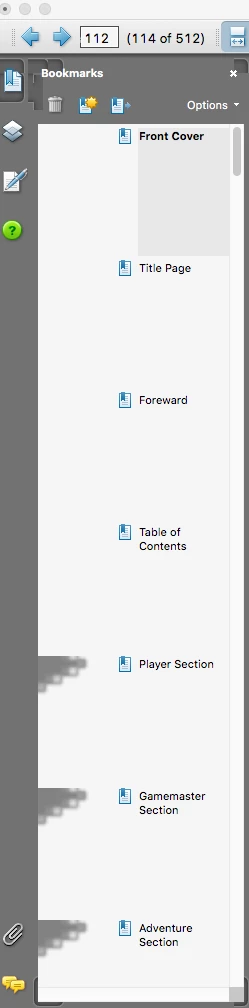
Screen Shot 2021-02-25 at 2.48.44 PM.png

TOPICS
General troubleshooting
461
Translate
Report
Community guidelines
Be kind and respectful, give credit to the original source of content, and search for duplicates before posting. Learn more
community guidelines
Community Expert ,
Feb 25, 2021 Feb 25, 2021

What's the exact version number of the application (You can find it out by going to Help - About Adobe Acrobat)? What's your OS version?

Translate
Report
Community guidelines
Be kind and respectful, give credit to the original source of content, and search for duplicates before posting. Learn more
community guidelines
New Here ,
Mar 01, 2021 Mar 01, 2021
Mac OS 10.13.6
Adobe Acrobat 8 Professional 8.3.1
Translate
Report
Community guidelines
Be kind and respectful, give credit to the original source of content, and search for duplicates before posting. Learn more
community guidelines
Community Expert ,
Mar 01, 2021 Mar 01, 2021

I'm surprised it works at all... That version of Acrobat is extremely old and not compatible with your OS. Problems are to be expected.

Translate
Report
Community guidelines
Be kind and respectful, give credit to the original source of content, and search for duplicates before posting. Learn more
community guidelines
New Here ,
Mar 01, 2021 Mar 01, 2021

Ok, the problem is that Adobe Acrobat DC doesn't show up on my Mac, only an old install of Acrobat CS5.   When I try to reinstall Acrobat DC, I get a message saying that Adobe Acrobat DC is already installed, but I cannot find Acrobat DC anywhere on my Mac's applications.

Translate
Report
Community guidelines
Be kind and respectful, give credit to the original source of content, and search for duplicates before posting. Learn more
community guidelines
Community Expert ,
Mar 01, 2021 Mar 01, 2021
LATEST

Start by uninstalling Acrobat 8, as it can conflict with Acrobat DC. Then uninstall DC, run the Cleaner tool (https://labs.adobe.com/downloads/acrobatcleaner.html) and then re-install it and try again.

Translate
Report
Community guidelines
Be kind and respectful, give credit to the original source of content, and search for duplicates before posting. Learn more
community guidelines