
Adobe Acrobat now using Chrome for sign-ins?
Hi,
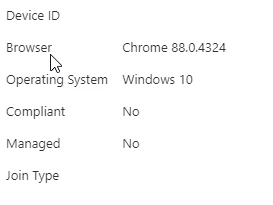
We leverage single sign on through microsoft azure to the adobe suite. We have the adobe acrobat pro (32 bit) app. Previously, we had conditional access policies that require device trust. It looks from our logs like the sign in process used to use IE, which supports collecting device data to facilitate conditional access. After a recent update, users cannot log in. I noticed in our logs, that now when users attempt to sign in, it leverages chrome instead of IE on the backend. This lightweight (no extensions) version of chrome will not work with conditional access device trust policies, as without the windows accounts extension, it cannot identify the device. Not a huge deal for now, we have excluded the adobe single sign on from conditional access device trust.
However, I cannot find any release notes that indicate adobe acrobat pro switched to using chrome. This is what i see for logins now from adobe acrobat in the single sign on provider:
I did find an article about sign ins moving to internet explorer a while back:
Update your operating system to work with Adobe apps
"If you are a Windows user
Starting August 2020, only Internet Explorer version 11 and later are supported for signing in. Adobe software uses Internet Explorer during the sign-in process. If you are using an older version of Internet Explorer, you need to move to the latest one before July 14, 2021. After this date, you will no longer be able to sign in to your Adobe account, and will be redirected to this page."
Here is the concern: Is this an intentional update by adobe, which i can find no record of, or is there potential that some malicious actor in the supply chain has modified the application without Adobe knowledge? If anyone else knows of an official listing of this change/update, or is sharing our issues with conditional access, that would be great to know. Thanks!
 AdChoices