


New Participant
January 11, 2023
Answered

Adobe Acrobat - Permanently Disable Home Screen Feature

  • January 11, 2023
  • 12 replies
  • 8241 views

Please describe the exact preference in Adobe Acrobat Pro that permanently disables the Home Screen feature. Please don't send a pointless link to directions that don't solve my problem. Tell me exactly how to disable this pointless and annoying feature.


Correct answer JR Boulay

Ratushebarl Greg Harbour

Joe26853055d0nb

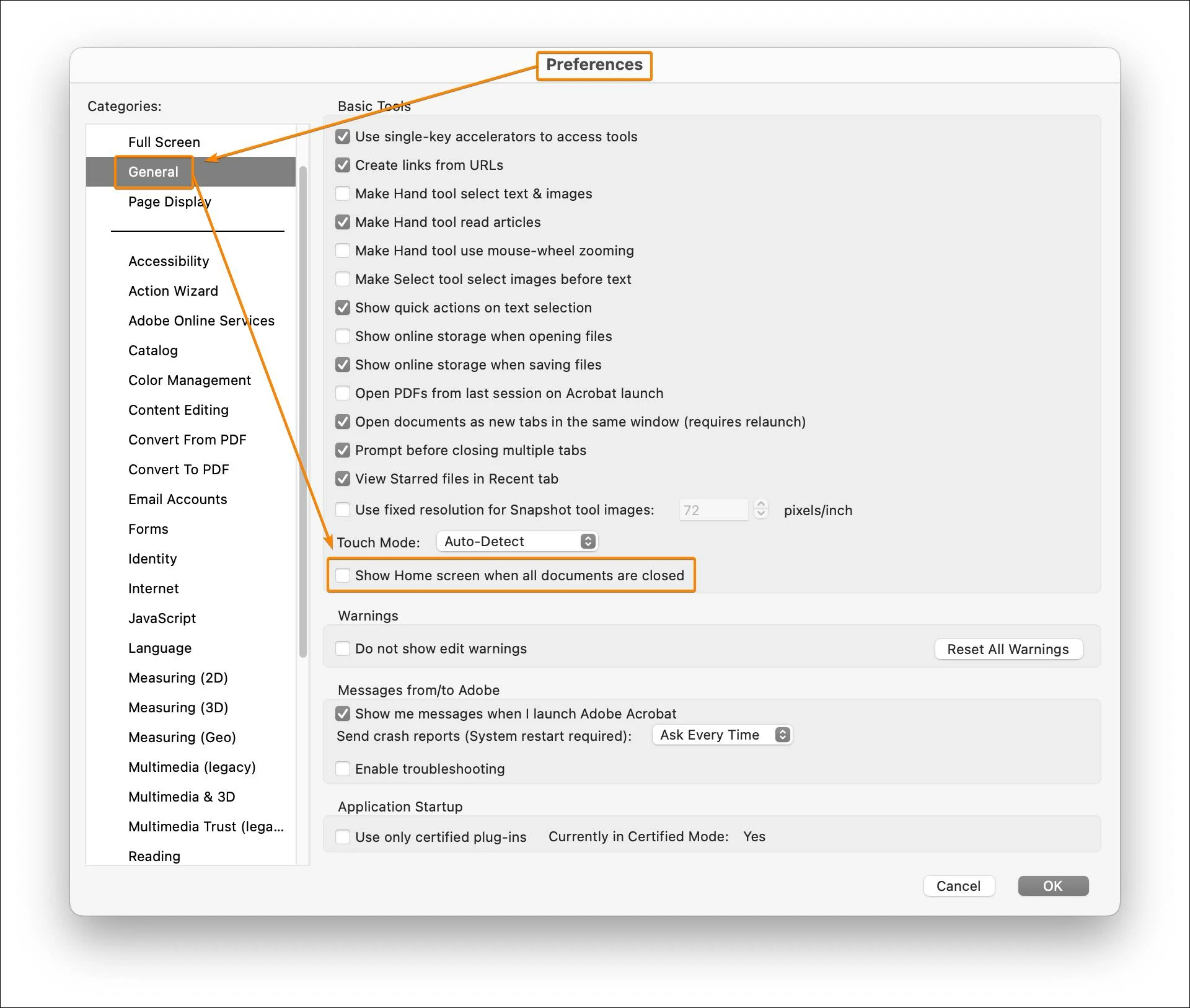
Simply uncheck this option in the Preferences (macOS only, not available for the Windows version).


12 replies

Inspiring
May 6, 2025

Replying here - still not solved May 2025. None of JR Boulay's responses are effective. Adobe will need to code in this functionality.

JR Boulay
Community Expert
Community Expert
December 18, 2024

So you must uncheck these options:


Acrobate du PDF, InDesigner et Photoshopographe
Known Participant
December 18, 2024

Ok so that works, finally. Now if they can get rid of the blasted Welcome screen..


JR Boulay
Community Expert
Community Expert
January 30, 2025

"Ok so that works, finally. Now if they can get rid of the blasted Welcome screen.."

Uncheck this option:


Acrobate du PDF, InDesigner et Photoshopographe
JR Boulay
Community Expert
JR BoulayCommunity ExpertCorrect answer
Community Expert
December 16, 2024

Ratushebarl Greg Harbour

Joe26853055d0nb

Simply uncheck this option in the Preferences (macOS only, not available for the Windows version).


Acrobate du PDF, InDesigner et Photoshopographe
Known Participant
December 16, 2024

Unchecked, home screen still displays. Wrong answer sorry.


JR Boulay
Community Expert
Community Expert
December 17, 2024

Try to revert to the Classic UI: https://community.adobe.com/t5/acrobat-discussions/acrobat-2023-how-to-revert-to-classic-gui-user-interface/td-p/14052807
Consider the "new Acrobat" as a beta version, many features are still missing or half-implemented.

Acrobate du PDF, InDesigner et Photoshopographe
Inspiring
October 27, 2024

Being unable to disable homeview/screen is a great example why I'm replacing Acrobat with Preview for most use because of its scope creep from a useful utility to an app pursuing no clear purpose so just occluding its utility


JR Boulay
Community Expert
Community Expert
December 16, 2024

Preview, aka "the PDF killer".

This old article is still relevant: http://khkonsulting.com/2013/06/preview-app-killer-of-pdf-files/

Acrobate du PDF, InDesigner et Photoshopographe
New Participant
September 8, 2024

Fullu agree. This is so dump. I'm using Adobe products for 30 years and I used to love the products they've made. Now I really hate Adobe. I love indesign. The people behind it know what thay are doing and don't force unnecessary changes.
It's how day say - what is the worst enemy of good?...Better. They are doing instant nonsense changes to Photoshop. Now they put their hands on Acrobat. What's the idea for changing interfaces, keyboard shortcuts, function usage? It's so stupid. If it wasn't for my clients who also struggle with adobe products, I would have changed it 8 years ago. But competitors are progressing and one day Adobe will end up like Quark, unless they stop messing with everything just for doing something. Better focus on making products work like it should – Illustrator the worst of all of them. Full of bugs, super slow almost unusable even on fastest macs, unprecise !!!. NIGHTMARE

New Participant
October 23, 2024

Bumping to show my support. Found this thread googling hth to remove this feature -_____-.

JimRanes
New Participant
June 18, 2024

This issue still is not solved. Replying to bump this topic. Anyone know of any progress on how to turn off the home screen? Very annoying. The setting in the preferences does NOT work. C'mon Adobe, PLEASE fix this!!!

New Participant
February 7, 2024

This is beyond annoying.  All previous versions of Acrobat, ctrl-w would close the pdf and minimize acrobat.  Now i have to constantly content with this useless home screen taking up my entire desktop.

Participating Frequently
March 8, 2024

Agreed. It's beyond useless for me and a complete waste of space.
I really wish Adobe would listen to its customers. It seems very arrogant to simply ignore/deny requests to have the ability to completely custominze the workspace. Instead we have to deal with nonsense such as the uneeded/unwanted "home screen" and the bright blue "Adobe Account" button. Adobe appears to have become Quark from the '90s.

JR Boulay
Community Expert
Community Expert
January 13, 2023

"See the correct answer posted in the link below..."

This is a MacOS only feature, not available on Windows.

Acrobate du PDF, InDesigner et Photoshopographe
Legend
January 12, 2023

@Joe26853055d0nb 


See the correct answer posted in the link below...

you may want to uncheck the show online storage options also...

https://community.adobe.com/t5/acrobat-discussions/how-to-make-home-screen-goes-away-after-closing-pdf-file-in-acrobat-dc/td-p/7037565


Regards,

Mike

New Participant
November 18, 2024

Are you AI? That page is from 2015, the option no longer exists.


JR Boulay
Community Expert
Community Expert
November 18, 2024

There are only humans on this users forum.
I don't use a Mac any more so I can't check whether this option still exists, but what I can say for sure is that it only existed in the Mac version, not in the Windows version.

Acrobate du PDF, InDesigner et Photoshopographe
Meenakshi Negi
Community Manager
Community Manager
January 12, 2023

Hi Joe26853055d0nb,


Thank you for reaching out.


If you are referring to removing the Home page in Acrobat that opens by default when you open the application directly, it is not possible. It is designed behavior.

Let us know if you were referring to some other feature.


Thanks,

Meenakshi 


Known Participant
November 14, 2024

Then it's a stupid design that belongs in Windows 98. The multi-step process for accessing files (if not recent) is also incredibly annoying and counterproductive. A backwards step.


New Participant
December 16, 2024

The persistent "Home" screen in Adobe Acrobat is beyond annoying,  it disrupts the workflow and feels absolutely unnecessary. When I close a document, I want the app to close entirely rather than defaulting to the "Home" screen.

I’ve explored the preferences but couldn’t find an option to disable this feature. It would be great if Adobe allowed users to customize this behavior. Adding an option to skip the "Home" screen would improve the experience for many users who prefer a simpler, document-focused workflow.